
Affiliate disclosure: this post contains affiliate links (CJ) to Contabo. If you order through them, SiftGuide may earn a commission at no extra cost to you; it does not change your price or terms. Plans, prices and setup steps come from Contabo’s official pages and help center, and the security and maintenance notes come from OpenClaw’s official documentation, all checked on October 20, 2026 (Europe/Bucharest). We have not benchmarked these servers or tested OpenClaw ourselves.
OpenClaw (formerly Clawdbot, then Moltbot) is an open-source AI agent that runs on your own server and talks to you through messaging apps such as WhatsApp, Telegram, Discord and Slack. Unlike a chatbot in a browser tab, it can be given tools: browse the web, work with files, run commands and schedule tasks. Running it on a VPS keeps it online around the clock without tying up your laptop. Contabo offers OpenClaw as a free 1-click add-on called “OpenClaw Server” on its Cloud VPS plans. This guide covers what you get, which plan to pick, the two bills you will actually pay, how to install and onboard it, and the security steps OpenClaw’s own documentation asks for.
What Contabo’s 1-click OpenClaw gives you
- OpenClaw pre-installed on a Cloud VPS or VDS; Contabo’s help center says the add-on comes “with no additional costs”, and its price data lists the OpenClaw Server add-on at €0.
- Setup over SSH. After installation you configure OpenClaw in a terminal session on the server; there is no public web interface by default.
- A private Control UI. OpenClaw’s web dashboard listens only on the server itself (127.0.0.1, usually port 18789). You reach it from your computer through an SSH tunnel.
- Login details in your order confirmation email and in the Customer Panel; the password is the one you set when ordering.
OpenClaw itself is open source under the MIT licence (per its GitHub repository). Contabo supports the server and the initial 1-click installation; after that, configuring, updating and troubleshooting OpenClaw is your job, and Contabo points you to OpenClaw’s documentation and community.
Before you start: two bills and an agent that can act
- You need an AI provider. Contabo’s help center says a valid API key is required for OpenClaw to function (OpenClaw’s docs also accept an existing Claude Code or Codex CLI login). Contabo’s OpenClaw page is blunt about the cost: you need “an API key with billing set up for your chosen AI provider”, you “pay per token”, and these costs “can add up fast with an autonomous agent like OpenClaw”. That bill comes from your AI provider, not Contabo, and it is not included in any price below.
- Local models are possible, but not on a small VPS for free. Contabo’s blog notes that running local AI models on the same machine needs GPU resources and more RAM, in exchange for no per-token API costs. The Cloud VPS plans in this guide have no GPU.
- It can do things, not just say things. During onboarding you must confirm that you understand OpenClaw is powerful and potentially risky; it can read files and run actions if tools are enabled. Contabo adds that it does not control or monitor how OpenClaw is used, and that you are responsible for securing the server, your API keys and how the agent is used.
- One trust boundary per agent. OpenClaw’s security docs say a gateway is meant for one operator, or a team whose members trust each other; it is “not a hostile multi-tenant security boundary” for users who don’t trust one another. If you plan to let several people message it, read that page first.
- Your messaging accounts become a remote control. Contabo’s blog warns that anyone gaining access to your WhatsApp or Telegram account can command your agent, so turn on two-factor authentication there.
Which Contabo plan for OpenClaw?
Contabo’s OpenClaw page recommends four Cloud VPS plans. Prices are EUR before VAT. The monthly-term price is what you pay on a 1-month contract; the 24-month rate is the effective monthly price Contabo shows “for the first 24 months” of a 24-month subscription. Each plan’s Get Started button opens the order page with the OpenClaw image preselected.
Plan: Cloud VPS 4
- Resources: 4 vCPU, 8 GB RAM, 100 GB SSD
- Port speed: 200 Mbit/s
- Monthly term: €5.50/mo
- 24-month rate: €4.40/mo
- Contabo’s label: OpenClaw Personal Use
- Contabo suggests it for: personal reminders, social media posting and data backups
Plan: Cloud VPS 6
- Resources: 6 vCPU, 12 GB RAM, 200 GB SSD or 100 GB NVMe
- Port speed: 300 Mbit/s
- Monthly term: €7.50/mo
- 24-month rate: €6.00/mo
- Contabo’s label: OpenClaw Power User
- Contabo suggests it for: web scraping, social media reporting and data analytics
Plan: Cloud VPS 12
- Resources: 12 vCPU, 48 GB RAM, 400 GB SSD or 200 GB NVMe
- Port speed: 800 Mbit/s
- Monthly term: €25.00/mo
- 24-month rate: €20.00/mo
- Contabo’s label: OpenClaw Team Deployment
- Contabo suggests it for: syncing CRM data, processing orders and marketing automation
Plan: Cloud VPS 18
- Resources: 18 vCPU, 96 GB RAM, 600 GB SSD or 300 GB NVMe
- Port speed: 1 Gbit/s
- Monthly term: €49.00/mo
- 24-month rate: €39.20/mo
- Contabo’s label: OpenClaw Enterprise Scale
- Contabo suggests it for: complex systems and data-intensive automations
How much server does OpenClaw need? When the AI runs at a provider (Claude, GPT, Gemini and so on), the agent itself is light: Contabo’s blog says a server with 2 CPU cores, 4 GB RAM and 20 GB storage “handles most use cases”. Every plan above clears that. Bigger plans make sense for heavy browser automation, many skills and integrations, or other apps on the same server, not for “more AI”.
See Contabo Cloud VPS plans for OpenClaw
How to order or install it
New server
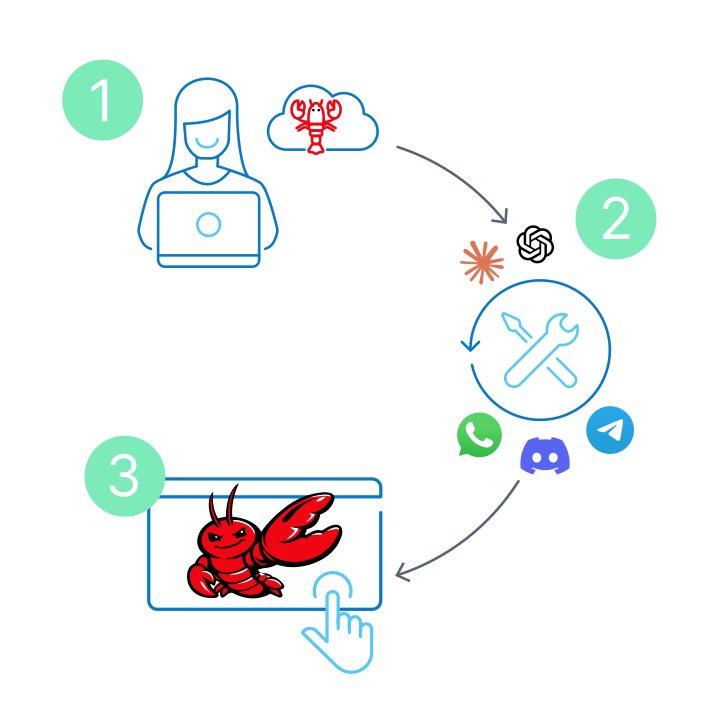
Use a Get Started button on Contabo’s OpenClaw page (or open the Cloud VPS plans and pick OpenClaw in the order configurator), choose the region, term and password, and order. Contabo deploys the server with OpenClaw installed and sends the access details by email.
Server you already have
Contabo’s help center describes the reinstall route: in the Customer Control Panel open Servers & Hosting > VPS/VDS, click the Quick Action (⋮) menu next to the server, choose Reinstall, switch to the Application Installation tab, select OpenClaw from the application list, set an admin password (you need it for SSH) and click Install. The installation may take several minutes. A reinstall replaces what is on that server, so back it up first.
First login and onboarding
1. Connect over SSH
Contabo’s guide connects as root with the password set during installation:
ssh root@<your-server-ip>2. Run the onboarding wizard
OpenClaw may start the onboarding wizard automatically after you log in. If it doesn’t, start it yourself:
openclaw onboardAccording to Contabo’s help center, the wizard walks you through:
- A security warning you must accept.
- Onboarding mode: QuickStart (recommended, basic settings you can change later) or Manual (full configuration).
- Model and authentication provider: pick your AI provider and enter a valid API key.
- Channels: how OpenClaw receives messages, for example Telegram, WhatsApp or Discord. You can skip this and add channels later.
- Skills: optional; some need extra dependencies or API keys, and you can enable them later.
- The gateway token: onboarding generates a secure token (or tokenized link) for the Control UI. Save it.
3. Talk to the agent in the terminal
Contabo recommends the terminal UI for interacting with your agent directly:
openclaw tui4. Open the Control UI through an SSH tunnel
Because the Control UI only listens on the server itself, run this on your own computer (replace the IP), keep the window open, then browse to http://localhost:18789/:
ssh -N -L 18789:127.0.0.1:18789 root@<your-server-ip>If the Control UI asks for the gateway token and you didn’t save it, run this on the server; it prints a fresh access link (OpenClaw’s docs describe it as a short-lived, one-time owner pairing link):
openclaw dashboardLock it down: what OpenClaw’s own docs ask for
- Keep the gateway private. OpenClaw’s VPS guide calls loopback plus an SSH tunnel or Tailscale Serve the secure default. Don’t expose port 18789 to the internet just to save typing; if you bind the gateway beyond loopback (LAN or tailnet), the docs say it requires a shared secret (token or password).
- Harden SSH first. The same page says to decide how you administer the box before installing OpenClaw on a public VPS (for example Tailscale-only SSH, or equivalent hardening of your SSH path).
- Run the built-in audit after onboarding and after every config change.
--deepadds live gateway checks, and--fixapplies the supported safe fixes:
openclaw security audit
openclaw security audit --deep
openclaw security audit --fix- Start restrictive. OpenClaw publishes a “hardened baseline” config that keeps the gateway on loopback, denies shell execution by default and limits file access to the workspace; enable tools one by one for what you actually need. See Hardened baselines.
- Treat
~/.openclawas a vault. The docs say to assume anything under it may contain secrets or private data (config tokens, channel credentials, model auth profiles, transcripts). Keep the folder at700andopenclaw.jsonat600, and consider full-disk encryption. - Use a dedicated runtime. For a shared company agent, the docs recommend a dedicated VPS/VM/container with a dedicated OS user and accounts, and say not to sign it into personal Apple/Google accounts or personal browser/password-manager profiles.
- Keep spending visible. In chat,
/usage costshows a local cost summary from OpenClaw’s session logs; on the server,openclaw status --usageprints a per-provider usage and quota breakdown. Also set a spending limit with your AI provider if it offers one.
Backups and updates
- Back up with OpenClaw’s own command. OpenClaw stores its state in SQLite databases, and its docs warn never to copy the live
.sqlite,-wal,-shmor-journalfiles as a backup. Useopenclaw backup createinstead, and remember that backups contain credentials too, so store them securely. - Server-level backups: Contabo’s Auto Backup is a paid extra (€1.65 per month on Cloud VPS 4 in Contabo’s price data). It is not a replacement for an OpenClaw backup you can restore on another machine.
- Update deliberately. OpenClaw’s update guide says to create a verified backup before a significant update. Updating is your responsibility after the 1-click install, per Contabo.
What it really costs
- The server: from €5.50 per month (Cloud VPS 4) on a monthly term or €4.40 per month on a 24-month term.
- VAT: these prices exclude VAT; Contabo adds your country’s rate at checkout (its site lists, for example, 19% Germany, 20% United Kingdom and 21% Romania for private customers).
- Location: the prices above are for the EU location; other regions add a monthly surcharge that depends on the plan (on Cloud VPS 4, Contabo’s price data lists €1.05 for the UK or US Central up to €2.55 for Japan). Our full Contabo price guide has the regional details.
- OpenClaw: €0. The add-on is free and OpenClaw is open source; Contabo says it adds no per-user fees or message limits.
- The AI provider: usage-based, per token, billed by the provider you connect. This is the line that can grow fastest; we can’t give you a number because it depends on the model and how much work the agent does.
- Traffic and contract: incoming traffic is unlimited and unmetered; outgoing is unlimited under a fair usage policy, and Contabo reserves the right to throttle exceptionally high or disruptive usage. Minimum term 1 month; cancellation notice none for pre-paid, 4 weeks for post-paid.
Which plan should you pick?
- One person, an API model, a couple of channels: Cloud VPS 4 (“Personal Use”). It already has double the RAM of the blog’s “most use cases” figure.
- Browser automation, scraping or more apps on the same server: Cloud VPS 6 (“Power User”).
- A team agent with many integrations: Cloud VPS 12 (“Team Deployment”), on a dedicated server and OS user as OpenClaw’s docs recommend.
- Cloud VPS 18 (“Enterprise Scale”) is for heavy, data-intensive automation; it is not needed to run one assistant against a hosted model.
Order a Contabo Cloud VPS for OpenClaw · Contabo home page
Where the official sources don’t agree (checked October 20, 2026 (Europe/Bucharest))
- Plan name in Contabo’s blog: the OpenClaw blog post suggests “a Cloud VPS 10 from Contabo with 4 vCPU cores, 8 GB RAM, and 75 GB NVMe storage”. Contabo’s current lineup and its OpenClaw page have no Cloud VPS 10; the 4 vCPU / 8 GB plan is Cloud VPS 4 with 100 GB SSD.
- What OpenClaw runs on: the same blog post says a local install means installing “dependencies like Python and several libraries”. OpenClaw’s own getting-started page requires Node.js 24.16+ or 26.1+ (Node 22, 23 and 25 are unsupported). On Contabo’s 1-click image this is handled for you; for a manual install, follow the official docs.
- Root or not: Contabo’s help article logs you in as root to configure OpenClaw, while Contabo’s blog says to run the agent “with minimal necessary permissions, never root”, and OpenClaw’s docs recommend a dedicated OS user for a shared agent. Neither Contabo source says which user the 1-click install runs OpenClaw as; check it on your server before enabling shell or file tools.
- “Your API keys are encrypted”: Contabo’s OpenClaw FAQ says so. OpenClaw’s own docs tell you to assume anything under
~/.openclaw/may contain secrets, to keep tight file permissions and to use full-disk encryption on the host. Follow the docs. - Your own domain: Contabo’s FAQ suggests pointing a domain at the VPS and adding Let’s Encrypt “for secure access to your OpenClaw instance”. Its own help article and OpenClaw’s docs keep the Control UI on localhost and reach it through an SSH tunnel (or Tailscale Serve). Publishing the dashboard on a domain is an advanced step that needs gateway authentication; OpenClaw has an exposure runbook for it.
More free 1-click apps on Contabo: if you want automation without an AI agent, see self-hosting n8n on a Contabo VPS; for a private way into your servers, self-hosting WireGuard on Contabo; and for code and CI, GitLab CE on Contabo.
FAQ
Is OpenClaw on Contabo free?
The software is. Contabo’s price data lists the OpenClaw Server add-on at €0, and OpenClaw is open source (MIT). You pay for the server and, separately, for the AI provider you connect, which bills per token.
What is the cheapest server Contabo recommends for OpenClaw?
Cloud VPS 4 (4 vCPU, 8 GB RAM, 100 GB SSD, 200 Mbit/s port): €5.50 per month on a monthly term or €4.40 per month on a 24-month term, before VAT. Contabo labels it “OpenClaw Personal Use”.
Do I need an API key?
Yes, for the usual setup. Contabo’s help center says a valid API key is required for OpenClaw to function; OpenClaw’s docs also accept an existing Claude Code or Codex CLI login. Running local models instead needs much more hardware (Contabo’s blog mentions GPU resources).
Can I open OpenClaw in a browser?
Yes, but not directly from the internet by default. The Control UI listens on 127.0.0.1 port 18789 on the server; open an SSH tunnel (ssh -N -L 18789:127.0.0.1:18789 root@<your-server-ip>) and browse to http://localhost:18789/. openclaw dashboard prints a fresh access link.
Can I add OpenClaw to a server I already have?
Yes. Contabo’s help center describes it: Customer Panel > your VPS/VDS > Reinstall > Application Installation > OpenClaw. A reinstall replaces the server’s contents, so back up first.
Does Contabo support OpenClaw itself?
Only the server and the initial 1-click installation. Configuration, updates and troubleshooting of OpenClaw are your responsibility; Contabo refers you to OpenClaw’s documentation and community.
Is it safe to run an AI agent on a public VPS?
It can be, if you keep OpenClaw’s defaults (gateway on loopback, pairing for unknown senders), harden SSH, run openclaw security audit, enable tools only as needed and protect your messaging accounts with two-factor authentication. The agent can act with the permissions you give it, so give it as few as possible.
Sources
All checked on October 20, 2026 (Europe/Bucharest).
- Contabo – OpenClaw VPS Hosting: https://contabo.com/en/openclaw-hosting/
- Contabo – Cloud VPS: https://contabo.com/en/vps/
- Contabo Help Center – What is OpenClaw and how do I use it on Contabo?: https://help.contabo.com/en/support/solutions/articles/103000390037-what-is-openclaw-and-how-do-i-use-it-on-contabo-
- Contabo Blog – What is OpenClaw: Self-Hosted AI Agent Guide: https://contabo.com/blog/what-is-openclaw-self-hosted-ai-agent-guide/
- OpenClaw – Getting started: https://docs.openclaw.ai/start/getting-started
- OpenClaw – Linux server / VPS: https://docs.openclaw.ai/vps
- OpenClaw – Security: https://docs.openclaw.ai/gateway/security
- OpenClaw – Security CLI: https://docs.openclaw.ai/cli/security
- OpenClaw – Secrets, storage, and logs: https://docs.openclaw.ai/gateway/security/secrets-and-storage
- OpenClaw – Hardened baselines: https://docs.openclaw.ai/gateway/security/hardened-baseline
- OpenClaw – Remote access: https://docs.openclaw.ai/gateway/remote
- OpenClaw – Backups: https://docs.openclaw.ai/install/backups
- OpenClaw – Updating: https://docs.openclaw.ai/install/updating
- OpenClaw – Usage tracking: https://docs.openclaw.ai/concepts/usage-tracking
- OpenClaw on GitHub: https://github.com/openclaw/openclaw
