
Affiliate disclosure: this post contains affiliate links (CJ) to Contabo. If you order through them, SiftGuide may earn a commission at no extra cost to you; it does not change your price or terms. Plans and prices come from Contabo’s official game-server page and price data; game requirements from Mojang, the PaperMC docs and the official Palworld server guide. All checked on October 31, 2026 (Europe/Bucharest). We have not benchmarked these servers, placed an order or load-tested a game on them. Figures marked “our arithmetic” are our own calculations.
A rented game server keeps your world online when you log off, and your friends can join without you leaving your PC running. Contabo now sells its normal Cloud VPS plans under a “Game Server” label, with full root access, Linux or Windows, and “Always-On DDoS Protection”. It is not a one-click game panel: you install the game’s dedicated server yourself. In exchange you get a lot of RAM for the money, and RAM is what decides which game you can run. This guide matches each plan to what Minecraft and Palworld officially ask for, adds up the real monthly cost (backup, region, Windows) and walks through the setup.
The short answer
- Minecraft with friends: Cloud VPS 4 (4 vCPU, 8 GB RAM, 100 GB SSD) at €5.50 a month, or €4.40 a month on a 24-month term, before VAT. Contabo labels it the “Starter Gameserver” for “small friend groups and test servers”. PaperMC’s own example start command gives the server 4 GB, which leaves room on 8 GB.
- Minecraft with plugins or a growing community: Cloud VPS 6 (6 vCPU, 12 GB RAM) at €7.50, or €6.00 on 24 months.
- Palworld: Cloud VPS 8 (8 vCPU, 24 GB RAM) at €14.00, or €11.20 on 24 months. The official Palworld server guide asks for 16 GB of memory; Cloud VPS 8 is the cheapest plan on Contabo’s game-server page that has it. 8 GB “is also bootable, but increases the possibility of server crashes”.
- Big Palworld worlds or several games at once: Cloud VPS 12 (12 vCPU, 48 GB RAM) at €25.00, or €20.00 on 24 months. Palworld recommends more than 32 GB for larger servers.
- Black Friday: Contabo’s Black Friday page only says “Contabo Black Friday Deals Coming Soon!”. No deal prices are published yet, so the prices above are the regular ones.
The four game-server plans
Prices are for the EU location, before VAT, from Contabo’s game-server page and its price data on October 31, 2026 (Europe/Bucharest). The 12-month column is our arithmetic from Contabo’s listed term discount.
Plan: Cloud VPS 4
“Starter Gameserver”
- CPU / RAM / disk: 4 vCPU / 8 GB / 100 GB SSD
- Port: 200 Mbit/s
- Snapshots: 1 Snapshot
- Monthly: €5.50/mo
- 12 months: €4.68/mo
- 24 months: €4.40/mo
- Auto Backup: €1.65/mo
Plan: Cloud VPS 6
“Community Game Server”
- CPU / RAM / disk: 6 vCPU / 12 GB / 200 GB SSD or 100 GB NVMe
- Port: 300 Mbit/s
- Snapshots: 2 Snapshots
- Monthly: €7.50/mo
- 12 months: €6.38/mo
- 24 months: €6.00/mo
- Auto Backup: €3.35/mo
Plan: Cloud VPS 8
“Modded / Multi-Game Server”
- CPU / RAM / disk: 8 vCPU / 24 GB / 300 GB SSD or 150 GB NVMe
- Port: 600 Mbit/s
- Snapshots: 3 Snapshots
- Monthly: €14.00/mo
- 12 months: €11.90/mo
- 24 months: €11.20/mo
- Auto Backup: €5.00/mo
Plan: Cloud VPS 12
“High-Population Game Server”
- CPU / RAM / disk: 12 vCPU / 48 GB / 400 GB SSD or 200 GB NVMe
- Port: 800 Mbit/s
- Snapshots: 3 Snapshots
- Monthly: €25.00/mo
- 12 months: €21.25/mo
- 24 months: €20.00/mo
- Auto Backup: €6.70/mo
Order a Cloud VPS for your game server
- Disk type: Cloud VPS 6, 8 and 12 come with SSD by default. The NVMe option (half the space, faster disk) adds €0.75, €1.50 and €2.50 a month. Palworld’s guide says “Low-performance storage may corrupt saved data” and recommends a faster SSD, so NVMe is worth the small extra for Palworld.
- Traffic: plan data says “Unlimited Traffic*”, and the game-server page says “All Locations include unlimited traffic, DDoS protection”.
- Snapshots vs backups: a snapshot is a quick restore point on the same server. Auto Backup is Contabo’s daily off-server backup add-on. For a world you care about, use both, or copy the world folder somewhere else yourself.
What each game officially needs
Game: Palworld (official server guide v1.0.4)
- Memory: 16 GB; more than 32 GB recommended for larger servers; 8 GB boots but risks out-of-memory crashes
- CPU: 4 cores or more recommended
- Network: UDP 8211 (default, changeable)
- Notes: Faster SSD recommended; Windows or Linux 64-bit; official Docker image available
Game: Minecraft: Java Edition (Mojang, PaperMC)
- Memory: Not stated by Mojang; PaperMC’s example command uses 4 GB (
-Xms4G -Xmx4G) - CPU: Not stated
- Network: TCP 25565 (default)
- Notes: Current release 26.3 needs Java 25 (Mojang’s version data); Paper 26.1+ also needs Java 25
Game: Minecraft: Bedrock (Mojang, Contabo blog)
- Memory: Not stated
- CPU: Not stated
- Network: 19132 (and 19133 for IPv6) by default
- Notes: Dedicated server runs on Windows or Linux
How we matched plans: the game needs its memory plus room for the operating system. For Minecraft, a 4 GB server heap fits on Cloud VPS 4 (8 GB); plugin-heavy or modded servers usually need a bigger heap, which is where Cloud VPS 6 (12 GB) comes in. For Palworld, the 16 GB official figure rules out Cloud VPS 4 and 6 (8 and 12 GB), so Cloud VPS 8 (24 GB) is the realistic starting point, and Cloud VPS 12 (48 GB) is the plan that clears the “larger than 32GB” recommendation. Contabo’s page also names ARK and Rust; we could not capture official server requirements for those two, so check their docs before you pick a plan.
The real monthly cost: backup, region, Windows
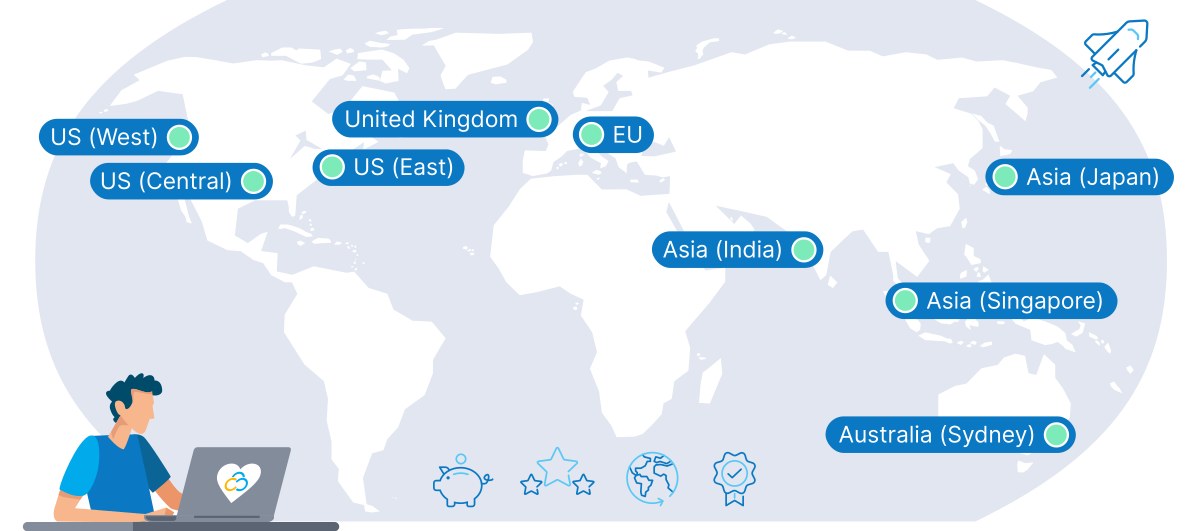
The plan price is for the EU location. Picking a location closer to your players lowers ping but adds a monthly surcharge, which grows with the plan:
Location surcharge: UK
- Cloud VPS 4: €1.05
- Cloud VPS 6: €1.60
- Cloud VPS 8: €3.25
- Cloud VPS 12: €5.80
Location surcharge: US Central
- Cloud VPS 4: €1.05
- Cloud VPS 6: €1.60
- Cloud VPS 8: €3.25
- Cloud VPS 12: €5.80
Location surcharge: US East
- Cloud VPS 4: €1.55
- Cloud VPS 6: €2.40
- Cloud VPS 8: €4.75
- Cloud VPS 12: €8.55
Location surcharge: US West
- Cloud VPS 4: €1.30
- Cloud VPS 6: €2.00
- Cloud VPS 8: €4.00
- Cloud VPS 12: €7.15
Location surcharge: Singapore
- Cloud VPS 4: €2.50
- Cloud VPS 6: €3.95
- Cloud VPS 8: €7.85
- Cloud VPS 12: €14.05
Location surcharge: Japan
- Cloud VPS 4: €2.55
- Cloud VPS 6: €4.00
- Cloud VPS 8: €8.00
- Cloud VPS 12: €14.30
Location surcharge: India
- Cloud VPS 4: €2.40
- Cloud VPS 6: €3.70
- Cloud VPS 8: €7.40
- Cloud VPS 12: €13.20
Location surcharge: Australia
- Cloud VPS 4: €2.15
- Cloud VPS 6: €3.30
- Cloud VPS 8: €6.60
- Cloud VPS 12: €11.85
- Windows (Windows Server Datacenter 2025) adds €8.00 a month on Cloud VPS 4, €17.00 on Cloud VPS 6, €28.00 on Cloud VPS 8 and €53.00 on Cloud VPS 12. Minecraft and Palworld both run on Linux, so you only need Windows for a game whose server is Windows-only. More in our Contabo Windows VPS cost guide.
- VAT is added at checkout based on your country: Contabo’s country list shows, for example, 19% for Germany and 20% for France and the UK. All our prices are before VAT.
Our arithmetic: a Minecraft server on Cloud VPS 4 with Auto Backup costs €5.50 + €1.65 = €7.15 a month. A Palworld server on Cloud VPS 8 with Auto Backup costs €14.00 + €5.00 = €19.00 a month in the EU, or €23.75 if you move it to US East (+€4.75). Cloud VPS 8 alone on a 24-month term is €11.20 × 24 = €268.80 for the two years. All before VAT.
Where the sources disagree
- Names. Contabo’s menu now says “Core VPS”, while the game-server cards and the price data say Cloud VPS 4, 6, 8 and 12. Same products.
- Disk. The cards say 200, 300 and 400 GB SSD; the price data lists each as SSD or NVMe at half the size (for example “200GB SSD / 100GB NVMe”), and the NVMe choice costs extra. The page also says “Pick the storage tier you need from 100 GB to 600 GB”, but the four game-server cards stop at 400 GB.
- Minecraft ports. Mojang only says to “open port 25565 for Java”. Contabo’s port-forwarding guide (last updated September 17, 2026) opens both
25565/tcpand25565/udp, saying the game “mainly uses TCP” but some functions and plugins need UDP. We show both below; you can skip the UDP rule if you do not use them.
Set up a Minecraft Java server (Paper) on Ubuntu
Paper is a popular, faster drop-in replacement for the vanilla server (it is “a drop-in replacement for both CraftBukkit and Spigot”) and runs plugins. Steps for a fresh Ubuntu or Debian Cloud VPS:
- Firewall first. Allow SSH before you turn UFW on, or you lock yourself out (Contabo’s guide warns about this too). Then open the game port:
sudo ufw allow OpenSSH
sudo ufw allow 25565/tcp
sudo ufw allow 25565/udp   # optional, see above
sudo ufw enable
sudo ufw status- Install Java 25. The current Minecraft release needs Java 25. PaperMC’s docs install Amazon Corretto 25 like this:
sudo apt-get update
sudo apt-get install ca-certificates apt-transport-https gnupg wget
wget -O - https://apt.corretto.aws/corretto.key | sudo gpg --dearmor -o /usr/share/keyrings/corretto-keyring.gpg && \
echo "deb [signed-by=/usr/share/keyrings/corretto-keyring.gpg] https://apt.corretto.aws stable main" | sudo tee /etc/apt/sources.list.d/corretto.list
sudo apt-get update
sudo apt-get install -y java-25-amazon-corretto-jdk libxi6 libxtst6 libxrender1
java -version- Download Paper from the official Paper downloads page into a folder such as
~/minecraft, and start it with PaperMC’s command. Change4Gto set the memory; on Cloud VPS 6 you could use 8G.
mkdir -p ~/minecraft && cd ~/minecraft
# put the downloaded paper jar here, renamed to paper.jar
java -Xms4G -Xmx4G -jar paper.jar --nogui- Accept the EULA. The first start stops and creates
eula.txt. By running the server software you agree to the Minecraft End User License Agreement; seteula=truein that file and start the server again. - Keep it running after you log out: run it inside
tmuxorscreen, or as a systemd service. Players connect to your server’s IP address (port 25565 is the default, so they do not need to type it). Contabo’s Minecraft server commands guide covers ops, whitelists and game rules.
Bedrock players (phones, consoles) cannot join a Java server. Mojang’s download page notes the Java server “is only compatible with Minecraft: Java Edition”. For them, run Mojang’s Bedrock dedicated server instead and open port 19132.
Set up a Palworld dedicated server on Linux
The official Palworld server guide offers SteamCMD on Linux or an official Docker image (pocketpairjp/palworld-dedicated-server-docker, with a sample Compose file). With SteamCMD installed (follow Valve’s instructions for your distribution), the official commands are:
steamcmd +login anonymous +app_update 2394010 validate +quit
cd ~/Steam/steamapps/common/PalServer
./PalServer.sh
Then open the game port. Palworld uses UDP 8211 by default:
sudo ufw allow 8211/udpRun it as a normal user, not root, and inside tmux or as a service so it keeps running. Two tips from the official guide: use fast storage, because slow disks can corrupt saves, and do not use Docker Desktop for the Docker method (“Docker Desktop is deprecated” for it). Plain Docker Engine on the VPS is fine; Docker is also a free option when you order the server.
Buy now or wait for Black Friday?
On October 31, 2026 (Europe/Bucharest) Contabo’s Black Friday page said “Contabo Black Friday Deals Coming Soon!” and offered a newsletter reminder, plus the line “Even our regular prices offer better value than most deals you’ll find elsewhere”. It listed no deal prices. If you want the server for a holiday gaming session soon, the monthly term (€5.50 for Cloud VPS 4) costs only €1.10 a month more than the 24-month price and does not lock you into two years. If you were going to commit to 24 months anyway, it may be worth waiting a few weeks to see what Contabo announces. We do not know what the deals will be.
Check today’s Contabo prices · Contabo homepage
What we could not confirm
- How many players each plan handles. Contabo describes its plans as for “small friend groups” up to “busy public or community servers” but gives no numbers, and Mojang publishes no RAM figure. Mods, view distance and player behaviour change the load a lot.
- Official server requirements for ARK and Rust, which Contabo’s page also names.
- What “Always-On DDoS Protection” covers in detail; the page only says it is “built to absorb common DDoS attacks”.
- Whether add-ons such as Auto Backup, the location surcharge or Windows get the same term discount as the plan on 12- or 24-month terms. Contabo’s price data lists them as monthly prices; check the order summary.
- Black Friday deal prices and dates, which were not published yet.
More Contabo guides: all Contabo VPS prices, Windows VPS cost, a private WireGuard VPN (handy for admin access to your game server) and Coolify on Contabo.
FAQ
Which Contabo plan is best for a Minecraft server?
For friends and small groups, Cloud VPS 4: 4 vCPU, 8 GB RAM and 100 GB SSD for €5.50 a month (€4.40 on 24 months) before VAT. For plugins or a bigger community, Cloud VPS 6 with 12 GB RAM.
Which Contabo plan can run a Palworld server?
Cloud VPS 8 (24 GB RAM) for €14.00 a month (€11.20 on 24 months). Palworld’s official guide asks for 16 GB of memory and says 8 GB boots but risks crashes. For larger servers it recommends more than 32 GB, which means Cloud VPS 12 (48 GB).
Is Contabo game server hosting a one-click game panel?
No. You get a VPS with full root access (Linux or Windows) and install the game’s dedicated server yourself. Contabo’s FAQ sums it up: rent a VPS, install the server software, open the required ports, then share the server address.
Which ports do I need to open?
Minecraft Java uses TCP 25565 by default (Contabo’s guide also opens UDP 25565). Minecraft Bedrock uses 19132 (19133 for IPv6). Palworld uses UDP 8211 by default.
Does Contabo protect game servers from DDoS attacks?
Contabo’s game-server page advertises “Always-On DDoS Protection” that is “built to absorb common DDoS attacks” in all locations. It does not give details or limits.
Does Contabo have Black Friday deals on game servers?
Its Black Friday page said “Contabo Black Friday Deals Coming Soon!” when we checked on October 31, 2026, with no prices yet.
Which Java version does a Minecraft server need?
Java 25 for the current release (26.3), according to Mojang’s version data. PaperMC also requires Java 25 for Paper 26.1 and newer.
Sources
All checked on October 31, 2026 (Europe/Bucharest).
- Contabo – Game Server Hosting: https://contabo.com/en/game-server-hosting/
- Contabo – VPS: https://contabo.com/en/vps/
- Contabo – Black Friday: https://contabo.com/en/black-friday/
- Contabo blog – Minecraft Server Port Forwarding: Complete Setup Guide: https://contabo.com/blog/minecraft-server-port-forwarding-complete-setup-guide/
- Contabo blog – Minecraft Server Commands: Complete Guide: https://contabo.com/blog/minecraft-server-commands-guide/
- Minecraft.net – Download the Minecraft: Java Edition server: https://www.minecraft.net/en-us/download/server
- Mojang – version manifest: https://piston-meta.mojang.com/mc/game/version_manifest_v2.json
- PaperMC docs – Getting started: https://docs.papermc.io/paper/getting-started/
- PaperMC docs – Installing Java: https://docs.papermc.io/misc/java-install/
- Palworld Server Guide – Requirements: https://docs.palworldgame.com/getting-started/requirements
- Palworld Server Guide – Deploy dedicated server: https://docs.palworldgame.com/getting-started/deploy-dedicated-server
