
Affiliate disclosure: this post contains affiliate links (Awin) to Wondershare’s HiPDF website. If you buy through them, SiftGuide may earn a commission at no extra cost to you; it does not change your price or terms. Plans, prices and limits come from HiPDF’s official pricing page, its FAQ and tool pages, and refund rules from Wondershare’s refund policy, all checked on October 20, 2026. Prices are the US-dollar prices shown on the English pricing page; your checkout may show another currency and local taxes. We have not tested HiPDF ourselves.
HiPDF is Wondershare’s online PDF tool: you edit, convert, compress, merge, sign and OCR PDFs in the browser, and newer AI tools let you chat with a PDF, get it read and summarised, or run an AI detector on it. The only device listed in its plan table is “Web” (Wondershare’s desktop editor is PDFelement, a separate product). You can start for free, but the paid plans don’t start the way most people expect: you pay US$0.99 or US$1.99 for 7 days, and unless you cancel in time, that turns into a yearly charge. Here is what each option really costs, what the free version allows, and the cancel-and-refund rules worth knowing before you click “Go Premium”.
HiPDF plans at a glance
Plan: 7-Day Basic Access
- Pay today: US$0.99 for 7 days
- Then: auto-renews US$39.99 a year
- What you get: 2,000 pages & 100MB, unlimited batch, full editing and downloading
- First year if you don’t cancel (our math): US$40.98
Plan: 7-Day Advanced Access (“Most Popular”)
- Pay today: US$1.99 for 7 days
- Then: auto-renews US$69.99 a year
- What you get: all Basic features plus more AI uses (Chat with PDF, AI Reader, AI Detector)
- First year if you don’t cancel (our math): US$71.98
Plan: AI Tool monthly plan
- Pay today: US$3.99 a month
- Then: renews monthly
- What you get: 1,000 AI uses per month (Chat with PDF, AI Reader, AI Detector)
- First year if you don’t cancel (our math): US$47.88 for 12 months
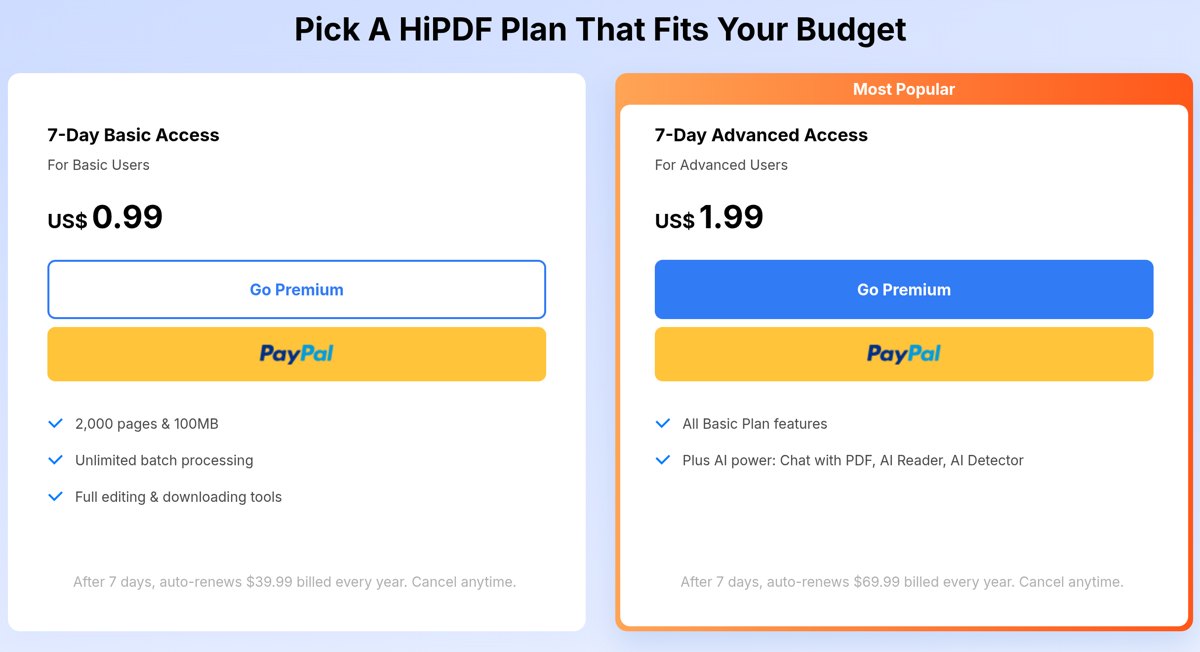
The big number on each card is the 7-day price. The yearly price (US$39.99 for Basic, US$69.99 for Advanced) appears in the small grey line “After 7 days, auto-renews … billed every year. Cancel anytime.” and again in the “Compare All plans” table further down, where the two plans are simply called Basic Plan (US$39.99/yr) and Advanced Plan (US$69.99/yr). Over a year that works out to about US$3.33 a month for Basic and US$5.83 a month for Advanced (our math).
See current HiPDF prices on the official pricing page
The 7-day catch: it is a paid trial of a yearly plan
The US$0.99 and US$1.99 cards are not one-week passes. They are the first 7 days of a yearly subscription. If you do nothing, the full yearly price is charged when the 7 days end, so the real first-year cost is US$40.98 for Basic (US$0.99 + US$39.99) or US$71.98 for Advanced (US$1.99 + US$69.99).
Wondershare’s refund policy, which covers HiPDF, makes the timing matter:
- “For paid trial and subscription products, please cancel at least 24 hours before the current trial or billing period ends to avoid being charged for the next term.”
- Among the cases it lists as not eligible for a refund: “The order is a renewal order, and the subscription was not canceled before the renewal charge”. Its FAQ adds that “in general, renewal charges are not refundable if the subscription was not canceled before the billing date.”
- It also warns that “different rules may apply to renewals, digital services, promotional offers, bundled purchases, and region-specific consumer rights”, so don’t count on getting the yearly charge back if you forget.
Practical tip: if you only need HiPDF for one job, set a reminder for day 5 or 6 and cancel at least 24 hours before the 7 days are up. The pricing page FAQ says “you can cancel your subscription anytime” and asks you to contact Wondershare to do it; the refund policy says you can cancel “at any time before the next billing charge”.
Basic vs Advanced: the only real difference is AI usage
In HiPDF’s “Compare All plans” table, both plans get exactly the same tools and file limits. The only rows that differ are the two AI quotas:
Feature (from HiPDF’s table): Device
- Basic Plan: Web
- Advanced Plan: Web
Feature (from HiPDF’s table): Batch processing, OCR, all PDF, image and AI tools, quick processing, processing range
- Basic Plan: included
- Advanced Plan: included
Feature (from HiPDF’s table): Maximum batch processing
- Basic Plan: No Limit
- Advanced Plan: No Limit
Feature (from HiPDF’s table): Maximum file size
- Basic Plan: 100MB
- Advanced Plan: 100MB
Feature (from HiPDF’s table): Maximum pages per file
- Basic Plan: 2000 Pages
- Advanced Plan: 2000 Pages
Feature (from HiPDF’s table): Chat with PDF & AI Read
- Basic Plan: 50 times; up to 260 pages and 100MB per PDF
- Advanced Plan: 1000 times; up to 260 pages and 100MB per PDF
Feature (from HiPDF’s table): AI Detector
- Basic Plan: 50 times; up to 260 pages and 10MB per PDF
- Advanced Plan: 1000 times; up to 260 pages and 10MB per PDF
Feature (from HiPDF’s table): Ad-free interface
- Basic Plan: yes
- Advanced Plan: yes
So Advanced costs US$30.00 more a year (our math) for 1,000 instead of 50 uses of Chat with PDF / AI Read and of the AI Detector. The table doesn’t say whether those counts are per month, per year or in total, so check at checkout if the AI quota is the reason you’re upgrading. If you mainly edit, convert, compress and OCR files, Basic has the same tools and limits.
One oddity: the plan cards present AI as an Advanced extra (“Plus AI power: Chat with PDF, AI Reader, AI Detector”), while the comparison table ticks “Access to All PDF, Image and AI Tools” for Basic too and gives Basic 50 AI uses. Going by the table, Basic includes a small AI allowance and Advanced a much larger one.
The US$3.99 AI Tool monthly plan
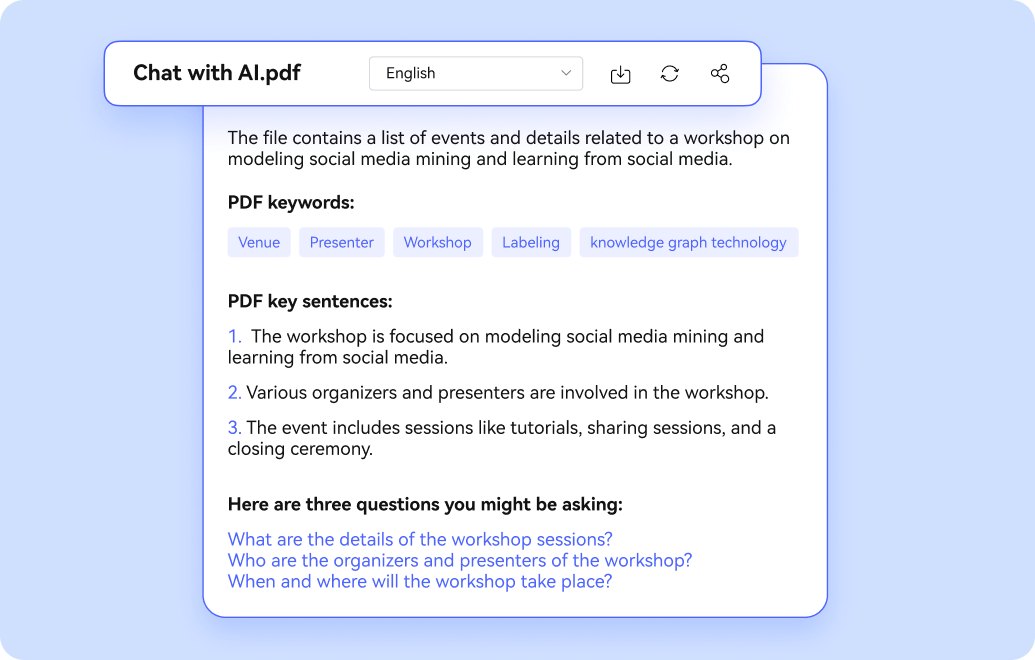
Under the two main cards there is a separate box, “AI Tool – Chat with PDF & AI Read”: a monthly plan at US$3.99 a month that “automatically renew[s], cancel at any time”, with “1,000 AI uses per month” for Chat with PDF, AI Reader and AI Detector. HiPDF’s FAQ adds that it allows PDFs “of up to 2,000 pages with a maximum size of 100M” and a 2,000-character limit for what you type into the chat.
Twelve months of it would cost US$47.88, which is US$22.11 less than a year of Advanced (our math). But the box only lists the AI features, and the page doesn’t say whether this plan also unlocks the paid editing limits (100MB files, 2,000 pages, unlimited batch). Treat it as an AI-only add-on unless checkout tells you otherwise.
What the free version allows
HiPDF calls itself an “All-in-one Free Online PDF Solution”, and you can use many tools without paying. The limits, from HiPDF’s own FAQ and tool pages:
- “limited access to most PDF and Image tools”; no OCR, batch processing or “range selecting” (processing only part of a document) in the free version;
- files up to 20 MB and 100 pages each, and up to 5 files at a time (the PDF editor page puts it as editing “up to 20MB for five files at no cost”);
- Chat with PDF: “a total of 50 questions, with a maximum of 20 pages per PDF”;
- AI Detector: 5,000 characters in total.
The PDF editor page also says “all uploaded files are permanently deleted within 60 minutes after processing.” It is still an online service, so think twice before uploading contracts, IDs or medical files. If a document is sensitive, an offline desktop editor may be the better choice; our guide to choosing a PDF editor covers what to check.
Try the HiPDF online PDF editor
Refunds: what “30-day money-back guarantee” really means
The pricing page says “All of our products come with a 30-day money-back guarantee.” Its own FAQ narrows that to “under the accepted technical circumstances”, and Wondershare’s refund policy sets the rules:
- Most products bought directly from Wondershare have a refund window of “up to 30 days from the initial payment date”. HiPDF isn’t on the shorter 7-day list (that list covers MobileTrans, Dr.Fone, Recoverit, Repairit, Relumi and Media.io), so the general rule should apply;
- EU residents may have a 14-day right of withdrawal, “subject to applicable legal exceptions”;
- not eligible: change of mind, “dissatisfaction with AI-generated output”, and renewals you didn’t cancel before the charge;
- requests go through Wondershare Account Center > My Orders > Order History.
For the 7-day plans, the “initial payment” is the US$0.99 or US$1.99, and the pricing card itself calls the yearly charge that follows an auto-renewal. That is why cancelling before day 7 matters more than the 30-day promise.
Which HiPDF option should you pick?
- One small job (a few files under 20 MB / 100 pages, no OCR): try the free version first.
- One bigger job (OCR, large files, batch): 7-Day Basic Access for US$0.99, and cancel at least 24 hours before day 7 if you don’t want the year.
- Regular PDF work without much AI: Basic at US$39.99 a year; you get the same tools and limits as Advanced.
- Heavy use of Chat with PDF or the AI Detector: Advanced at US$69.99 a year, or the US$3.99/month AI plan if you only need the AI tools for a month or two.
Compare HiPDF plans on the official site
Where HiPDF’s own pages don’t agree (checked October 20, 2026)
- “Cancel anytime” vs the renewal rule: the cards say “Cancel anytime”, but the refund policy asks you to cancel at least 24 hours before a paid trial ends and says renewals you didn’t cancel are generally not refundable.
- AI limits in four different units: the plan table says Chat with PDF “50 times” (Basic) / “1000 times” (Advanced) “up to 260 pages and 100MB per PDF”, with no time period; the AI plan says “1,000 AI uses per month”; the FAQ says the AI plan handles PDFs “of up to 2,000 pages”; and the Chat with PDF page talks in tokens: “5,000 tokens” free, “50,000 tokens” on “the monthly plan” and “2,000,000 AI tokens every month” on the AI plan.
- Is AI an Advanced extra? The Advanced card sells “Plus AI power”, yet the table ticks “Access to All PDF, Image and AI Tools” for Basic and gives Basic 50 AI uses.
- “41% OFF”: the Advanced column carries a “41% OFF” badge, but no original price is shown anywhere on the page.
- Free-version batch processing: the FAQ says the free version has “no access to … batch processing”, then in the next sentence allows “a maximum of 5 files in batch processing”.
- “30-day money-back guarantee”: the page says all products have one; the FAQ limits it to “accepted technical circumstances”; the refund policy excludes change of mind, AI-output dissatisfaction and uncancelled renewals.
- Desktop-software wording on a web service: the page promises “a free lifetime update Keycode” and its FAQ talks about a “Pro license”, while the plans are called Basic and Advanced and the only device listed is Web.
Need a desktop PDF editor instead? Our PDF editor buying guide explains trials, licences and AI add-ons, with Wondershare PDFelement as the worked example.
FAQ
How much does HiPDF cost?
On the English pricing page: 7-Day Basic Access US$0.99, then US$39.99 a year; 7-Day Advanced Access US$1.99, then US$69.99 a year; and an AI Tool monthly plan at US$3.99 a month. Your checkout may add local taxes or show another currency.
Is HiPDF free?
Partly. Many tools work for free with limits: no OCR or batch processing, files up to 20 MB and 100 pages, up to 5 files at a time, 50 Chat with PDF questions in total and 5,000 characters of AI detection.
Does the US$0.99 HiPDF trial renew automatically?
Yes. The card says “After 7 days, auto-renews $39.99 billed every year.” Advanced (US$1.99) renews at US$69.99 a year. Wondershare asks you to cancel at least 24 hours before the trial ends.
What is the difference between HiPDF Basic and Advanced?
In HiPDF’s comparison table, only the AI quotas differ: 50 vs 1,000 uses of Chat with PDF / AI Read and of the AI Detector. Tools, file size (100MB), pages per file (2,000) and batch processing are the same.
Can I get a refund on HiPDF?
Wondershare’s refund policy gives most products up to 30 days from the initial payment (14-day withdrawal for EU residents), but excludes change of mind, dissatisfaction with AI output and renewals that weren’t cancelled before the charge.
Does HiPDF work offline?
No. HiPDF is a web service and its plan table lists only “Web”. Wondershare’s offline editor is PDFelement, sold separately.
Is HiPDF safe for confidential files?
HiPDF says uploaded files are permanently deleted within 60 minutes after processing. Files still leave your computer, so for sensitive documents an offline editor is the more cautious choice.
Sources
All checked on October 20, 2026.
- HiPDF – Pricing and plans (incl. FAQ): https://www.hipdf.com/pricing.html
- HiPDF – Online PDF editor (free limits, file deletion): https://www.hipdf.com/pdf-editor
- HiPDF – Chat with PDF (token allowances): https://www.hipdf.com/chat-with-pdf
- HiPDF – Homepage: https://www.hipdf.com/
- Wondershare – Refund Policy: https://www.wondershare.com/refund-policy.html
