
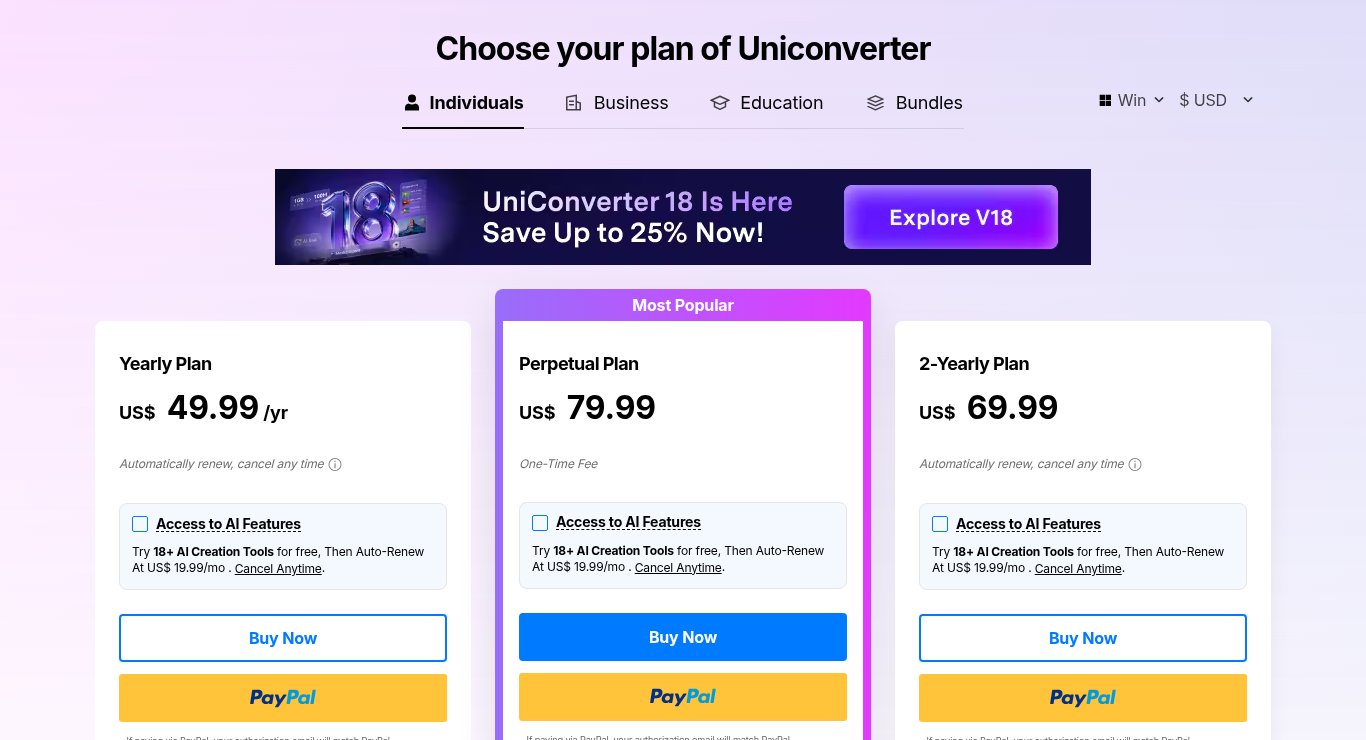
Prices checked on the official UniConverter store pages on October 24, 2026 (US dollars selected, before any local taxes). Wondershare changes prices and promotions often, so the price on the checkout page is the one that counts. This post contains affiliate links: if you buy through them, SiftGuide may earn a commission at no extra cost to you. We have not lab-tested UniConverter; plans, limits and terms below come from the official store pages, their FAQ and the Wondershare refund policy.
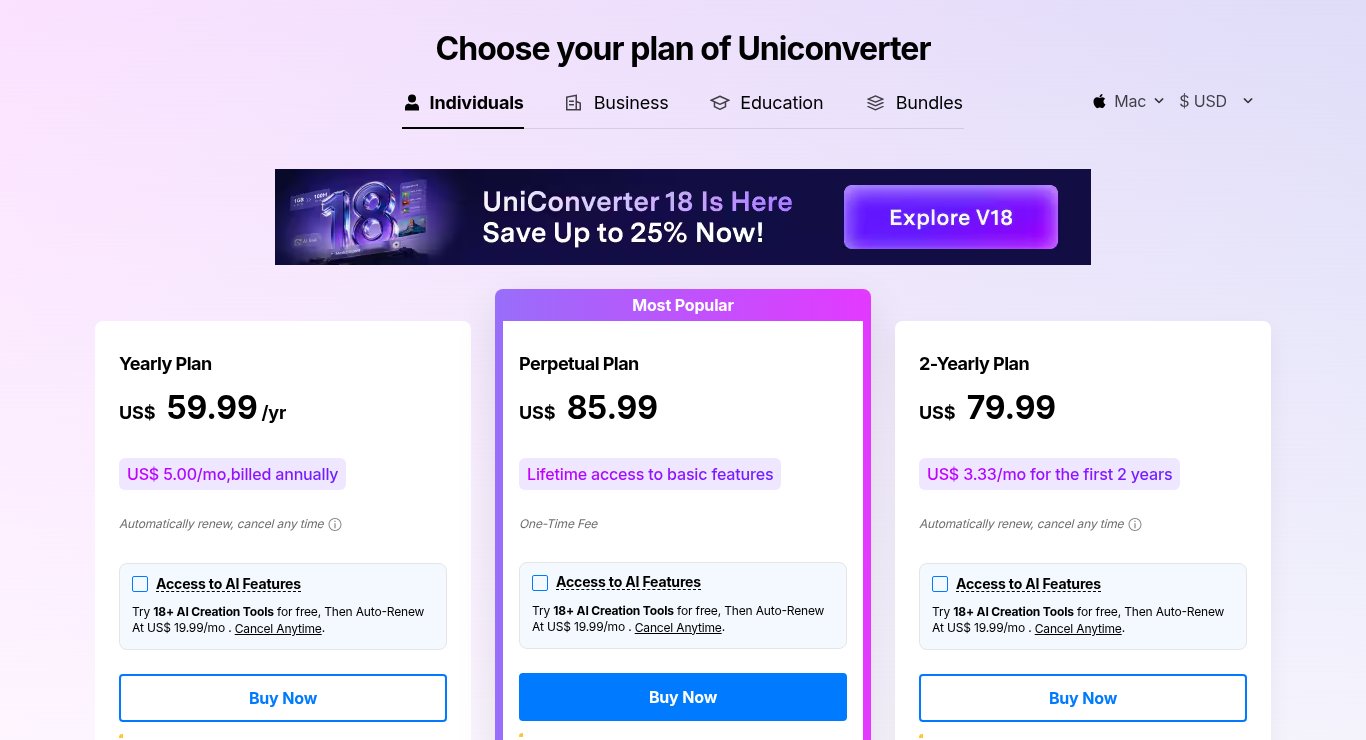
Short answer: UniConverter for Windows costs US$49.99 a year, US$69.99 for two years or US$79.99 once (Perpetual). On Mac it is US$59.99, US$79.99 and US$85.99. Windows and Mac are bought separately. The odd one out is the 2-Year plan: it costs less than Perpetual and only US$20.00 more than one year. Every card also has an “Access to AI Features” checkbox that turns into a US$19.99-a-month subscription after the trial. It was unticked when we checked, so leave it alone unless you want it.
- All prices at a glance
- Yearly vs 2-Year vs Perpetual (our arithmetic)
- The AI add-on and AI credits
- What the free trial can do
- Student, team and bundle prices
- Refunds and renewals
- Things to check before you buy
- Which plan to pick
- FAQ
UniConverter prices at a glance
Plan: Yearly (auto-renews)
- Windows: US$49.99
- Mac: US$59.99
Plan: 2-Yearly (auto-renews)
- Windows: US$69.99
- Mac: US$79.99
Plan: Perpetual (one-time fee)
- Windows: US$79.99
- Mac: US$85.99
Plan: AI credits included
- Windows: 600 / 600 / 1000
- Mac: 600 / 600 / 1000
The credits row lists Yearly / 2-Yearly / Perpetual, from the comparison table on both stores (the free trial gets 20 credits). Perpetual is marked “Most Popular”. All paid plans unlock the same basic features: full-length conversion and batch conversion, no watermark on batch image conversion and unlimited downloads from 1,000+ sites, where the trial gets 1/3 of each video and 1 download.
See UniConverter prices for Windows · See UniConverter prices for Mac
Yearly vs 2-Year vs Perpetual (our arithmetic)
Comparison: Two years on the Yearly plan
- Windows: US$99.98 (2 × US$49.99)
- Mac: US$119.98 (2 × US$59.99)
Comparison: 2-Yearly plan instead
- Windows: US$69.99: US$29.99 less
- Mac: US$79.99: US$39.99 less
Comparison: Perpetual vs 2-Yearly
- Windows: Perpetual costs US$10.00 more
- Mac: Perpetual costs US$6.00 more
Comparison: Perpetual vs one Yearly payment
- Windows: US$30.00 more
- Mac: US$26.00 more
Comparison: 2-Yearly per month
- Windows: about US$2.92
- Mac: US$3.33 (the store says the same)
Read the table this way. If you need UniConverter for more than one year, the Yearly plan is the worst deal: the 2-Yearly plan covers twice the time for US$20.00 more. And for only US$10.00 more on Windows (US$6.00 on Mac), Perpetual never renews and includes 1000 AI credits instead of 600.
There is a catch with Perpetual. The store FAQ says you get “lifetime access to the version of the software you purchased the license for, including updates. However, this plan does not include future versions of the software. Should a new version be released, you would need to purchase a new plan to access it.” Right now that version is UniConverter 18 (the store advertises “Save Up to 25% on V18”). The subscriptions keep you on the current version for as long as you pay. The Mac 2-Yearly card shows US$3.33/mo “for the first 2 years”, and neither store states the renewal price, so do not count on US$69.99 or US$79.99 again after two years.
Mac costs more on every plan: US$10.00 more on Yearly and 2-Yearly, and US$6.00 more on Perpetual (our arithmetic).
The AI add-on and AI credits
The checkbox on every plan card: “Access to AI Features: Try 18+ AI Creation Tools for free, Then Auto-Renew At US$ 19.99/mo. Cancel Anytime.” Its pop-up calls it “UniConverter AI Creation Tools (7-day trial)”. It is a separate monthly subscription on top of the plan you buy. If you forget to cancel it, it adds up to US$239.88 a year (12 × US$19.99, our arithmetic), almost five times the Windows Yearly plan. The boxes were unticked on both stores when we checked.
You do not need the add-on to use the AI tools at all. In the store comparison table, tools such as the video enhancer are “Paid By AI Credits” on every plan, and each plan comes with a credits bonus (600 on Yearly and 2-Yearly, 1000 on Perpetual, 20 on the trial). When the bonus runs out, the FAQ says “UniConverter supports purchase AI Credits separately” through a credits pack page. Note that the refund policy treats used credits as consumables: “generally non-refundable once consumed”.
If you mainly want to convert, compress and download video, the basic plan is enough. The AI extras (enhancers, background and watermark removal, text-to-speech and similar) are where the credits and the add-on come in.
What the free trial can do
From the store FAQ: “The trial version of UniConverter is restricted to convert only 1/3 length of the video, burn 1/3 length video to DVD, download 1 file with a maximum resolution of 480P and record limited video.” The FAQ adds that the 7-day free trial applies to all functions of version 17 and above.
Feature (official comparison table): Video and audio conversion
- Free trial: 1/3 of the length
- Paid plans: Unlimited
Feature (official comparison table): Downloads from 1,000+ sites
- Free trial: 1 file
- Paid plans: Unlimited
Feature (official comparison table): Batch image conversion
- Free trial: With watermark
- Paid plans: No watermark
Feature (official comparison table): AI credits
- Free trial: 20
- Paid plans: 600 or 1000
That is enough to check that UniConverter opens your files and that the output plays where you need it, which is the real point of a trial. It is not enough for an actual job. Download UniConverter from the official site. Windows needs Windows 11/10/8/7/Vista, a CPU over 1GHz, 2 GB of free disk space and 4 GB of RAM (8 GB recommended), per the official tech specs page.
Student, team and bundle prices
Plan: Student Monthly (1 PC, Windows)
- Price: US$7.99
- Notes: Was US$19.99; student status verification required
Plan: Student Quarterly (1 PC, Windows)
- Price: US$23.99
- Notes: Was US$29.99
Plan: Student Annual (1 PC, Windows)
- Price: US$31.99
- Notes: Was US$39.99; US$18.00 less than the regular Yearly plan (our arithmetic)
Plan: Windows + Mac Annual bundle
- Price: US$79.98/year
- Notes: Was $99.98/year; US$30.00 less than buying Windows and Mac Yearly separately (US$109.98, our arithmetic)
Plan: UniConverter + DVD Creator Annual bundle
- Price: US$71.95/year
- Notes: Was $89.94/year
Plan: Team Annual, 1 user
- Price: $59.99 (as shown)
- Notes: “not including Auto-Subtitle Generator and Background Remover”; a form for more than 20 users
Two things stand out (our arithmetic). Students should take the Annual plan: twelve monthly payments would cost US$95.88 and four quarters US$95.96, against US$31.99 for the year. And anyone with both a Windows PC and a Mac should look at the Windows + Mac bundle before buying two separate Yearly plans. The commercial vs personal rule matters too: the FAQ says “The commercial license is for commercial use, while the individual is for personal use.” If you convert video for paying clients, the individual plans above are not the right licence. See the UniConverter student plans.
Refunds and renewals
The store badge reads: “30-Day Money Back: We promise up to a 30-Day Money-Back Guarantee. Refunds will be approved under the accepted circumstances.” The Wondershare refund policy gives most products bought directly from Wondershare a window of up to 30 days from the initial payment. UniConverter is not in its shorter 7-day list (that list covers MobileTrans, Dr.Fone, Recoverit, Repairit, Relumi and Media.io). The policy also says:
- Requests based solely on change of mind, or solely on dissatisfaction with AI-generated output, are generally not eligible.
- A renewal order is not refundable if the subscription was not cancelled before the renewal charge.
- Used credits are generally non-refundable.
- EU residents may have a 14-day right of withdrawal, subject to legal exceptions.
For renewals, the FAQ says: “You will receive an e-mail notification 7 days prior to the end of the subscription.” Put the renewal date in your calendar anyway, for the plan and for the AI add-on if you ticked it.
Things to check before you buy
- Platform. The FAQ: “you have to pay for the corresponding versions of Plan for different devices. There are differences in the functions supported by the 2 systems.” A Windows licence will not activate the Mac app.
- Currency. The store may open in your local currency (it opened in pounds for us). Use the currency switch next to the Windows/Mac selector.
- The AI checkbox. It is on all three cards, on both stores.
- Perpetual is version-bound. A future UniConverter 19 would need a new purchase.
- Older prices elsewhere. Prices from affiliate feeds and older reviews (including some on SiftGuide) can differ. On October 24, 2026 the official Windows Yearly price was US$49.99.
Which UniConverter plan to pick
If you: Have one batch of videos to convert this year
- Pick: Yearly (US$49.99 Windows, US$59.99 Mac), and turn off auto-renew after buying
If you: Will use it for two years or more but want new versions
- Pick: 2-Yearly (US$69.99 / US$79.99)
If you: Want to pay once and are happy on version 18
- Pick: Perpetual (US$79.99 / US$85.99), with the most AI credits
If you: Use both a PC and a Mac
- Pick: Windows + Mac bundle (US$79.98/year)
If you: Are a student
- Pick: Student Annual (US$31.99, 1 PC)
If you: Are not sure it handles your files
- Pick: The free trial first
Related on SiftGuide
Step by step: how to convert and compress video with UniConverter. Editing rather than converting? See Filmora plans and prices. All Wondershare tools in one place: EdrawMax, MindMaster and UniConverter prices.
FAQ
How much does UniConverter cost?
On Windows: US$49.99 a year, US$69.99 for two years or US$79.99 once. On Mac: US$59.99, US$79.99 or US$85.99. Checked October 24, 2026, US dollars.
Is UniConverter free?
There is a free trial. It converts only 1/3 of each video, downloads 1 file at up to 480P and adds a watermark to batch image conversion.
Is the 2-Year plan better than Perpetual?
It is US$10.00 cheaper on Windows and US$6.00 cheaper on Mac and keeps you on new versions while it runs, but it auto-renews. Perpetual is paid once, covers only the version you buy and includes more AI credits (1000 vs 600).
Does one licence work on Windows and Mac?
No. The FAQ says you pay for each platform separately. The Windows + Mac Annual bundle costs US$79.98 a year.
What is the US$19.99 a month charge?
It is the optional “Access to AI Features” add-on on each plan card: a free trial, then an auto-renewing monthly subscription. Leave the box unticked if you do not want it.
Can I get a refund?
The store promises up to a 30-day money-back guarantee under accepted circumstances. Change of mind is generally not eligible, renewals are not refundable if not cancelled in time, and EU residents may have a 14-day right of withdrawal.
