
Affiliate disclosure: this post contains an affiliate link to ElevenLabs (via PartnerStack). If you subscribe through it, SiftGuide may earn a commission at no extra cost to you. Every price, limit and right below comes from ElevenLabs’ own pricing pages, Terms of Service and docs, checked on October 22, 2026. Prices are in US dollars and exclude taxes.
Short answer: ElevenLabs Sound Effects turns a text prompt into a sound of up to 30 seconds. On the pricing page a generation costs about 200 credits, which gives 50 generations a month on Free, 150 on Starter (US$6), 605 on Creator (US$22) and 3,000 on Pro (US$99). Two things change the bill more than people expect: setting the duration yourself switches billing to 40 credits per second, so a fixed 30-second clip costs about six default generations, and commercial use needs a paid plan, because Free is “Personal use only” and has no WAV, no API and no rights that outlive cancellation.
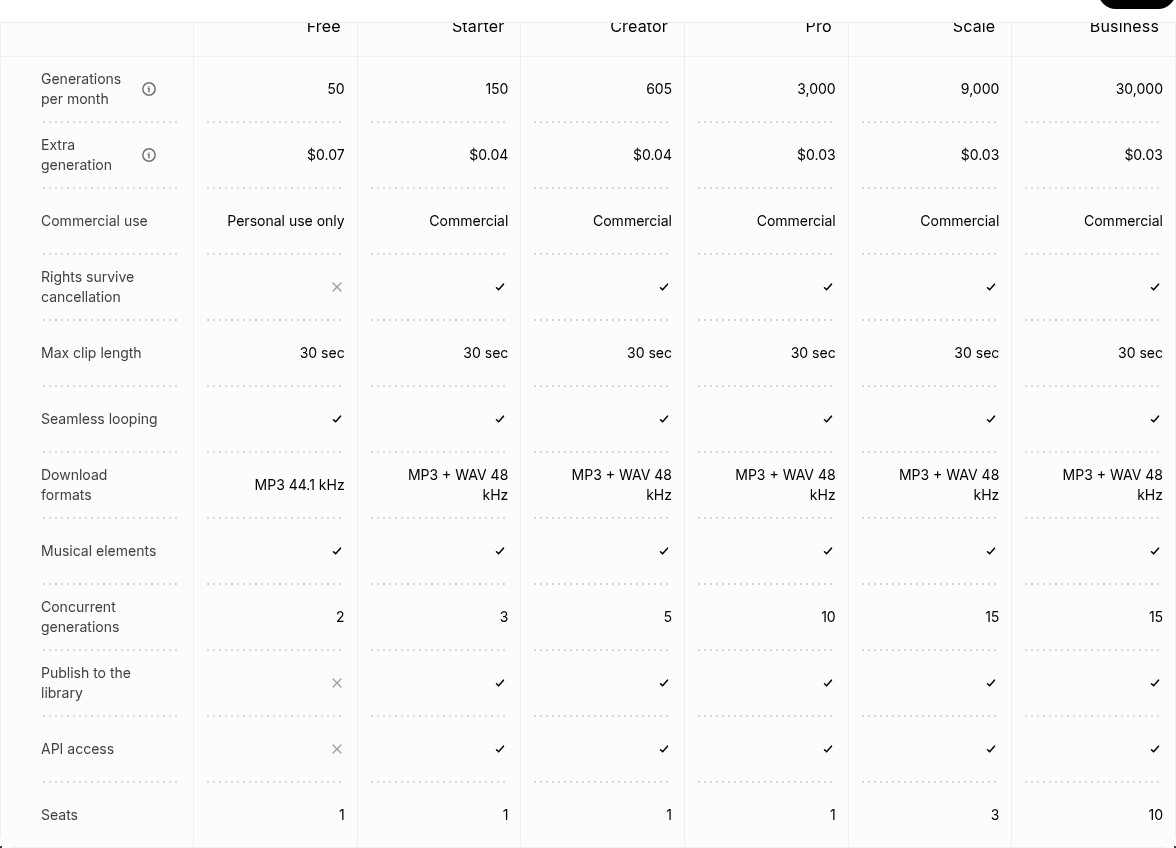
Sound Effects by plan at a glance
From the Sound Effects tab of the “Compare plans” table on elevenlabs.io/pricing (rendered October 22, 2026):
Plan: Free
- Price a month: US$0
- Generations a month: 50
- Extra generation: US$0.07
- Commercial use: Personal use only
- Downloads: MP3 44.1 kHz
- API: No
- Concurrent: 2
Plan: Starter
- Price a month: US$6
- Generations a month: 150
- Extra generation: US$0.04
- Commercial use: Commercial
- Downloads: MP3 + WAV 48 kHz
- API: Yes
- Concurrent: 3
Plan: Creator
- Price a month: US$22 (US$11 the first month)
- Generations a month: 605
- Extra generation: US$0.04
- Commercial use: Commercial
- Downloads: MP3 + WAV 48 kHz
- API: Yes
- Concurrent: 5
Plan: Pro
- Price a month: US$99
- Generations a month: 3,000
- Extra generation: US$0.03
- Commercial use: Commercial
- Downloads: MP3 + WAV 48 kHz
- API: Yes
- Concurrent: 10
Plan: Scale
- Price a month: US$299 (3 seats)
- Generations a month: 9,000
- Extra generation: US$0.03
- Commercial use: Commercial
- Downloads: MP3 + WAV 48 kHz
- API: Yes
- Concurrent: 15
Plan: Business
- Price a month: US$990 (10 seats)
- Generations a month: 30,000
- Extra generation: US$0.03
- Commercial use: Commercial
- Downloads: MP3 + WAV 48 kHz
- API: Yes
- Concurrent: 15
Every plan has the same 30-second maximum clip, seamless looping and musical elements (drum loops, bass lines, melodic samples). Paid plans add “Rights survive cancellation” and “Publish to the library”; Free has neither. Paying yearly works out to about US$5 a month for Starter, US$18.33 for Creator and US$82.50 for Pro.
See ElevenLabs plans (PartnerStack referral)
What one sound really costs in credits
Credits are shared across every ElevenLabs tool (voices, music, dubbing and so on), so the generation counts above assume you spend your whole allowance on sound effects. Two official rules decide the cost:
- Duration on Auto: the pricing FAQ lists Sound Effects at “200 credits per generation”. Each plan’s monthly credits divided by 200 give exactly the compare table’s numbers (10,000 / 200 = 50 on Free, 121,000 / 200 = 605 on Creator; our arithmetic).
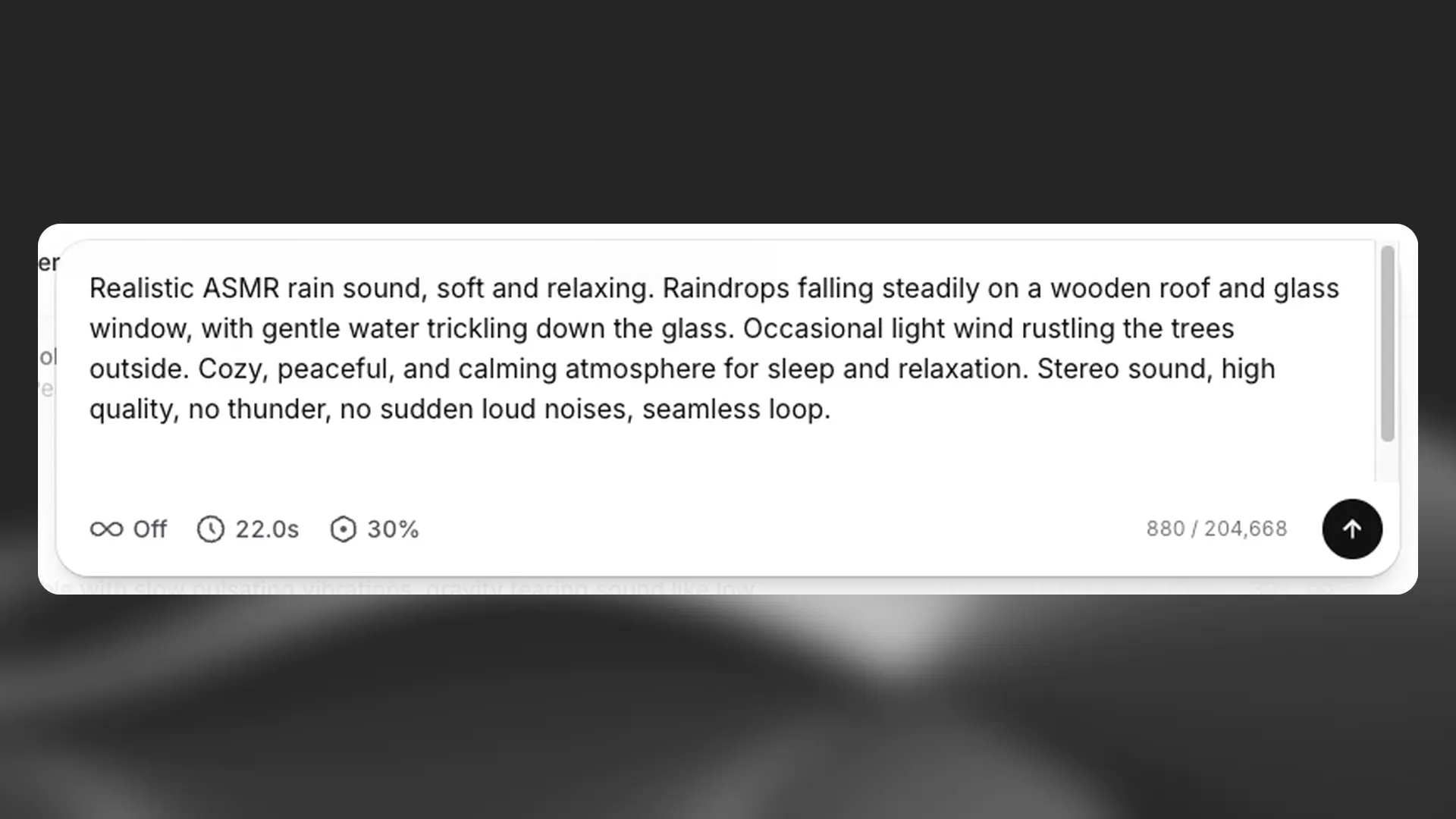
- Duration set by you: the docs say “40 credits per second when duration is specified”. A 30-second clip is then 1,200 credits, six times a default generation, so Starter’s 30,000 credits cover about 25 full-length clips rather than 150 (our arithmetic). ElevenLabs’ own screenshot of the settings bar shows a 22.0-second clip next to a cost of 880 credits, which is exactly 22 × 40.
What does not change the price: the prompt itself (“The cost is not influenced by the text input you use”) and downloading. Credits are “charged per generation request, not per download”, and if you regenerate without changing the content and certain settings, a limited number of free regenerations may be offered; the app tells you before you generate.
Where ElevenLabs’ own numbers disagree (as of October 22, 2026):
- Seconds vs generations: the plan cards on the same pricing page describe the allowance in seconds (250 seconds on Free, 750 on Starter, 2,500 on Creator, 12,500 on Pro, 50,000 on Scale, 275,000 on Business). Free and Starter match 40 credits per second; Creator and Pro do not (121,000 / 40 would be 3,025 seconds and 600,000 / 40 would be 15,000). Treat the generation count as the Auto-duration figure and the seconds as a rough guide.
- Four sounds per click: the product guide says “Four sound effects will be created each time” and the Sound Effects page promises “four samples within seconds”. ElevenLabs does not say whether 200 credits covers the batch of four or each one; watch your credit balance after the first generation.
- API wording: the API pricing page shows Sound Effects at “$0.12 Price per minute”, while its own FAQ says “Music and Sound Effects are billed per generation”. Its table also lists 8 included generations on pay-as-you-go and the same 150 / 605 / 3,000 / 9,000 / 30,000 as the plans.
- WAV: the compare table and the product guide offer WAV 48 kHz from Starter, but the API reference says WAV and PCM at 44.1 kHz need Pro or higher (and 192 kbps MP3 needs Creator). The docs also say WAV is for non-looping effects only; looping effects come as MP3.
- Shortest clip: the overview gives a range of 0.1 to 30 seconds; the API reference says a duration must be at least 0.5 seconds.
Can you use ElevenLabs sound effects commercially?
Yes, on any paid plan. ElevenLabs’ Sound Effects page says: “As long as you have a paid account, you can use our sound effects royalty-free in commercial projects, including YouTube videos, social media content, and even advertising (free users may only use the services for non-commercial purposes).” The Terms of Service say the same in general form: Free Users “may only use the Services for non-commercial purposes”, Paid Users “may use the Services for commercial purposes”.
- Monetized YouTube, Reels, podcasts, ads, games: Starter (US$6) is enough.
- After you cancel: the compare table ticks “Rights survive cancellation” for every paid plan and not for Free. Make the sounds you need while subscribed.
- What is not allowed: ElevenLabs asks that you “do not sell or license our tools or use the output to develop competitive products or services”. Reselling a pack of generated effects as your own sound library is the grey area to check in the Terms before you do it.
How to make a sound effect in ElevenLabs
- Open Sound Effects; it sits under Playground in the sidebar.
- Describe the sound in up to 450 characters. Short and concrete works best: “Glass shattering on concrete”, or with more detail, “high-quality, professionally recorded footsteps on grass, sound effects foley.”
- Set the duration or leave it on Auto (remember Auto is the cheaper setting), turn Looping on for rain, wind or room tone you want to repeat, and adjust prompt influence (30% by default; higher follows the prompt more literally).
- Click the arrow to generate. You get four variations.
- Open the History tab, download as MP3 (44.1 kHz) or WAV (48 kHz), or star a sound to keep it in Favorites. A second icon lets you share it on the public Explore page.
Prompt tips from ElevenLabs: for a sequence (“Footsteps on gravel, then a metallic door opens”) the model understands it, but ElevenLabs recommends generating each sound separately and combining them in an audio editor. Audio terms help: impact, whoosh, ambience, one-shot, loop, stem, braam (the big brassy trailer hit), glitch and drone. Musical prompts like “90s hip-hop drum loop, 90 BPM” work too; for full songs use Eleven Music instead.
Try ElevenLabs Sound Effects (PartnerStack referral)
For developers: the Sound Effects API
The endpoint is POST https://api.elevenlabs.io/v1/sound-generation with a text prompt and optional duration_seconds (0.5 to 30; leave it out to let the model choose), loop (only on the eleven_text_to_sound_v2 model, which is the default and only listed model) and prompt_influence (0 to 1, default 0.3). The default output is mp3_44100_128. API access needs a paid plan; Free has none.
Which plan to pick
If you want to: Try prompts and listen, no commercial use
- Pick: Free (50 generations, MP3 only)
If you want to: Add sounds to monetized videos, podcasts or ads
- Pick: Starter, US$6 a month (150 generations)
If you want to: Produce sounds every week alongside voiceovers
- Pick: Creator, US$22 a month (US$11 the first month, 605 generations)
If you want to: Need WAV 44.1 kHz through the API, or thousands of sounds
- Pick: Pro, US$99 a month (3,000 generations)
If you want to: A small team sharing one account
- Pick: Scale, US$299 a month (3 seats) or Business, US$990 (10 seats)
More from ElevenLabs on SiftGuide
For how credits work across every ElevenLabs tool, see the ElevenLabs pricing guide. Need full songs rather than effects? See Eleven Music commercial use by plan. Translating a video? See the ElevenLabs Dubbing guide.
FAQ
Is ElevenLabs Sound Effects free?
Yes, the Free plan gives 50 generations a month, but for personal, non-commercial use only, with MP3 downloads and no API.
How many credits does a sound effect cost?
About 200 credits per generation with duration on Auto, or 40 credits per second if you set the duration yourself (1,200 credits for 30 seconds).
How long can a sound effect be?
Up to 30 seconds per generation. For longer ambience, generate a looping effect and repeat it.
Are ElevenLabs sound effects royalty-free?
On paid plans, yes: you can use them in commercial projects, including YouTube, social media and advertising, without per-use fees.
Can I download WAV?
The pricing table offers WAV 48 kHz on Starter and above (non-looping effects). Through the API, WAV and PCM at 44.1 kHz require Pro or higher.
Does a longer prompt cost more?
No. ElevenLabs says the cost is not influenced by the text input; the settings and duration are what count.
Can I keep using sounds after I cancel?
The compare table says rights survive cancellation on paid plans. On Free they do not.
Sources
All checked on October 22, 2026:
- ElevenLabs pricing (plans, credits FAQ, Compare plans: Sound Effects)
- ElevenLabs API pricing
- ElevenLabs Sound Effects page and FAQ
- ElevenLabs Terms of Service
- Sound effects overview and key facts
- Sound effects (product guide)
- API reference: Create sound effect
- Help Center: How do I prompt for sound effects?
- Help Center: How much does it cost to generate sound effects?
