
Affiliate disclosure: this post contains affiliate links (CJ) to Contabo. If you order through them, SiftGuide may earn a commission at no extra cost to you; it does not change your price or terms. Plans, prices and setup steps come from Contabo’s official pages and help center, and the setup, model and security notes come from Hermes Agent’s official documentation, all checked on October 21, 2026 (Europe/Bucharest). We have not benchmarked these servers or tested Hermes Agent ourselves.
Hermes Agent is an open-source AI agent from Nous Research. It keeps memory across sessions, runs scheduled jobs, hands work to subagents and can reach you on Telegram, Discord, Slack, WhatsApp or Signal. Contabo now sells “Hermes AI VPS Hosting” and lists a free Hermes Agent Server 1-click app on its Cloud VPS plans. This guide covers which plan to pick, what it really costs, how the install works, and the part Contabo’s page skips: Hermes needs a language model, and for most people that model is a separate, usage-based bill.
What Hermes Agent is, and what Contabo’s 1-click gives you
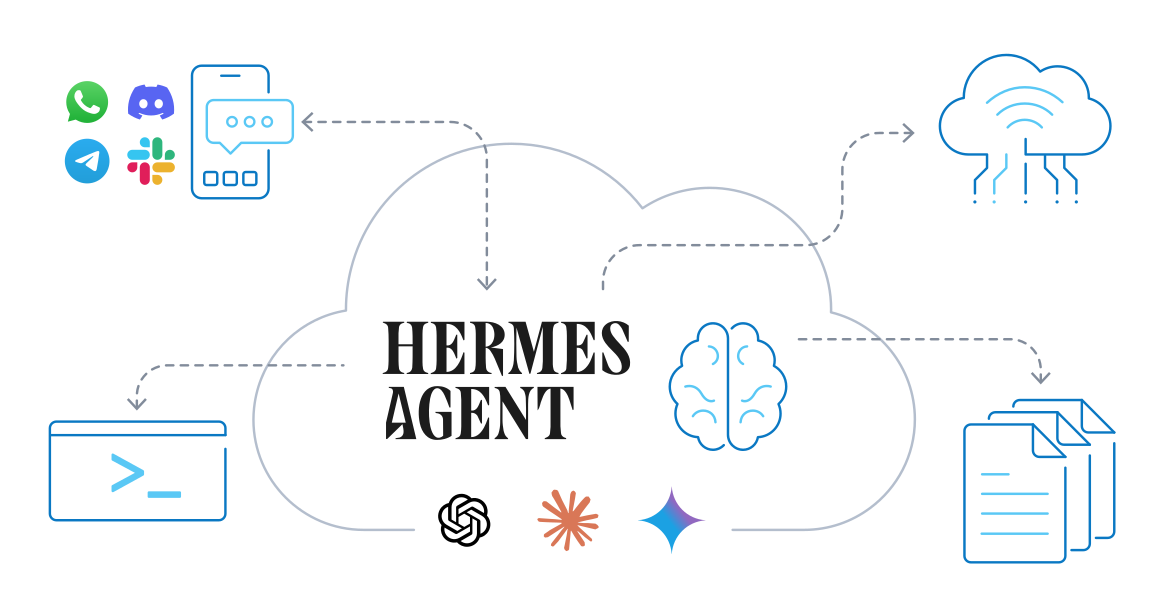
- An agent, not a model. Contabo’s page is titled “Hermes AI” and covers both Nous Research’s Hermes language models and Hermes Agent, but its own FAQ draws the line: “The Hermes AI model is the brain. The Hermes Agent is everything around it”. The 1-click app installs the Agent. You connect it to a model yourself.
- What the Agent does. Per its README and Contabo’s help article: memory that carries across sessions, a built-in cron scheduler that can deliver results to a chat app, isolated subagents for parallel work, and tools to search the web, drive a browser, work with files and run code. You talk to it in a terminal interface or through one gateway process for Telegram, Discord, Slack, WhatsApp and Signal.
- Free software. Hermes Agent is released under the MIT licence (copyright Nous Research).
- The 1-click app is €0. Contabo’s price data lists “Hermes Agent Server” at €0 on all four plans below, and each plan’s order configurator includes it. Contabo supports the VPS and the initial setup of the add-on. Updates, maintenance and troubleshooting of Hermes itself are your job, and Contabo’s help article refers you to the Hermes Agent documentation.
Which Contabo plan for Hermes Agent?
Contabo’s Hermes page shows four Cloud VPS plans. Prices are in EUR before VAT. The monthly-term price is what you pay on a 1-month contract. The 24-month rate is the effective monthly price Contabo shows “for the first 24 months” of a 24-month subscription.
Plan: Cloud VPS 4
- Resources: 4 vCPU, 8 GB RAM, 100 GB SSD
- Port speed: 200 Mbit/s
- Monthly term: €5.50/mo
- 24-month rate: €4.40/mo
- Contabo’s label: Hermes Personal Use
- Contabo suggests it for: one person running their own agent for daily work
Plan: Cloud VPS 6
- Resources: 6 vCPU, 12 GB RAM, 200 GB SSD or 100 GB NVMe
- Port speed: 300 Mbit/s
- Monthly term: €7.50/mo
- 24-month rate: €6.00/mo
- Contabo’s label: Hermes Power User
- Contabo suggests it for: daily use across lots of integrations
Plan: Cloud VPS 12
- Resources: 12 vCPU, 48 GB RAM, 400 GB SSD or 200 GB NVMe
- Port speed: 800 Mbit/s
- Monthly term: €25.00/mo
- 24-month rate: €20.00/mo
- Contabo’s label: Hermes Team Deployment
- Contabo suggests it for: small teams with several subagents at once
Plan: Cloud VPS 18
- Resources: 18 vCPU, 96 GB RAM, 600 GB SSD or 300 GB NVMe
- Port speed: 1 Gbit/s
- Monthly term: €49.00/mo
- 24-month rate: €39.20/mo
- Contabo’s label: Hermes Enterprise Scale
- Contabo suggests it for: complex agent pipelines and heavy parallel work
Our take on sizing: if Hermes talks to a hosted model (OpenRouter, OpenAI, Anthropic, Nous Portal and so on), the heavy lifting happens on the provider’s side, and the server mostly runs the agent, its tools and its browser. For one person that points to Cloud VPS 4. Step up when you run several subagents at once, browse a lot, or share the agent with a team. None of these plans lists a GPU, which matters if you hoped to run the model on the same box (next section).
What you actually pay for the server
- Term: the minimum contract is 1 month. On Cloud VPS 4 a 24-month term brings €5.50 down to €4.40 a month, that is €105.60 over two years against €132.00 on monthly terms.
- VAT: prices above exclude VAT. Contabo’s country list shows, for example, 19% for Germany, 20% for the UK and 21% for Romania.
- Auto Backup (optional): €1.65/mo on Cloud VPS 4, €3.35 on 6, €6.70 on 12 and €10.00 on 18. Worth it here: the agent’s memory, skills and keys live on that one server.
- Location: the prices above are for the EU location. Other regions add a surcharge: on Cloud VPS 4, from €1.05 (UK) to €2.55 (Japan) a month; on Cloud VPS 6, €1.60 to €4.00. Our Contabo price guide has more on regions.
- Traffic: incoming is unlimited; outgoing is unlimited under a fair-use policy, and Contabo reserves the right to throttle exceptionally heavy use.
See Contabo Cloud VPS plans for Hermes Agent
The model bill: “no per-token charges” only applies to a model you host yourself
Contabo’s page sells a “flat monthly bill” and says there are “no per-token charges”, because “the model runs on your server”. That is only true if you run the model on your server. Hermes Agent’s documentation says you need at least one model provider configured, and the setup wizard (hermes setup, then hermes model to switch) offers hosted providers such as Nous Portal, OpenRouter, OpenAI and Anthropic, as well as self-hosted endpoints such as Ollama and vLLM. Contabo’s own help article stores your API keys in /root/.hermes/.env. With a hosted provider, you pay that provider for usage, on top of the VPS, and a busy agent (scheduled jobs, subagents, browsing) uses more.
Running the model locally instead runs into a hard requirement: Hermes needs a model with at least 64,000 tokens of context and rejects smaller windows at startup. Hermes’ provider docs note that Ollama defaults to a 4,096-token window on machines with less than 24 GB of VRAM, so you would have to raise it, and none of the four Cloud VPS plans lists a GPU. A local model on a CPU-only VPS is possible to try, but plan on a hosted model unless you know your model and hardware can handle it.
Practical tip: before you leave Hermes running unattended, set a spending limit in your model provider’s account, and check usage from inside Hermes with /usage and /insights.
Install: 1-click (new or existing server) or the official script
Route A: Contabo’s 1-click app
For a new server, open the Cloud VPS plans, choose a plan and pick Hermes Agent in the order configurator. The Get Started buttons on Contabo’s Hermes page open the plain plan configurator, without Hermes preselected, so check that it is selected before you pay. The admin password you set while ordering becomes the server’s root password. For a server you already have, Contabo’s help article gives these steps:
- Log in to the Customer Control Panel and open Servers & Hosting > VPS/VDS.
- Click the Quick Action (⋮) menu next to the server and select Reinstall.
- Switch to the Application Installation tab and select Hermes Agent.
- Enter an admin password and store it. You need it for SSH.
- Click Install. Contabo says it may take several minutes. A reinstall replaces what is on that server, so back it up first.
If you use the Contabo Firewall, keep port 22 (SSH) open. Hermes does not expose a public web interface by default, so nothing else needs to be open.
Route B: the official install script (any Linux VPS)
Hermes’ README gives a one-line installer for Linux, macOS and WSL2. Over SSH on the server:
curl -fsSL https://hermes-agent.nousresearch.com/install.sh | bashThen reload your shell (source ~/.bashrc). If you are moving from OpenClaw, hermes claw migrate can import its settings, memories and skills (see our OpenClaw on Contabo guide for that agent).
First steps after either route
- Connect:
ssh root@<your-server-ip>. If SSH warns that the remote host identification has changed (normal after a reinstall), clear the old key withssh-keygen -R <your-server-ip>and reconnect. - Run the setup wizard, which configures the model provider, tools and options in one go:
hermes setupSettings land in /root/.hermes/config.yaml, API keys in /root/.hermes/.env. Start chatting with hermes. hermes doctor diagnoses problems and hermes update updates the agent.
The web dashboard, safely
hermes dashboard starts a local web UI on 127.0.0.1:9119, on the server itself. Contabo and Hermes both suggest reaching it over an SSH tunnel (or Tailscale) rather than opening it to the internet. From your own computer, a standard SSH port forward does it, then open http://127.0.0.1:9119 in your browser:
ssh -L 9119:127.0.0.1:9119 root@<your-server-ip>Binding the dashboard to a public address (--host 0.0.0.0) always requires a password or OAuth provider, per Hermes’ docs. On a VPS, the tunnel is simpler and safer.
Security: an agent with a terminal on your server
- Who can talk to it. The messaging gateway denies everyone who is not on an allowlist or paired via DM, by default. Keep it that way and list only your own accounts, for example
TELEGRAM_ALLOWED_USERSin the.envfile. - Dangerous commands. Hermes checks commands against a list of dangerous patterns and asks you to approve matches. The approval mode is
smart,manualoroffinconfig.yaml; a prompt you don’t answer within the timeout (300 seconds by default) is denied. Don’t switch it off on a server. - SSH. The 1-click install gives you root with a password. Our suggestion: add an SSH key, then turn off password logins, and keep only port 22 open in the Contabo Firewall.
- Keys.
/root/.hermes/.envholds your provider keys. Back it up privately, and include it in your restore plan (Auto Backup or your own).
Keep it running
To use Hermes from a chat app, run hermes gateway setup, then install the gateway as a service so it survives reboots. On Linux, Hermes’ docs give a user service or a boot-time system service:
hermes gateway install
# or, boot-time system service:
sudo hermes gateway install --system
Scheduled jobs come from Hermes’ built-in cron scheduler: you describe the job in natural language (a daily report, a nightly check) and choose where the result is delivered.
Order a Contabo Cloud VPS with the free Hermes Agent app
Where Contabo’s Hermes page doesn’t add up
- “No per-token charges”: true only for a model you host yourself. The Hermes setup Contabo documents asks for a model provider and stores API keys, and hosted providers bill per use (see above).
- “Ollama Phi”: the section “Why Self-Host Hermes AI on the Contabo Cloud?” opens with “Self-hosting Ollama Phi on Contabo means…”, text that seems to come from a different product page.
- Model vs agent: the page talks about the Hermes 3 and Hermes 4 models, but the 1-click app is Hermes Agent, which works with whatever model you connect.
- Price footnote: the plan cards show the 24-month rate “for the first 24 months”. The footnote says the displayed price is “the effective monthly rate for a 12-month subscription including applicable taxes”. Contabo’s price data matches the cards (24-month rate, before VAT), so that is what we list.
- Menu mix-up: in the site menu, “Paperclip AI Hosting” is described as “Deploy and manage your own apps” and “Dokploy Hosting” as “Orchestrate AI agents on your server”; the descriptions look swapped.
- Preselection: the Get Started buttons don’t preselect Hermes in the configurator, so select “Hermes Agent Server” yourself.
More free 1-click apps on Contabo: another AI agent, OpenClaw on Contabo; workflow automation, n8n on a Contabo VPS; your own deploy platform, Dokploy on Contabo. Or start from Contabo’s homepage.
Running more than one agent? Paperclip, an open-source app that coordinates agents like Hermes, OpenClaw, Claude Code and Codex with an org chart, budgets and approvals, is also a free 1-click app on Contabo (from Cloud VPS 6). See our guide to self-hosting Paperclip AI on Contabo, including budgets and the AI-usage bill.
FAQ
Is Hermes Agent on Contabo free?
The software is: Hermes Agent is MIT-licensed, and Contabo lists the Hermes Agent Server app at €0. You pay for the VPS and, unless you host the model yourself, for the AI model provider you connect.
What is the cheapest Contabo plan for Hermes Agent?
Cloud VPS 4 (4 vCPU, 8 GB RAM, 100 GB SSD, 200 Mbit/s port): €5.50 per month on a monthly term or €4.40 per month on a 24-month term, before VAT. Contabo labels it “Hermes Personal Use”.
Does the Contabo plan include the AI model?
No. The plan includes the server and the Hermes Agent install. You choose a model in hermes setup or hermes model: a hosted provider (billed by that provider) or a self-hosted endpoint such as Ollama. Hermes requires a model with at least 64,000 tokens of context.
How do I install Hermes Agent on an existing Contabo VPS?
Customer Control Panel > Servers & Hosting > VPS/VDS > Quick Action (⋮) > Reinstall > Application Installation > Hermes Agent, set an admin password, Install. This wipes the server, so back up first. Or run the official script: curl -fsSL https://hermes-agent.nousresearch.com/install.sh | bash.
How do I open the Hermes web dashboard?
Run hermes dashboard on the server (it listens on 127.0.0.1:9119), then connect from your computer with ssh -L 9119:127.0.0.1:9119 root@<your-server-ip> and open http://127.0.0.1:9119.
Which ports does Hermes need?
Only 22 for SSH, per Contabo’s help article. Hermes doesn’t expose a public web interface by default; reach the dashboard through an SSH tunnel or Tailscale.
Does Contabo support Hermes Agent?
Contabo supports the VPS (network, hardware) and the initial setup of the 1-click add-on. Maintenance, upgrades and troubleshooting of Hermes are yours, using the Hermes Agent documentation.
Sources
All checked on October 21, 2026 (Europe/Bucharest).
- Contabo – Hermes AI VPS Hosting: https://contabo.com/en/hermes-ai-vps-hosting/
- Contabo – Cloud VPS: https://contabo.com/en/vps/
- Contabo Help Center – What is Hermes Agent and how do I use it on Contabo?: https://help.contabo.com/en/support/solutions/articles/103000399566
- Hermes Agent on GitHub (README, MIT licence): https://github.com/NousResearch/hermes-agent
- Hermes Agent – Installation: https://hermes-agent.nousresearch.com/docs/getting-started/installation
- Hermes Agent – Quickstart: https://hermes-agent.nousresearch.com/docs/getting-started/quickstart
- Hermes Agent – AI Providers: https://hermes-agent.nousresearch.com/docs/integrations/providers
- Hermes Agent – Security: https://hermes-agent.nousresearch.com/docs/user-guide/security
- Hermes Agent – Messaging Gateway: https://hermes-agent.nousresearch.com/docs/user-guide/messaging
- Hermes Agent – Web Dashboard: https://hermes-agent.nousresearch.com/docs/user-guide/features/web-dashboard
- Hermes Agent – Cron Scheduling: https://hermes-agent.nousresearch.com/docs/user-guide/features/cron
