
Affiliate disclosure: this post contains affiliate links (CJ) to Contabo. If you order through them, SiftGuide may earn a commission at no extra cost to you; it does not change your price or terms. Plans, prices and setup steps come from Contabo’s official pages, blog and help center, and the setup, cost and budget notes come from Paperclip’s official README and documentation, all checked on October 21, 2026 (Europe/Bucharest). We have not benchmarked these servers or tested Paperclip ourselves.
Paperclip is an open-source, MIT-licensed app for running a team of AI agents: you give it a goal, an org chart (a “CEO” agent, engineers, marketers), budgets and approval rules, and it hands the work to agents such as Claude Code, Codex, OpenClaw or Hermes. Contabo now sells “Paperclip AI VPS Hosting” with a free Paperclip Server 1-click app. This guide covers which plan to pick, what the server really costs, how the 1-click install works, and the bill that the server price leaves out: the agents Paperclip coordinates call AI models, and those calls are paid separately.
What Paperclip is, and what Contabo’s 1-click gives you
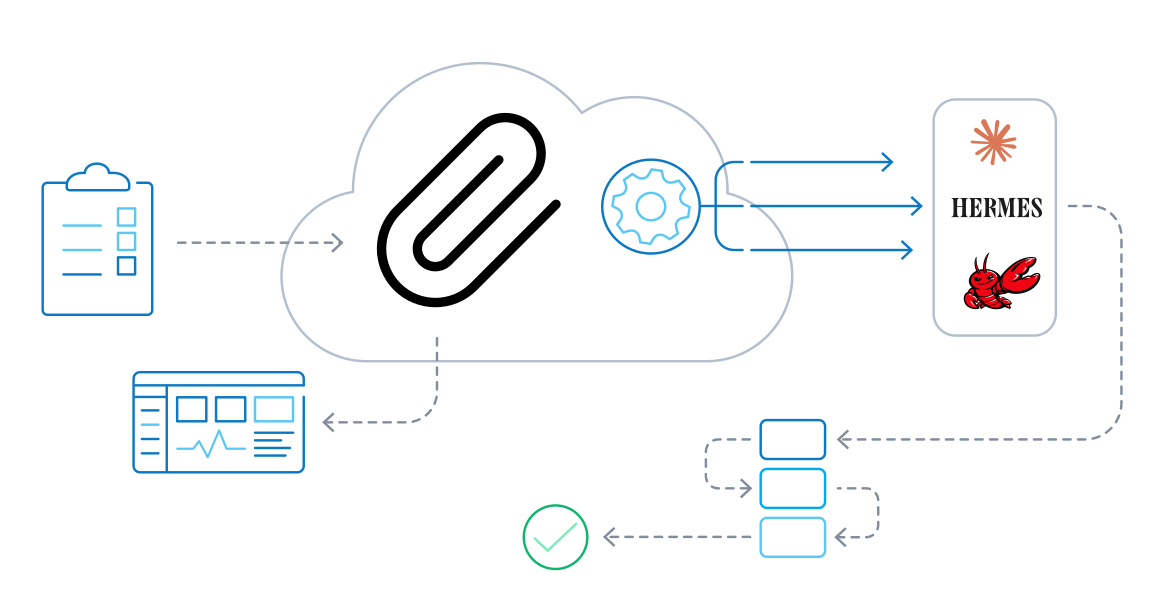
- A control plane, not an agent and not a model. In Contabo’s words, Paperclip “coordinates agents through adapters to runtimes like Claude Code, OpenClaw, and Hermes, rather than acting as the runtime itself.” Paperclip’s own README calls it “a Node.js server and React UI that orchestrates a team of AI agents to run a business.”
- What it does. Per its README and docs: org charts with roles and reporting lines, goals linked to tasks, “heartbeats” that wake agents for assigned work or on a schedule, approval stages, and company, agent and project budgets with alerts and automatic pauses. Its motto: “If it can receive a heartbeat, it’s hired.”
- Which agents. Paperclip lists OpenClaw, Claude Code, Codex, Cursor, Gemini CLI, OpenCode, Pi, Hermes, Grok Build and Kimi Code, plus generic process and HTTP webhook adapters.
- Free software, no account. “Open source. Self-hosted. No Paperclip account required. MIT licensed.” (Copyright Paperclip AI.)
- The 1-click app is €0. Contabo’s price data lists “Paperclip Server” at €0 on Cloud VPS 6, 8 and 12. Contabo supports the VPS and the initial setup of the add-on; for Paperclip configuration and use, its help article sends you to Paperclip’s documentation.
Which Contabo plan for Paperclip?
Contabo’s Paperclip page shows three Cloud VPS plans. Prices are in EUR before VAT. The monthly-term price is what you pay on a 1-month contract; the 24-month rate is the effective monthly price Contabo shows “for the first 24 months” of a 24-month subscription.
Plan: Cloud VPS 6
- Resources: 6 vCPU, 12 GB RAM, 200 GB SSD or 100 GB NVMe
- Port speed: 300 Mbit/s
- Monthly term: €7.50/mo
- 24-month rate: €6.00/mo
- Contabo’s label: Paperclip Power User
- Contabo suggests it for: always-on automation, recurring tasks, heavier day-to-day agent activity
Plan: Cloud VPS 8
- Resources: 8 vCPU, 24 GB RAM, 300 GB SSD or 150 GB NVMe
- Port speed: 600 Mbit/s
- Monthly term: €14.00/mo
- 24-month rate: €11.20/mo
- Contabo’s label: Paperclip Team Use
- Contabo suggests it for: shared dashboards and multi-agent work for a small team
Plan: Cloud VPS 12
- Resources: 12 vCPU, 48 GB RAM, 400 GB SSD or 200 GB NVMe
- Port speed: 800 Mbit/s
- Monthly term: €25.00/mo
- 24-month rate: €20.00/mo
- Contabo’s label: Paperclip Enterprise
- Contabo suggests it for: larger-scale orchestration with more parallel work
Why there is no cheaper plan on the page: in Contabo’s catalog data, the Paperclip Server add-on is offered on Cloud VPS 6, 8 and 12, but not on Cloud VPS 4 (€5.50/mo, 4 vCPU, 8 GB RAM). So €7.50 a month (€6.00 on 24 months) is the entry price for the 1-click route.
How much server does Paperclip need?
Less than the plans above, according to the sources themselves:
- Paperclip’s installation guide: “Any Linux VPS with 1 vCPU and 2 GB of RAM is enough to get started.”
- Contabo’s blog sizing table: 1 vCPU / 2 GB for local evaluation (1–3 agents), 2 vCPU / 4 GB for development or a small team (4–6 agents), 4 vCPU / 8 GB for production (8–12 agents), 8 vCPU / 16 GB for about 20 agents, 16 vCPU / 32 GB for 40+ agents.
- Contabo’s own Paperclip page: “The Paperclip control plane itself is lightweight, but your total resource requirement depends on which adapters you run and how many agents operate concurrently.”
Our take: the agents are what eat RAM and CPU. If your agents run on the same server (for example Claude Code or Codex launched by Paperclip as local processes), size for them; if they call hosted models or run elsewhere, Paperclip itself needs little. For one person trying Paperclip with a few agents, Cloud VPS 6 (6 vCPU / 12 GB) is already above the blog’s “production” row. Cloud VPS 8 makes sense for a small team or about 20 busy agents. None of these plans lists a GPU, and Contabo’s blog says Paperclip doesn’t need one: “Paperclip itself is an orchestration layer, not a model.”
Want to stay on Cloud VPS 4 instead? Paperclip’s docs support a manual install (Node.js 24.11 or newer, then npx paperclipai@latest onboard --yes) on any Linux VPS, so you can install it yourself on the €5.50 plan; you just don’t get the 1-click image. See our Contabo VPS price guide for that plan.
What you actually pay for the server
- Term: the minimum contract is 1 month. On Cloud VPS 6 a 24-month term brings €7.50 down to €6.00 a month, that is €144.00 over two years against €180.00 on monthly terms (our math).
- VAT: prices above exclude VAT. Contabo’s country list shows, for example, 19% for Germany, 20% for the UK and 21% for Romania.
- Auto Backup (optional): €3.35/mo on Cloud VPS 6, €5.00 on 8 and €6.70 on 12. Worth considering: in the 1-click setup the database, config and keys live on that one server.
- Location: the prices above are for the EU location. Other regions add a monthly surcharge: on Cloud VPS 6 from €1.60 (UK) to €4.00 (Japan); on Cloud VPS 8 from €3.25 to €8.00; on Cloud VPS 12 from €5.80 to €14.30.
- Traffic: incoming traffic is “Unlimited and unmetered”; outgoing is unlimited under a fair-usage policy.
See Contabo Cloud VPS plans for Paperclip
The bill the server price leaves out: your agents’ AI usage
Contabo’s page promises “no per-request fees” and “No per-seat charges, no per-request billing, no escalating costs as your workflows scale.” That is true for Contabo and for Paperclip itself. It is not true for the agents Paperclip runs. Paperclip’s own docs are blunt about it:
“AI providers charge for usage.” … “This isn’t a Paperclip fee; it’s a cost you pay directly to the AI provider.”
- Every heartbeat is a model call. Each time an agent wakes up, it sends its identity, tasks and instructions to a model provider, and that provider bills per token. Paperclip’s costs guide says a busy coding or writing agent “might process 100,000–500,000 tokens per month”, and a company has several agents.
- API key or subscription. Agents can run on API keys (pay per use) or, for Claude Code and Codex, on a subscription sign-in; Paperclip’s Costs view counts runs as “api” or “subscription”. For subscription sign-in on the server, the README says you also need Python 3 and the provider’s CLI on the Paperclip host.
- Contabo’s own blog agrees: “The core Paperclip project is open source with no license fees; you pay only for infrastructure and LLM usage.”
Set a budget before the first run
Paperclip’s main safety net is its budget system. Per its docs, a monthly cap can be set for the whole company and per agent; Paperclip warns at 80% and, at 100%, hard-stops and pauses that scope. A per-agent cap is enforced on its own: “An agent at 100% pauses even if the company still has headroom.” Budgets are entered in cents (the docs’ example, 10000, is 100 US dollars a month). In the UI they live under Audit > Budgets, where a hard stop shows Raise budget & resume or Keep paused.
Two caveats from the same sources: the README notes that “Enforcement uses recorded spend; usage reporting and in-flight work can delay a stop”, and Paperclip “does not push outbound webhooks today”, so you won’t get a Slack or email ping by default. Our suggestion: also set a spending limit in each AI provider’s own console, so there is a hard cap even if Paperclip’s stop comes late.
How to install Paperclip on Contabo (1-click)
New server: pick Cloud VPS 6, 8 or 12 and choose “Paperclip Server” as the application in the configurator. The Get Started buttons on Contabo’s page open the plan configurator without preselecting Paperclip, so check it yourself. The initial password for the 1-click app is the one you set during the order.
Existing server (this wipes it, back up first): per Contabo’s help article, Customer Control Panel > Servers & Hosting > VPS/VDS > Quick Action (⋮) > Reinstall > Application Installation tab > Paperclip, enter an admin password (you need it for SSH), then Install. “The installation may take several minutes.”
First start: SSH, switch user, onboard
“Paperclip runs securely on the server and does not expose a public web interface by default.” You finish the setup over SSH (if you use the Contabo Firewall, keep port 22 open):
ssh root@<your-server-ip>
# Paperclip is installed for a dedicated user:
su - application_user
# first run: checks, then starts the server
paperclipai onboard --yes
Don’t skip the su - application_user step: Contabo warns that running Paperclip commands as root “will result in “command not found””. That matches Paperclip’s own rule not to run onboarding from a root shell, because the embedded PostgreSQL “refuses to run as an administrative user”. If you reinstalled the server and SSH complains that the host identification changed, run ssh-keygen -R <your-server-ip> on your computer and reconnect.
Open the dashboard through an SSH tunnel
Paperclip listens on http://localhost:3100 on the server. From your own computer, open a tunnel and then browse to the same address locally:
ssh -N -L 3100:localhost:3100 root@<your-server-ip>
# then open http://localhost:3100 in your browser
Then create your company, add the adapters you will use, assign agent roles and set budgets. After a reconnect, start Paperclip again with su - application_user and paperclipai run; Contabo notes it “may not display output and will keep running in the terminal. This is expected behavior.” To keep it running after you log out, Paperclip’s CLI can install it as a background service (check it with paperclipai service status).
Safe settings
- Keep it private. The 1-click quickstart (
onboard --yes) uses loopback-only defaults, which is why you need the SSH tunnel. For remote access without a tunnel, Paperclip’s README recommends “authenticated mode with a private-network bind such as Tailscale” (--bind tailnet) rather than opening port 3100 to the internet. - SSH. Our suggestion: add an SSH key, turn off password logins, and keep only port 22 open in the Contabo Firewall.
- Database and backups. The quickstart runs an embedded PostgreSQL under
~/.paperclip. Paperclip’s deployment guide says “Embedded Postgres is for local only”, and Contabo’s blog recommends a dedicated PostgreSQL 17+ for production. For a private single-server setup, at least turn on Auto Backup or your own backups of that folder; Paperclip’s docs also describe company exports for recovery. - Keys. Provider API keys you add give agents spending power. Use separate keys for Paperclip with their own limits.
Order a Contabo Cloud VPS with the free Paperclip app
Where the official sources don’t add up
- “No per-request fees”: true for the server and for Paperclip, but the agents it coordinates usually call paid AI providers per token (Paperclip’s own costs guide).
- Sizing: Paperclip’s docs say 1 vCPU / 2 GB is enough to start and Contabo’s blog rates 4 vCPU / 8 GB as “production”, yet the 1-click app starts at Cloud VPS 6 (6 vCPU / 12 GB) and isn’t offered on Cloud VPS 4.
- “Sweet spot” plan: Contabo’s blog calls an “8 vCPU / 16 GB RAM / 200 GB NVMe Cloud VPS” the sweet spot for about 20 agents, but the Paperclip page’s 8-core plan, Cloud VPS 8, has 24 GB RAM and 300 GB SSD or 150 GB NVMe. The blog also says its table is “the same reference table maintained in the Paperclip installation docs”; the Paperclip installation page we checked gives only the 1 vCPU / 2 GB starting point.
- Budget promise: the costs guide says “an agent won’t spend a cent beyond what you allow”, while the README says reporting and in-flight work “can delay a stop”.
- Price footnote: the plan cards show the 24-month rate “for the first 24 months”, before VAT. The footnote says the displayed price is “the effective monthly rate for a 12-month subscription including applicable taxes”. Contabo’s price data matches the cards, so that is what we list.
- Menu mix-up: Contabo’s site menu describes “Paperclip AI Hosting” as “Deploy and manage your own apps”, which fits a deploy platform better than an agent orchestrator.
Agents Paperclip can coordinate, also free 1-click apps on Contabo: Hermes Agent on Contabo and OpenClaw on Contabo. For workflow automation without agents, see n8n on a Contabo VPS. Or start from Contabo’s homepage.
FAQ
Is Paperclip on Contabo free?
The software is: Paperclip is MIT-licensed and needs no Paperclip account, and Contabo lists the Paperclip Server app at €0. You pay for the VPS and for the AI usage of the agents you connect (API keys or subscriptions with the providers).
What is the cheapest Contabo plan with the 1-click Paperclip app?
Cloud VPS 6 (6 vCPU, 12 GB RAM, 200 GB SSD or 100 GB NVMe, 300 Mbit/s port): €7.50 per month on a monthly term or €6.00 per month on a 24-month term, before VAT. Contabo labels it “Paperclip Power User”. Cloud VPS 4 doesn’t offer the add-on, but you can install Paperclip on it manually.
Does Paperclip need a GPU?
No. Paperclip coordinates agents; the models run at your AI providers or wherever your adapters point. Contabo’s blog only suggests a separate GPU machine if you want to host model weights yourself.
How do I open the Paperclip dashboard on Contabo?
Paperclip listens on localhost:3100 on the server. Run ssh -N -L 3100:localhost:3100 root@<your-server-ip> on your computer and open http://localhost:3100.
Why do I get “command not found” for paperclipai?
You are probably root. On Contabo’s 1-click image Paperclip is installed for application_user: run su - application_user first.
How do I stop Paperclip agents from running up a big bill?
Set a monthly company budget and per-agent budgets in Paperclip (warning at 80%, hard stop at 100% by default), and set spending limits with each AI provider as a second cap.
Does Contabo support Paperclip?
Contabo supports the VPS (network, hardware) and the initial setup of the 1-click add-on. For configuring and using Paperclip, Contabo points you to Paperclip’s documentation.
Sources
All checked on October 21, 2026 (Europe/Bucharest).
- Contabo – Paperclip AI VPS Hosting: https://contabo.com/en/paperclip-ai-vps-hosting/
- Contabo – Cloud VPS: https://contabo.com/en/vps/
- Contabo Help Center – What is Paperclip AI and how do I use it on Contabo?: https://help.contabo.com/en/support/solutions/articles/103000399542
- Contabo blog – How to Self-Host Paperclip on a Contabo VPS in 2026 (last updated October 8, 2026): https://contabo.com/blog/how-to-self-host-paperclip-on-contabo-vps/
- Paperclip on GitHub (README, MIT licence): https://github.com/paperclipai/paperclip
- Paperclip – Installation: https://docs.paperclip.ing/guides/getting-started/installation/
- Paperclip – CLI installation (onboard, run): https://docs.paperclip.ing/reference/cli/installation/
- Paperclip – Costs and Budgets: https://docs.paperclip.ing/guides/day-to-day/costs/
- Paperclip – Set a monthly budget: https://docs.paperclip.ing/how-to/set-monthly-budget/
- Paperclip – Deploy to a VPS or Fly.io: https://docs.paperclip.ing/how-to/deploy-to-vps-or-fly/
