
Affiliate disclosure: this post contains an affiliate link to ElevenLabs (via PartnerStack). If you subscribe through it, SiftGuide may earn a commission at no extra cost to you; it does not change your price. Every step, limit and price below comes from ElevenLabs’ official documentation and pricing page, checked on October 18, 2026. Prices are in US dollars and exclude taxes. The words-per-plan figures are our own rough arithmetic, and we have not produced a full audiobook with it ourselves.
ElevenLabs has a dedicated Audiobooks workflow inside its Studio editor: you upload an EPUB or PDF, pick one narrator or a full cast of character voices, fix the pronunciation of names, and it generates the narration chapter by chapter. You can then export MP3 or WAV files, or publish straight to ElevenReader, Spotify and other partners. This guide walks through each step, works out roughly how much of a book each plan covers, and lists the rules for Spotify and ElevenReader.
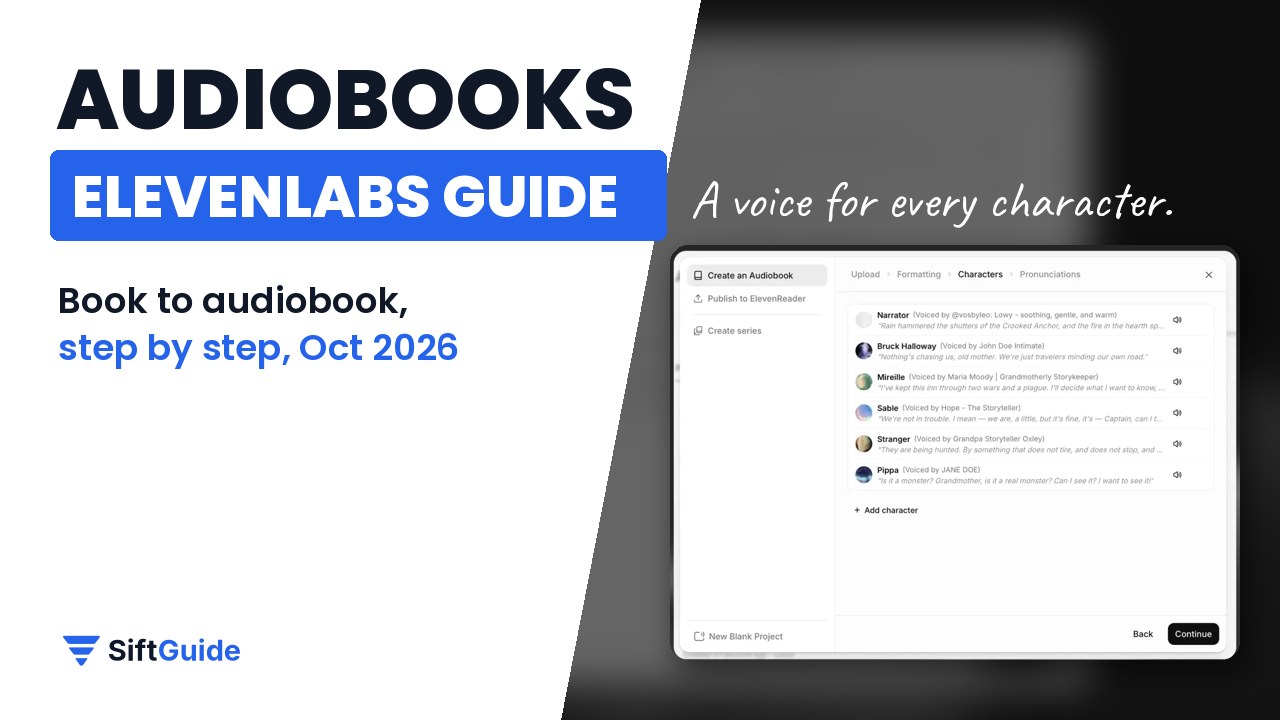
ElevenLabs Audiobooks at a glance
Question: Which plans include it?
- Answer from ElevenLabs’ docs: Studio, where Audiobooks lives, is on every plan including Free. The Commercial License starts on Starter, so plan on a paid plan for a book you sell.
Question: What can I upload?
- Answer from ElevenLabs’ docs: EPUB or PDF in the Audiobooks flow. A regular Studio project also takes DOCX, TXT, HTML or a URL.
Question: Narration style
- Answer from ElevenLabs’ docs: Single cast (one narrator) or Multi cast (a narrator plus a voice for each detected character, up to 150 detected voices per book).
Question: Recommended model
- Answer from ElevenLabs’ docs: Eleven Multilingual v2 (the default; 29 languages). Eleven v4 is ElevenLabs’ newest model.
Question: Credits
- Answer from ElevenLabs’ docs: 1 credit per character on Multilingual v2. Playing back audio you already generated is free.
Question: Export
- Answer from ElevenLabs’ docs: MP3 or WAV, as one file or a ZIP per chapter, plus AAF timeline data and subtitles.
Question: Publishing
- Answer from ElevenLabs’ docs: ElevenReader, and partner platforms such as Spotify and InAudio.
Try ElevenLabs Audiobooks (free plan available)
How to make an audiobook with ElevenLabs, step by step
1. Upload your manuscript and pick the basics
Open Audiobooks and select Create an Audiobook. Drop in your EPUB or PDF, then choose the narration style and the model. ElevenLabs recommends Eleven Multilingual v2 for long-form audiobooks; it supports 29 languages. Select Continue and the file is parsed for metadata, chapters and formatting.
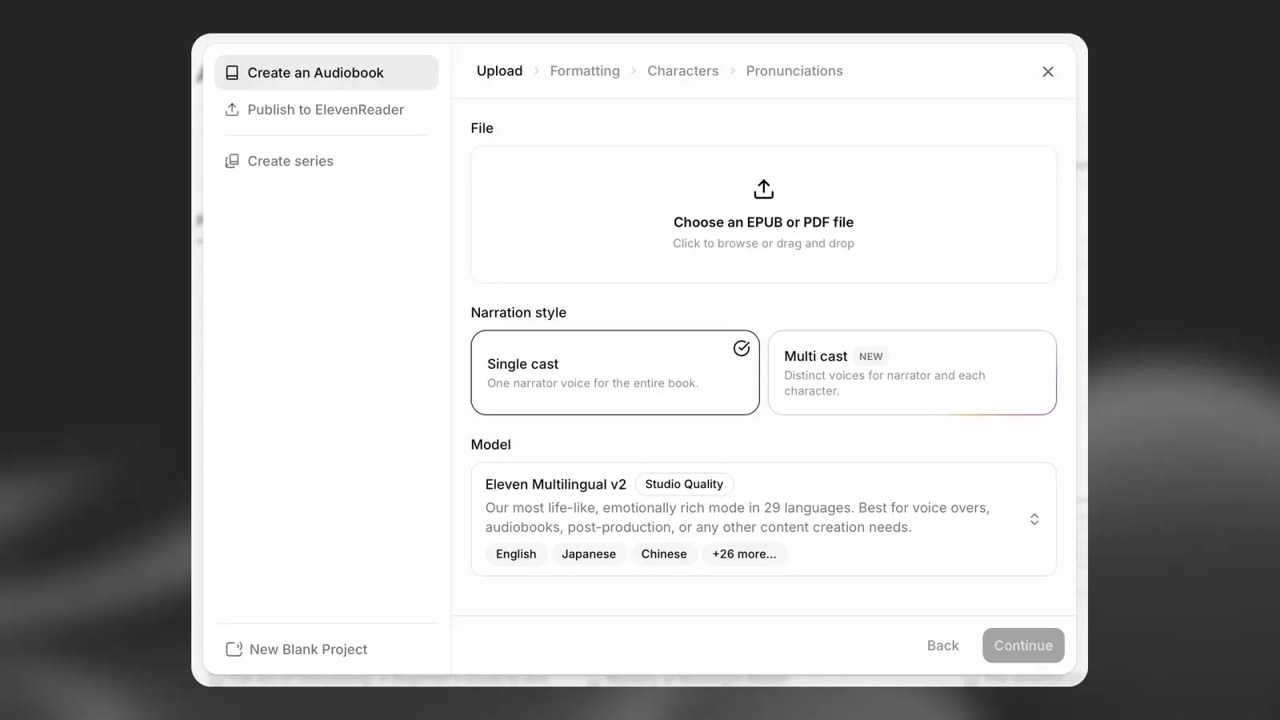
Tip for EPUBs: ElevenLabs calls EPUB the best format. Format every chapter heading as Heading 1 and each chapter becomes its own chapter in the editor automatically.
2. Check the formatting
On the Formatting screen you can keep, replace or remove the cover it pulled from your file, and tick or untick the sections it found (copyright notice, dedication, prologue, chapters, epilogue). ElevenLabs warns that it may not detect sections exactly as you intended, so check this carefully: anything ticked here gets narrated.
3. Cast the voices
With Single cast you choose one narrator. With Multi cast, Character Casting scans the book, proposes a voice for every character it thinks speaks, and lets you preview each one on real dialogue from your book. ElevenLabs says to treat the detection as a starting point: minor, unnamed or hard-to-separate speakers can be missed, so read through the list and add or change voices. You can search the Voice Library (over 10,000 voices) by language, accent, category, gender and age, or use a clone of your own voice. Note that previewing a voice with custom audio uses credits.
4. Fix pronunciations
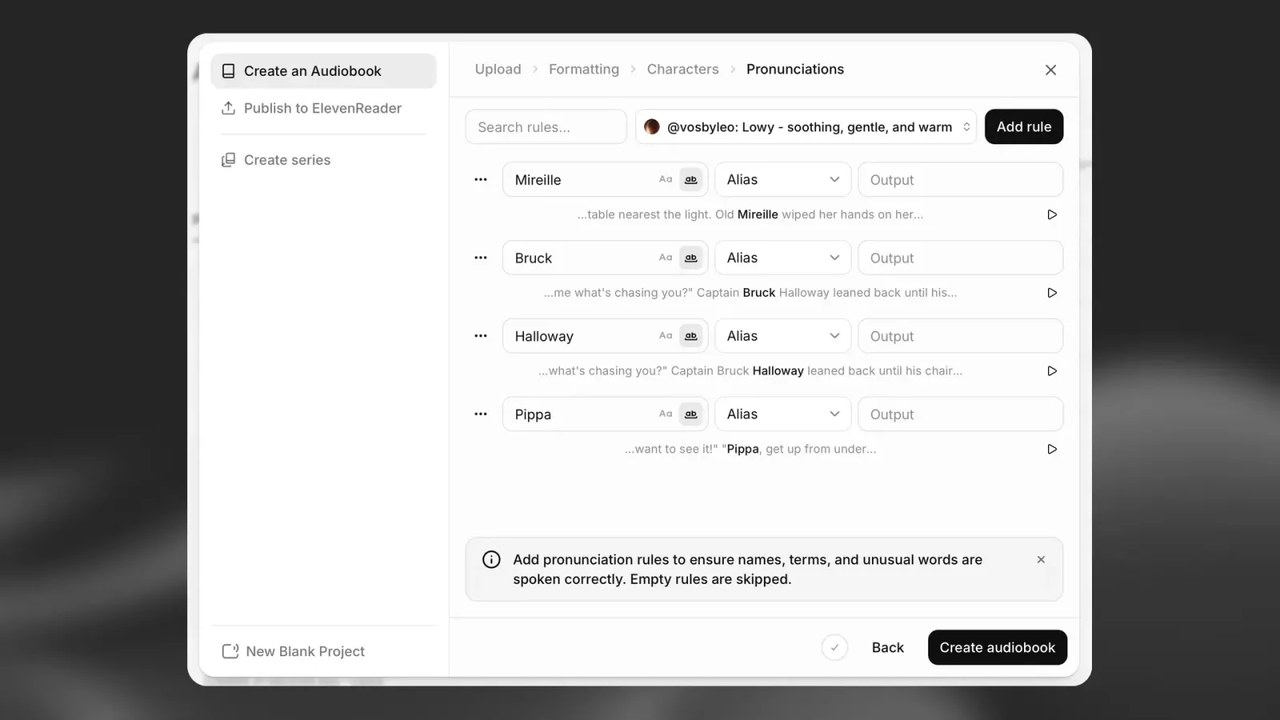
The Pronunciations step lists names, places and invented words it thinks need help. For each one, add a rule such as an Alias (a spelling that sounds right) and press Play to hear the sentence from your book where the word appears. Empty rules are skipped. Phonetic (phoneme) rules only work on English models such as Flash v2, so on Multilingual v2 stick to aliases.
5. Create, listen and fix
Select Create audiobook. In the editor, narration is generated paragraph by paragraph inside each chapter; a dark bar beside a paragraph means it has audio, a light grey bar means it doesn’t yet. You can edit the text, override voice settings for one paragraph, add music or sound effects as extra tracks on the timeline, or use Actor Mode to record your own reading as a guide for the delivery.
Listen to the whole thing before you publish. ElevenLabs itself says editorial and quality checks are essential, and the cheapest fixes are the early ones: changing a voice or model after generating doesn’t update the old audio, so those paragraphs have to be regenerated (and paid for) again.
How much of a book does each plan cover?
On Eleven Multilingual v2, one character of text costs one credit, and all ElevenLabs tools share the same monthly credit pool. To turn credits into words we use a rule of thumb of about 6 characters per English word, counting the space. That gives a rough ceiling if you spend the whole month on narration:
Plan: Free
- Price per month: US$0
- Credits per month: 10,000
- Rough words narrated: About 1,666 words (no Commercial License)
Plan: Starter
- Price per month: US$6
- Credits per month: 30,000
- Rough words narrated: About 5,000 words
Plan: Creator
- Price per month: US$22
- Credits per month: 121,000
- Rough words narrated: About 20,000 words
Plan: Pro
- Price per month: US$99
- Credits per month: 600,000
- Rough words narrated: About 100,000 words
So a 70,000-word novel is roughly 420,000 characters. That fits inside one month of Pro. On Creator it doesn’t fit even with rollover: unused credits roll over for up to two months, but your balance tops out at 3 times the monthly quota (363,000 credits on Creator), and rollover doesn’t apply to the Free plan. Leave room for re-takes too. Studio gives up to two free regenerations of a selection only if you haven’t changed its text, voice or voice settings; after that, regenerating costs credits again. This is our arithmetic, not an ElevenLabs quote; other models can cost a different number of credits per character, so check the cost the app shows. Annual billing works out to $5 a month for Starter, $18.33 for Creator and $82.50 for Pro. Prices exclude taxes. More on the plans in our ElevenLabs pricing guide.
See ElevenLabs plans and credits
Studio limits worth knowing
- Project size: up to 500 chapters per project, 400 paragraphs per chapter and 5,000 characters per paragraph.
- Number of projects: the pricing page lists 3 Studio projects on Free and 20 on Starter (an older help-center article says 5 on Free); the help center lists 1,000 on Creator and 3,000 on Pro.
- If you downgrade or cancel: ElevenLabs says it doesn’t delete your projects, but you can no longer generate with your Instant or Professional Voice Clones, and you can’t create new projects above your plan’s limit.
- Output quality depends on your plan and project settings and doesn’t change the credit cost. To see the exact bitrate and sample rate, open Publish, then the Export tab, and hover over Audio format.
Exporting your audiobook
Click Publish in the top right and open the Export tab. You can export the full project or single chapters, as audio, AAF timeline data (for a video or audio editor) or subtitles, in MP3 or WAV, either as one file or a ZIP with one file per chapter. Any paragraph you haven’t generated yet is generated during export, which uses credits, so export one chapter first if you want to check the cost.
Publishing to Spotify
- In your finished project, go to Export > Publish > Spotify and click Continue.
- Choose which chapter Spotify uses for the free preview (its first 5 minutes).
- Check the narrator names for the credits; by default each voice is listed as “Digital Voice” plus the voice name.
- Click Export to get the book as MP3, then sign in to Spotify for Authors, choose New Audiobook and upload the files.
If the book uses an Instant Voice Clone, ElevenLabs asks you to verify that voice before the export. Spotify marks every digitally narrated title: “This audiobook is narrated by a digital voice.” is added to the start of the description.
Publishing to ElevenReader, and what it pays
ElevenReader is ElevenLabs’ own listening app. Publishing there costs nothing. You set up an author profile, add the title, subtitle and cover, choose distribution details, accept the agreements and set up payouts, then the book is reviewed before it appears in the app. You can also group books into a series from your Bookshelf.
- Direct sales: 60% of the revenue collected after store fees. ElevenLabs says app-store fees are typically 30% of an in-app purchase and web purchases carry about a 3% Stripe fee; tax may be withheld depending on where you live.
- Ultra subscription listening: US$0.20 per hour of verified listening, capped at US$2.50 per book. You can combine the two: in the subscription for Ultra listeners, for sale to everyone else.
- Languages: during the beta, ElevenReader Publishing only accepts books in English, Spanish, Portuguese, Polish, German or French.
- No guarantee: ElevenLabs is clear that taking part doesn’t guarantee any earnings.
There’s also a no-production option: upload just the text to ElevenReader Publishing and listeners pick an AI voice on demand. That skips the editing (and the credits) but gives you no control over the voice. Audiobooks offers a similar dynamic narration mode where listeners choose the voice, but music, sound effects and external audio aren’t played in that mode.
Narrate it in your own voice
Want the book in your own voice rather than a library voice? See our guide to cloning your voice with ElevenLabs (Instant cloning is on Starter, Professional cloning starts on Creator). To turn a video into other languages instead, see our ElevenLabs Dubbing guide.
Want to publish the manuscript to ElevenReader for free (on-demand AI narration, no Studio credits)? See our separate guide to ElevenReader Publishing (60% after store fees on direct sales, Ultra listening at US$0.20/hour capped at US$2.50 per book).
FAQ
Can I make an audiobook with ElevenLabs for free?
You can try it: Studio is on the Free plan with 10,000 credits a month, roughly 1,700 words of narration by our estimate. The Free plan has no Commercial License, though, so for a book you plan to sell you need at least Starter (US$6 a month before taxes).
Which file formats does ElevenLabs Audiobooks accept?
EPUB and PDF in the Audiobooks flow; Studio projects also take DOCX, TXT, HTML and URLs. EPUB with chapter titles as Heading 1 gives the cleanest chapter split.
Can each character have a different voice?
Yes. Choose Multi cast and Character Casting proposes a voice for each detected character (up to 150 per book). Change a character’s voice later and every line they speak updates across the book, after regenerating.
Can I publish an ElevenLabs audiobook on Spotify?
Yes. Export from Studio via Export, Publish, Spotify to get MP3 files, then upload them in Spotify for Authors. Spotify labels it as narrated by a digital voice.
How much does ElevenReader pay authors?
60% of the revenue from direct sales after store fees, or US$0.20 per verified listening hour from Ultra subscribers, capped at US$2.50 per book. Earnings aren’t guaranteed.
Do I have to generate every chapter before exporting?
No. Anything not generated yet is generated during export, which uses credits.
Sources
All checked on October 18, 2026.
