
Affiliate disclosure: this post contains an affiliate link to ElevenLabs (via PartnerStack). If you subscribe through it, SiftGuide may earn a commission at no extra cost to you. Every price, limit and right below comes from ElevenLabs’ own pricing page, Terms of Service and docs, checked on October 23, 2026. Prices are in US dollars and exclude taxes.
Short answer: ElevenLabs Image & Video is the image and video generator inside ElevenLabs (models such as Google Veo 3.1, Kling, Seedance, Runway, GPT Image, Nano Banana and FLUX, plus upscaling and lip-sync). It runs on the same shared credits as everything else. Free gives you images only (up to 40 a month, 3 requests a day, personal use with attribution). Video starts at Starter (US$6): up to 198 images or up to 211 seconds of video a month, but still at 720p and not watermark-free. Watermark-free export and all models start at Creator (US$22), 4K at Pro (US$99), which is also the minimum for the API. Those monthly numbers assume the cheapest model; ElevenLabs says images cost 250 to 2,650 credits each and video 234 to 5,000 credits per second, and it does not publish a price list per model. The app shows the exact cost before you click Generate.
Image & Video by plan at a glance
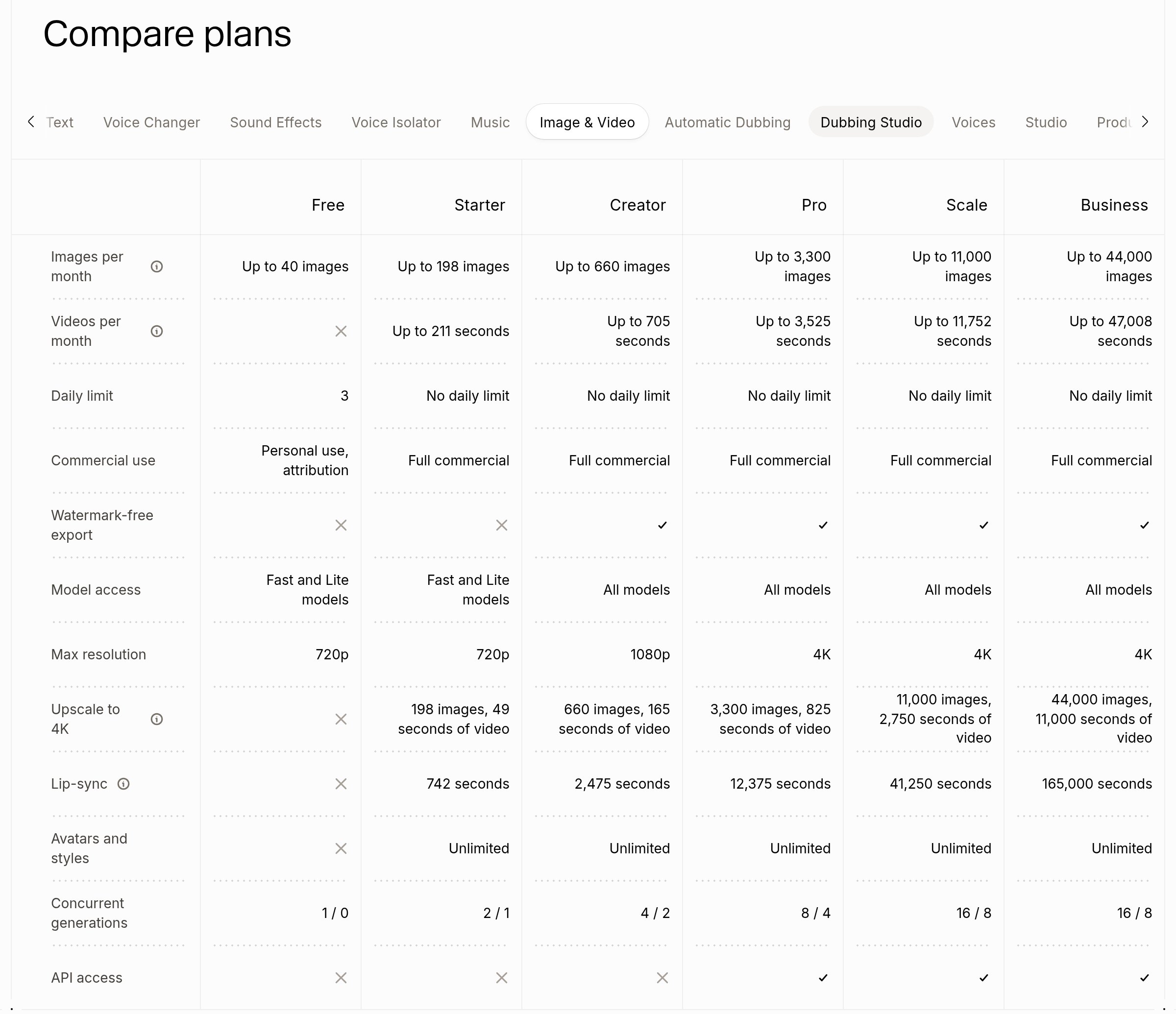
This is the Image & Video tab of ElevenLabs’ “Compare plans” table on elevenlabs.io/pricing (rendered October 23, 2026). Text values are copied from the page; the yes/no cells are tick and cross icons, read from the screenshot below.
Plan: Free
- Price a month: US$0
- Credits a month: 10,000
- Images a month: Up to 40
- Video a month: No
- Daily limit: 3
- Commercial use: Personal use, attribution
- Watermark-free: No
- Models: Fast and Lite
- Max resolution: 720p
- API: No
- Upscale to 4K (included): No
- Lip-sync (included): No
- Avatars and styles: No
- Concurrent generations: 1 / 0
Plan: Starter
- Price a month: US$6
- Credits a month: 30,000
- Images a month: Up to 198
- Video a month: Up to 211 s
- Daily limit: None
- Commercial use: Full commercial
- Watermark-free: No
- Models: Fast and Lite
- Max resolution: 720p
- API: No
- Upscale to 4K (included): 198 images, 49 s of video
- Lip-sync (included): 742 s
- Avatars and styles: Unlimited
- Concurrent generations: 2 / 1
Plan: Creator
- Price a month: US$22 (US$11 the first month)
- Credits a month: 121,000
- Images a month: Up to 660
- Video a month: Up to 705 s
- Daily limit: None
- Commercial use: Full commercial
- Watermark-free: Yes
- Models: All models
- Max resolution: 1080p
- API: No
- Upscale to 4K (included): 660 images, 165 s of video
- Lip-sync (included): 2,475 s
- Avatars and styles: Unlimited
- Concurrent generations: 4 / 2
Plan: Pro
- Price a month: US$99
- Credits a month: 600,000
- Images a month: Up to 3,300
- Video a month: Up to 3,525 s
- Daily limit: None
- Commercial use: Full commercial
- Watermark-free: Yes
- Models: All models
- Max resolution: 4K
- API: Yes
- Upscale to 4K (included): 3,300 images, 825 s of video
- Lip-sync (included): 12,375 s
- Avatars and styles: Unlimited
- Concurrent generations: 8 / 4
Plan: Scale
- Price a month: US$299
- Credits a month: 1,800,000
- Images a month: Up to 11,000
- Video a month: Up to 11,752 s
- Daily limit: None
- Commercial use: Full commercial
- Watermark-free: Yes
- Models: All models
- Max resolution: 4K
- API: Yes
- Upscale to 4K (included): 11,000 images, 2,750 s of video
- Lip-sync (included): 41,250 s
- Avatars and styles: Unlimited
- Concurrent generations: 16 / 8
Plan: Business
- Price a month: US$990
- Credits a month: 6,000,000
- Images a month: Up to 44,000
- Video a month: Up to 47,008 s
- Daily limit: None
- Commercial use: Full commercial
- Watermark-free: Yes
- Models: All models
- Max resolution: 4K
- API: Yes
- Upscale to 4K (included): 44,000 images, 11,000 s of video
- Lip-sync (included): 165,000 s
- Avatars and styles: Unlimited
- Concurrent generations: 16 / 8
The table does not label the two numbers under “Concurrent generations”; on Free, where video is not available, it reads 1 / 0. Paying yearly works out to about US$5 a month for Starter, US$18.33 for Creator, US$82.50 for Pro, US$249.17 for Scale and US$825 for Business. When we checked, the Starter card also showed a promotion: “Until Nov 1”, first month “83% off” at US$1, then US$6. Unused credits on paid plans roll over for up to two months (up to 2× the monthly quota); on Free they do not.
See ElevenLabs plans (PartnerStack referral)
How many credits an image or a second of video really costs
The tooltips on the pricing table explain where the monthly numbers come from: images are “calculated using the lowest cost image model. Images cost between 250-2,650 credits per image”, and video seconds are “calculated using the lowest cost video model. Videos cost between 234-5,000 credits per second.” Upscaling “starts from 250 credits per image” and 1,000 credits per second of video; lip-sync “starts from 67 credits per second”. ElevenLabs does not publish a per-model credit list: every model in the docs says “Varies based on selected settings”, the pricing FAQ that lists credit costs for other tools has no line for Image & Video, and the API pricing page has no Image & Video entry. What it does promise is that “Before you submit your generation, you will be shown the cost based on the model and settings you’ve chosen.” Settings that move the price are the model, resolution, duration and the number of variations.
What that means in practice (our arithmetic, from the official ranges and the plan credits):
- Best case vs worst case for images. Starter’s 30,000 credits are “up to 198” images on the cheapest model, but at the top of the range (2,650 credits) they buy about 11 images. Creator: 660 vs about 45. Pro: 3,300 vs about 226.
- Best case vs worst case for video. Starter’s “up to 211 seconds” drops to about 6 seconds at 5,000 credits per second. Creator: 705 s vs about 24 s. Pro: 3,525 s vs 120 s.
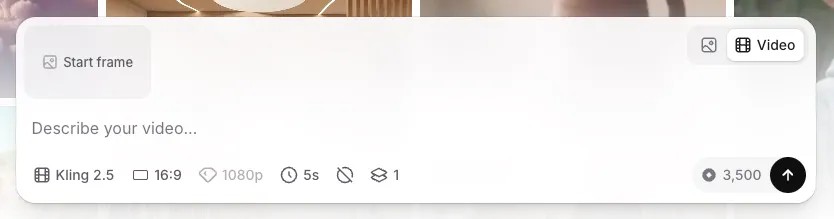
- The docs example above (a 5-second 1080p Kling 2.5 clip at 3,500 credits) works out to 700 credits per second, so Starter’s 30,000 credits would cover about 8 such clips a month and Creator’s 121,000 about 34, if you spent them on nothing else. Prices in that screenshot may have changed; check the cost chip in your own account.
- Price per image at the cheapest rate is about US$0.03 on Starter (US$6 / 198), US$0.033 on Creator and US$0.03 on Pro. At the top of the range it is about US$0.55 per image on Starter (US$6 / 11).
- Credits are shared. The pricing FAQ says “All products draw from one shared monthly credit pool”, so every image or second of video leaves fewer credits for voiceovers, music or dubbing.
Where ElevenLabs’ own numbers do not add up (as of October 23, 2026):
- Allowances above the stated minimum price. For Free, 10,000 credits ÷ 250 = 40 images, exactly the table. For paid plans the table is more generous than the tooltip’s own minimum would allow: Starter 30,000 ÷ 250 = 120 images, but the table says 198; 30,000 ÷ 234 ≈ 128 seconds of video, but the table says 211; lip-sync 30,000 ÷ 67 ≈ 448 s vs 742 s; video upscaling 30,000 ÷ 1,000 = 30 s vs 49 s. The gap is about 1.65× on Starter, 1.36× on Creator, 1.38× on Pro, 1.53× on Scale and 1.83× on Business. The page does not explain it (it could be a discounted rate on paid plans), so treat the table numbers as “up to”, as ElevenLabs labels them.
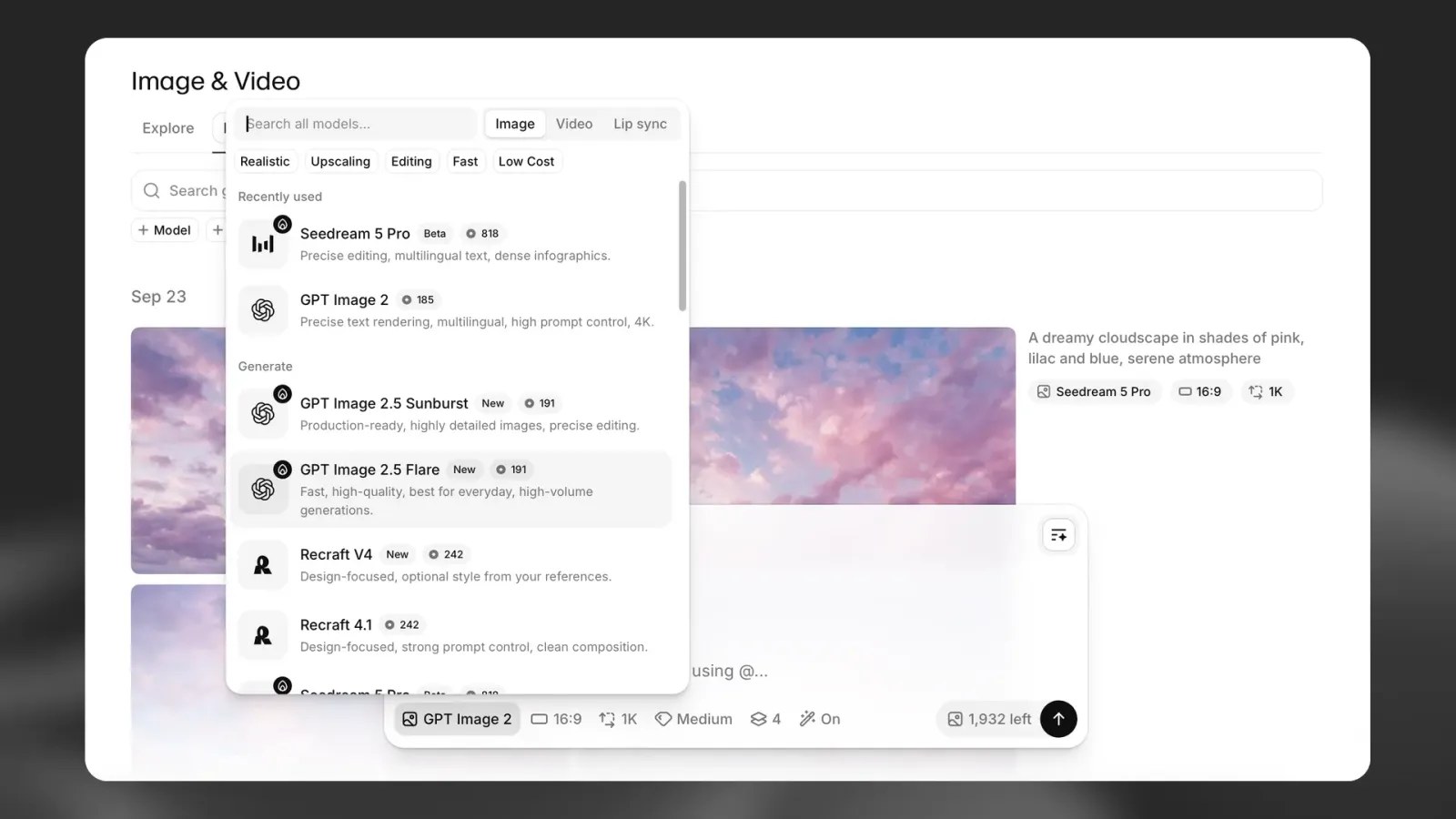
- Model prices in the docs screenshot. The model picker screenshot in the official guide shows image models at 185 to 818 credits (for example GPT Image 2 at 185), below the 250-credit minimum in the pricing tooltip. The screenshot may be older than the tooltip.
- “Full commercial” but watermarked. Starter is marked “Full commercial”, yet its “Watermark-free export” cell is a cross; the first plan with a tick is Creator.
- 4K. The /image-video page promises “Export videos up to 4K resolution with upscaling”; the plan table caps Free and Starter at 720p and Creator at 1080p. Starter and Creator do include an “Upscale to 4K” allowance (49 s and 165 s of video), so on those plans 4K is the upscaler, not native output.
- Free and commercial use. Free is “Personal use, attribution”; the Terms of Service say Free Users “may only use the Services for non-commercial purposes”.
Free plan, US restrictions and other limits
- Free = images only, three a day. The docs: “Free plan users can only generate images and are limited to three image requests per day. Video generation requires a paid plan.” The table caps Free at up to 40 images a month, so credits run out before the daily limit would.
- Not every model is available in the United States. ElevenLabs warns that “Some Image & Video models and input upload capabilities are restricted in the United States”. In the docs model list we counted 73 models (39 video, 23 image, 8 lip-sync, 3 utility); 30 of them carry a “not available in the United States” note, including every Seedance, Kling, MiniMax and Wan video model (and the Kling 2.5 used in the cost example above). Google Veo 3.1, Runway, LTX, GPT Image, Nano Banana and FLUX are not flagged.
- Model access by plan. Free and Starter get “Fast and Lite models”; Creator and up get “All models”. The pricing page does not list which models count as Fast and Lite.
- Deprecations. Seedance 1.5 Pro is marked deprecated; “ByteDance retires the model on November 11, 2026”.
- Avatars are “available on all paid plans”, with API access “Not available at launch; planned for future release”.
- Output formats: PNG for images, MP4 (H.264 or H.265, up to 4K with upscaling) for video.
- Grants: members of the ElevenLabs Grants program can use up to 1,000,000 grant credits on Image & Video and Flows.
Can you use the images and videos commercially?
On any paid plan. The compare table marks Free as “Personal use, attribution” and every paid plan as “Full commercial”, and the Terms of Service say Paid Users “may use the Services for commercial purposes”. If the video is for a client or an ad, remember the watermark: Starter is commercial but not watermark-free, so Creator (US$22) is the realistic minimum for clean, commercial output.
How to use ElevenLabs Image & Video
- Open Image & Video in the ElevenLabs app and use the toggle in the prompt box to choose Image or Video.
- Write a prompt, or drag a reference image (JPG, PNG, WEBP and more) into the reference slots.
- Pick a model and set aspect ratio, resolution, duration (video) and the number of variations. Check the credit cost next to the generate button.
- Generate, review the result in History, then Upscale, add LipSync with audio, or Recreate a new variation.
- Download the file or import it straight into an ElevenCreative Studio project.
Tips before you spend credits
- Start with one variation, short and low-res. Variations, resolution and duration all raise the cost, so test the prompt cheaply first and upscale only the keeper (our tip, based on how ElevenLabs says cost is calculated).
- Use the “Low Cost” filter in the model picker when you are still iterating.
- Failed generations are not charged, per the API guide, and the pricing FAQ says whether a regeneration is free “is indicated before generating”.
Try ElevenLabs Image & Video (PartnerStack referral)
For developers: the Image & Video API
Two endpoints: POST https://api.elevenlabs.io/v1/flows/image and POST https://api.elevenlabs.io/v1/flows/video. They are asynchronous: “The call returns as soon as the generation is queued”, and the result goes to your workspace webhooks, or you can “omit the field and poll instead”. The API “requires a Pro plan or above. Calls from a workspace below that tier are rejected with a 402 paid_plan_required error.” Pricing is the same credits as the app: “A generation costs the same through the API as it does in the ElevenLabs app”, and “Failed generations are not charged.” For API requests, ByteDance models “are disabled by default and require explicit approval before use”. Unlike voice tools, Image & Video has no US-dollar per-unit price on the API pricing page.
Building multi-step pipelines in the visual editor instead? ElevenLabs Flows “supports over 50 image and video models”, and each node “costs credits based on the model and settings used, identical to standalone tool pricing”.
Which plan to pick
If you want to: Try image generation for yourself (3 requests a day, up to 40 images a month)
- Pick: Free
If you want to: Test video models and make a few short clips, watermark and 720p are fine
- Pick: Starter, US$6 a month
If you want to: Client or ad work: watermark-free, all models, 1080p
- Pick: Creator, US$22 a month (US$11 the first month)
If you want to: Native 4K, heavy video use, or the API
- Pick: Pro, US$99 a month
If you want to: A team producing a lot of video
- Pick: Scale (3 seats) or Business (10 seats)
More from ElevenLabs on SiftGuide
For how credits work across every ElevenLabs tool, see the ElevenLabs pricing guide. Adding sound to your clips? See ElevenLabs Sound Effects pricing and the Eleven Music commercial-use guide. Need a voiceover for the video in another language? See how to dub a video with ElevenLabs.
FAQ
Is ElevenLabs Image & Video free?
Images only: the Free plan allows three image requests a day and up to 40 images a month, for personal use with attribution. Video needs a paid plan.
How much does an AI video cost on ElevenLabs?
Between 234 and 5,000 credits per second, depending on the model and settings. Starter (US$6, 30,000 credits) includes up to 211 seconds on the cheapest model; the exact cost is shown before you generate.
Does Starter remove the watermark?
No. In the compare table watermark-free export starts at Creator (US$22).
Can I export in 4K?
Native 4K starts at Pro. Starter (720p) and Creator (1080p) include a limited 4K upscale allowance; Free has none.
Which models are included?
Free and Starter get Fast and Lite models; Creator and above get all models. Some models are not available in the United States.
Is there an API?
Yes, POST /v1/flows/image and /v1/flows/video, on Pro or above, billed in the same credits as the app.
Sources
All checked on October 23, 2026:
- ElevenLabs pricing (plans, credits FAQ, Compare plans: Image & Video, tooltips)
- ElevenLabs Image to Video page and FAQ
- ElevenLabs API pricing
- ElevenLabs Terms of Service
- Image & Video (capability overview, models, formats)
- Image & Video (product guide)
- Image & Video API guide
- API reference: create image generation
- API reference: create video generation
- Avatars
- Help Center: how much does Image & Video cost?
- Help Center: how are credits charged in Flows?
