
Prices checked on the official Recoverit store pages on October 24, 2026 (US dollars selected, before local taxes; the store says “All prices subject to applicable local taxes”). Wondershare changes sale prices often, so the price on the checkout page is the one that counts. This post contains affiliate links: if you buy through them, SiftGuide may earn a commission at no extra cost to you. We have not lab-tested Recoverit; features and terms below come from the official store, free-version pages, FAQ and refund policy.
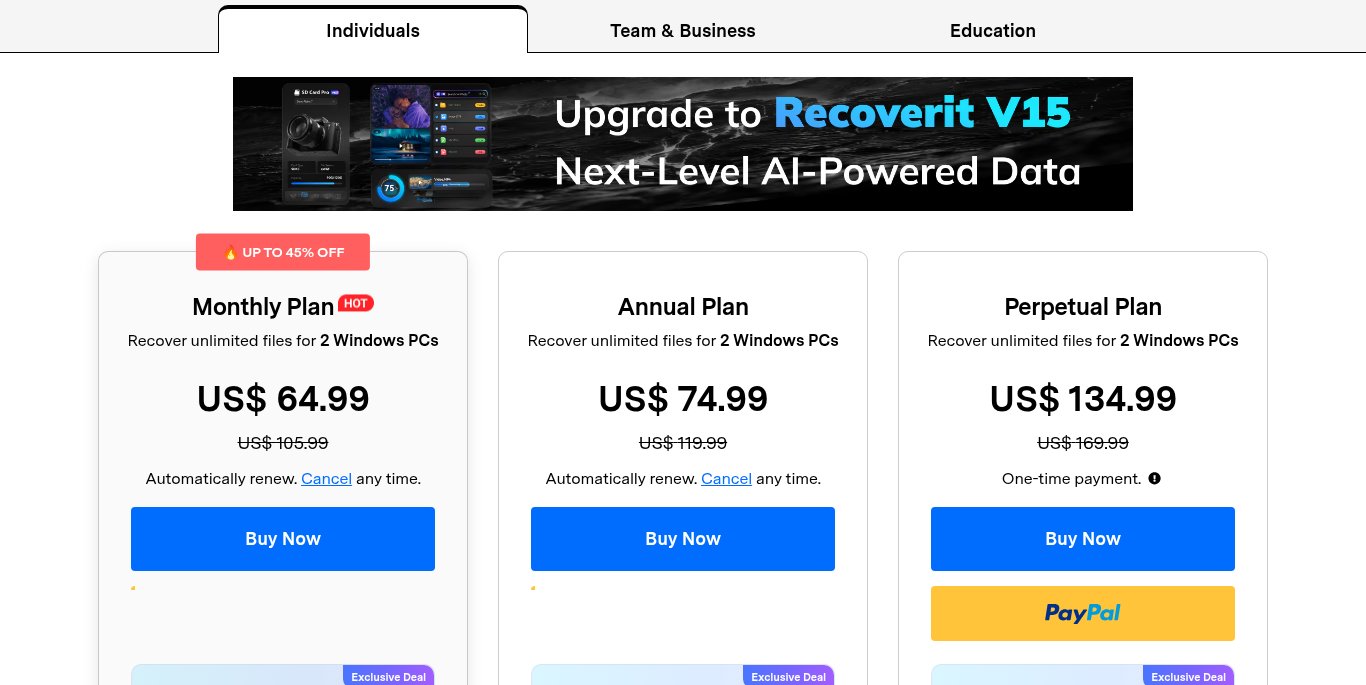
Short answer: Recoverit no longer splits into several editions on its store: there is one full version per platform, sold by time. On Windows it costs US$64.99 a month, US$74.99 a year or US$134.99 once. On Mac there is no yearly plan: US$76.49 a month, US$94.99 a quarter or US$144.99 once. Every plan covers 2 computers, and activated devices cannot be changed. Before paying anything, run the free version: it scans, previews and recovers up to 500MB.
- All prices at a glance
- Free version vs paid
- Which plan is cheapest for your case (our arithmetic)
- How real are the “up to 45% off” badges?
- Devices, Perpetual and renewals
- Refunds: the 7-day rule
- Things to check before you buy
- Which plan to pick
- FAQ
Recoverit prices at a glance
Plan: Monthly (auto-renews)
- Windows (2 PCs): US$64.99 (was US$105.99)
- Mac (2 Macs): US$76.49 (was US$127.49)
Plan: Annual (auto-renews)
- Windows (2 PCs): US$74.99 (was US$119.99)
- Mac (2 Macs): Not offered
Plan: Quarterly (auto-renews)
- Windows (2 PCs): Not offered
- Mac (2 Macs): US$94.99 (was US$164.99)
Plan: Perpetual (one-time payment)
- Windows (2 PCs): US$134.99 (was US$169.99)
- Mac (2 Macs): US$144.99 (was US$179.99)
“Was” is the crossed-out price on the store card. All three cards list the same features: unlimited file recovery, full file preview, AI-powered custom recovery, professional SD card recovery, corrupted video, photo and document repair, plus OneDrive (Windows) or iCloud (Mac) and system-crash recovery. So you are choosing how long you pay for, not which features you get.
See Recoverit prices for Windows · See Recoverit prices for Mac
Free version vs paid
Recoverit Free for Windows and for Mac scans your drive and shows a preview of what can be found. Wondershare’s free-version page: it “allows you to recover up to 500MB of files. If you exceed this recovery limit, you’ll need to upgrade to the full edition”.
Feature (official comparison table): Recovery size
- Free: Up to 500MB
- Paid: Unlimited
Feature (official comparison table): SD card and internal drives
- Free: Yes
- Paid: Yes
Feature (official comparison table): Disk image, BitLocker drives, NAS and Linux
- Free: Yes
- Paid: Yes
Feature (official comparison table): Enhanced photo and video recovery
- Free: Yes
- Paid: Yes
Feature (official comparison table): Bootable toolkit (PC crashed or will not start)
- Free: No
- Paid: Yes
Feature (official comparison table): Corrupt video repair
- Free: No
- Paid: Yes
Get Recoverit Free for Windows · Get Recoverit Free for Mac
That makes the free version the honest first step: if the scan cannot see your files, no paid plan will help. If it can, and the files are small (a few documents or a handful of photos), 500MB may be all you need. Large videos or a whole formatted card are where the paid plan comes in.
Which plan is cheapest for your case (our arithmetic)
Situation: One-off recovery, done in a month
- Windows: Monthly US$64.99
- Mac: Monthly US$76.49
Situation: Might need it again within a year
- Windows: Annual US$74.99: only US$10.00 more than one month
- Mac: Quarterly US$94.99: US$18.50 more than one month
Situation: Two separate months of use
- Windows: US$129.98 on Monthly: more than the Annual plan and close to Perpetual
- Mac: US$152.98 on Monthly: more than Perpetual (US$144.99)
Situation: Keep it for years
- Windows: Perpetual US$134.99 = Annual + US$60.00; less than two Annual payments (US$149.98)
- Mac: Perpetual US$144.99 = Quarterly + US$50.00; less than two quarters (US$189.98)
The surprise on Windows: the Annual plan costs just US$10.00 more than a single month, about US$6.25 a month spread over the year. If there is any chance you will need recovery again (camera cards, a second drive), Annual beats Monthly. Just remember both auto-renew. The two-year comparisons assume renewal at today’s price; the store does not state the renewal price.
On Mac there is no Annual card at all, and every Mac plan costs more than the Windows equivalent (US$11.50 more per month, US$10.00 more for Perpetual). If you own both a Mac and a PC, recover from the Windows machine where you can.
How real are the “up to 45% off” badges?
The Windows store shows “UP TO 45% OFF” and the Mac store “UP TO 40% OFF”. Measured against the crossed-out prices on the same cards (our arithmetic):
| Plan | Discount |
|---|---|
| Windows Monthly | 38.7% |
| Windows Annual | 37.5% |
| Windows Perpetual | 20.6% |
| Mac Monthly | 40.0% |
| Mac Quarterly | 42.4% |
| Mac Perpetual | 19.4% |
None of the Windows cards reaches 45% on its own, and Perpetual is discounted about half as much as the subscriptions. Treat the crossed-out prices as anchors and compare the real numbers above.
Watch the add-on checkbox (Windows): each Windows card has a “Get 10% off your … Plan” box. It adds the Relumi AI Photo App: “3-day FREE trial with 300 AI credits, then US$ 5.99/week”. That is a separate weekly subscription. The box was unticked when we checked; leave it that way if you only want Recoverit, or cancel Relumi before day 3.
Devices, Perpetual and renewals
- 2 computers, fixed. The FAQ: “‘2 Windows PCs’ means you can use the license on two Windows computers. Activated devices cannot be changed.” The Mac FAQ says the same for 2 Macs. Do not activate it on a machine you are about to sell.
- Perpetual means this major version. You can use “the purchased major version of Recoverit permanently and receive updates within that version only. This plan does not include upgrades to future major versions.” The store currently promotes Recoverit V15.
- Renewal reminder. Monthly, Annual and Quarterly plans renew automatically; the FAQ says you get an email 7 days before the end of the subscription with instructions to renew or cancel.
- Old files. The FAQ says deleted data can be recovered “regardless of the time period as long as the original lost data has not been overwritten by new data”. In practice: stop saving to that drive until you have scanned it.
Refunds: the 7-day rule
The store promises a “7-Day money back guarantee: If a solution to your problem can’t be found, you’ll be entitled to a refund.” Wondershare’s refund policy lists Recoverit among the products with a refund window of 7 days from initial payment (most other Wondershare products get 30). The policy also says:
- Requests based solely on change of mind are generally not eligible.
- A renewal order is not refundable if the subscription was not cancelled before the renewal charge.
- A critical technical issue with no effective solution within 7 days is an eligible case.
- EU residents may have a 14-day right of withdrawal, subject to legal exceptions.
This is another reason to run the free scan first: once you have paid, “I didn’t need it after all” is not a refund reason.
Things to check before you buy
- Pick the right platform. Windows and Mac are separate licences with different prices and plan lengths.
- Currency. The store may open in your local currency; there is a USD switch at the top of the pricing table.
- Prices differ between pages. On October 24, 2026 the Mac free-version page showed “$84.99/Month” next to its upgrade button, while the Mac store card said US$76.49. The checkout price is what you pay.
- Team & Business and Education. The store has separate tabs for business licences and a student plan (shown with a 30% off badge). We did not price them here; check the store if they apply to you.
- Marketing claims. The 99.5% recovery rate on the homepage is described by Wondershare as coming from “internal testing”, not an independent test.
Which Recoverit plan to pick
If you: Lost a few documents or photos (under 500MB)
- Pick: Recoverit Free first
If you: Formatted a camera card once, on Windows
- Pick: Monthly (US$64.99), or Annual for US$10.00 more
If you: Shoot a lot and lose cards now and then
If you: Have a PC that will not boot
- Pick: A paid plan: the bootable toolkit is not in Free
If you: Want to pay once and stay on this version
- Pick: Perpetual (US$134.99 Windows, US$144.99 Mac)
Related on SiftGuide
Step by step: how to recover deleted files with Recoverit. Files come back but will not open? See Repairit prices (file, video and photo repair, including the Repairit + Recoverit bundle). Lost data on a phone instead? See Dr.Fone Full Toolkit vs single tools and our Recoverit vs Dr.Fone overview.
FAQ
How much does Recoverit cost?
On Windows: US$64.99 a month, US$74.99 a year or US$134.99 once. On Mac: US$76.49 a month, US$94.99 a quarter or US$144.99 once. Checked October 24, 2026, US dollars, before taxes.
Is Recoverit free?
There is a free version for Windows and Mac. It scans and previews, and recovers up to 500MB; the bootable toolkit and corrupt video repair need a paid plan.
Is there a yearly plan for Mac?
Not on the Mac store when we checked: Mac offers Monthly, Quarterly and Perpetual.
How many computers can I use Recoverit on?
Each plan covers 2 Windows PCs or 2 Macs, and the FAQ says activated devices cannot be changed.
Can I get a refund?
Recoverit has a 7-day refund window from initial payment. Change of mind is generally not eligible; a technical problem without a solution can be. EU residents may have a 14-day right of withdrawal.
Does Perpetual include future versions?
No. You keep the major version you bought and its updates; future major versions are not included.
