
Affiliate disclosure: this post contains an affiliate link to ElevenLabs (via PartnerStack). If you subscribe through it, SiftGuide may earn a commission at no extra cost to you. Every price, limit and feature below comes from ElevenLabs’ own pricing page, Studio page and docs, checked on October 23, 2026. Prices are in US dollars and exclude taxes.
Short answer: ElevenLabs Studio, the long-form editor for audiobooks, podcasts and narrated video, is included in every plan, Free included; there is no separate Studio fee. What changes from plan to plan is how much you can make and how it comes out: Free (US$0) gives 10,000 credits a month, 5 projects, personal use only and watermarked video; Starter (US$6, US$1 for the first month until Nov 1) adds commercial use and 20 projects but still 128 kbps audio; Creator (US$22, US$11 for the first month) adds watermark-free video and 1,000 projects; Pro (US$99) is the first plan that exports 192 kbps MP3 and 44.1 kHz WAV. Studio spends the same credits as Text to Speech, so on Eleven Multilingual v2 one character of your script costs one credit, and Creator’s 121,000 credits are about 121 minutes of narration a month.
ElevenLabs Studio plans at a glance
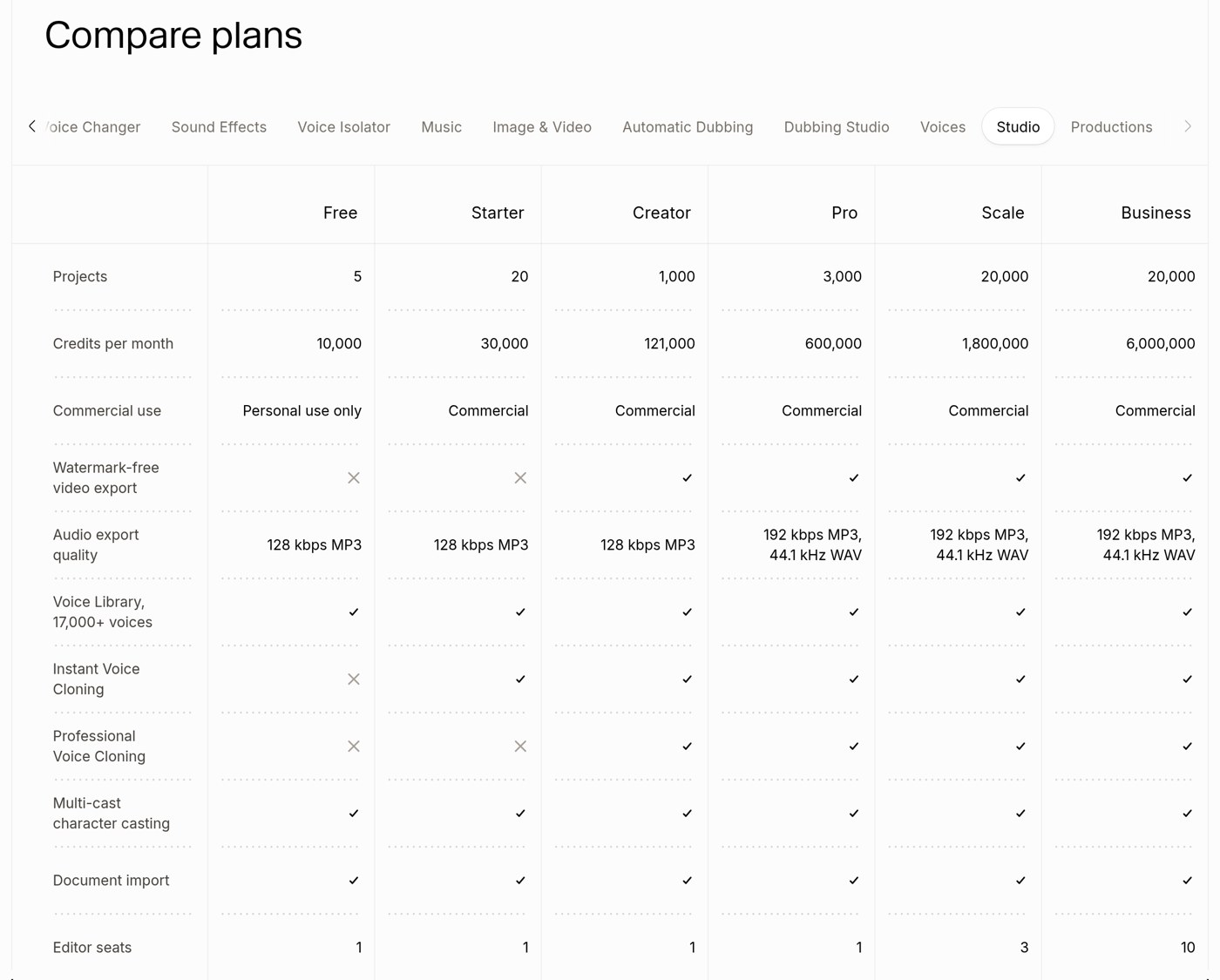
This is the Studio tab of the “Compare plans” table on elevenlabs.io/pricing (rendered October 23, 2026), with the monthly prices from the plan cards and the narration minutes from the Text to Speech tab. The check and cross marks are icons on the page; we read them from the page code and the screenshot below.
Plan: Free
- Price / month: US$0
- Credits / month: 10,000
- Narration (TTS tab): ~10 min
- Projects: 5
- Commercial use: Personal use only
- Watermark-free video: ✗
- Audio export: 128 kbps MP3
- Voice cloning: none
- Editor seats: 1
Plan: Starter
- Price / month: US$6 (US$1 first month, until Nov 1)
- Credits / month: 30,000
- Narration (TTS tab): ~30 min
- Projects: 20
- Commercial use: Commercial
- Watermark-free video: ✗
- Audio export: 128 kbps MP3
- Voice cloning: Instant
- Editor seats: 1
Plan: Creator
- Price / month: US$22 (US$11 first month)
- Credits / month: 121,000
- Narration (TTS tab): ~121 min
- Projects: 1,000
- Commercial use: Commercial
- Watermark-free video: ✓
- Audio export: 128 kbps MP3
- Voice cloning: Instant + Professional
- Editor seats: 1
Plan: Pro
- Price / month: US$99
- Credits / month: 600,000
- Narration (TTS tab): ~600 min
- Projects: 3,000
- Commercial use: Commercial
- Watermark-free video: ✓
- Audio export: 192 kbps MP3, 44.1 kHz WAV
- Voice cloning: Instant + Professional
- Editor seats: 1
Plan: Scale
- Price / month: US$299
- Credits / month: 1,800,000
- Narration (TTS tab): ~1,800 min
- Projects: 20,000
- Commercial use: Commercial
- Watermark-free video: ✓
- Audio export: 192 kbps MP3, 44.1 kHz WAV
- Voice cloning: Instant + Professional
- Editor seats: 3
Plan: Business
- Price / month: US$990
- Credits / month: 6,000,000
- Narration (TTS tab): ~6,000 min
- Projects: 20,000
- Commercial use: Commercial
- Watermark-free video: ✓
- Audio export: 192 kbps MP3, 44.1 kHz WAV
- Voice cloning: Instant + Professional
- Editor seats: 10
Every plan gets the Voice Library (“17,000+ voices” in this table), multi-cast character casting and document import. Annual billing is “monthly price × 10”; ElevenLabs gives the equivalent monthly prices as US$5 for Starter, US$18.33 for Creator, US$82.50 for Pro, US$249.17 for Scale and US$825 for Business. By our math, that saves US$44 a year on Creator (US$220 instead of US$264) and US$198 on Pro.
See ElevenLabs plans and try Studio (PartnerStack referral)
How Studio uses credits
- Narration = Text to Speech credits. The default model for most new Studio projects is Eleven Multilingual v2, and the pricing FAQ says: “For V2 Multilingual models, 1 text character equals 1 credit.” You can switch a project to another model, such as Eleven v3, in Project settings. The TTS tab’s minute estimates work out to about 1,000 credits per minute of speech (our math: 121,000 ÷ ~121).
- Export quality is free. “The quality setting does not affect credit usage.” Pro and above simply get the better files.
- You pay to generate, not to download. “Credits are charged per generation request, not per download.” When you export, you are “only charged credits for paragraphs that have not already been converted, or that have been edited since your last export.”
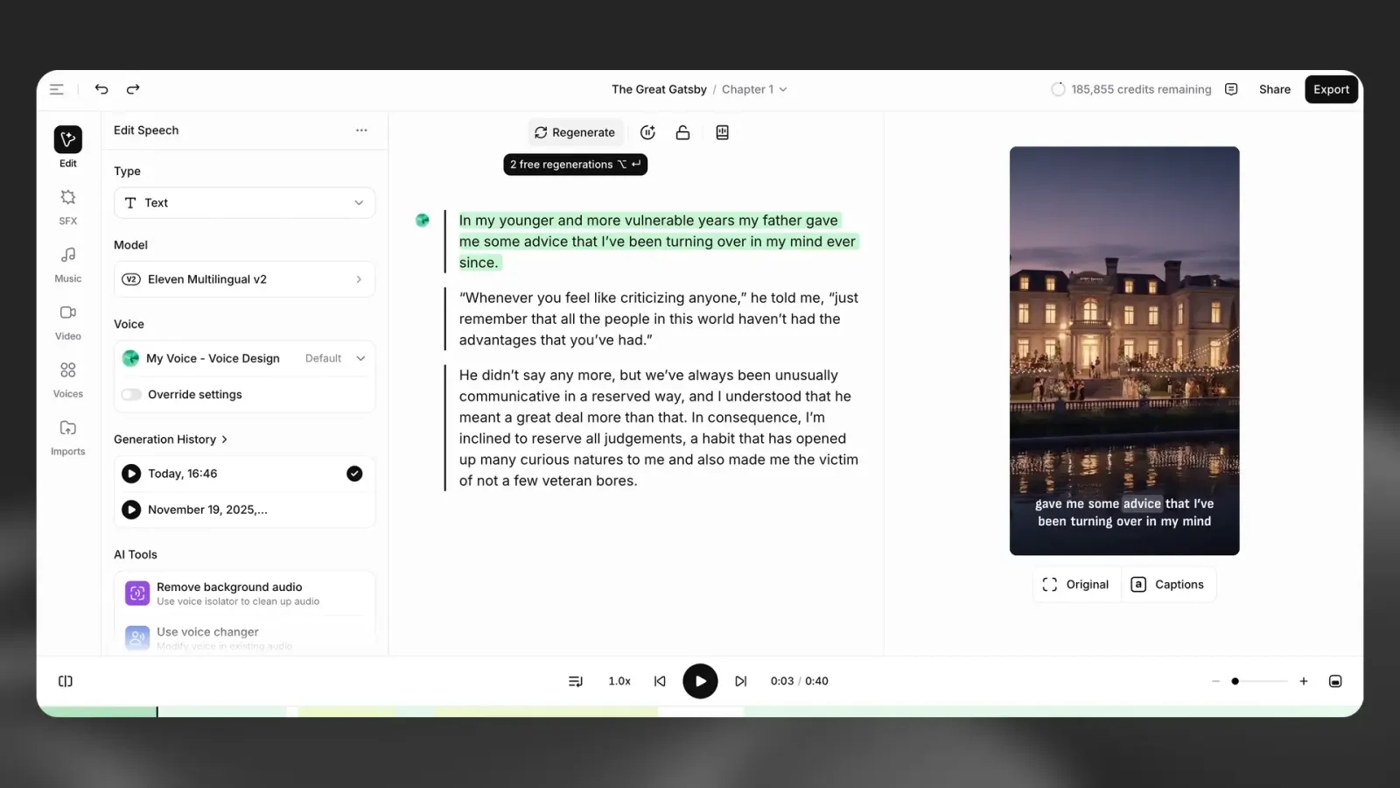
- Two free regenerations. ElevenLabs offers “up to two free regenerations in Studio, provided you haven’t changed the text that you’re regenerating, or assigned a different voice, or changed the voice settings.” If the button says Generate rather than Regenerate, you are charged. When you convert a whole chapter or project from the Export dialog, Auto-Regenerate checks for mispronunciations and artefacts and redoes the audio “up to two times, at no extra cost.”
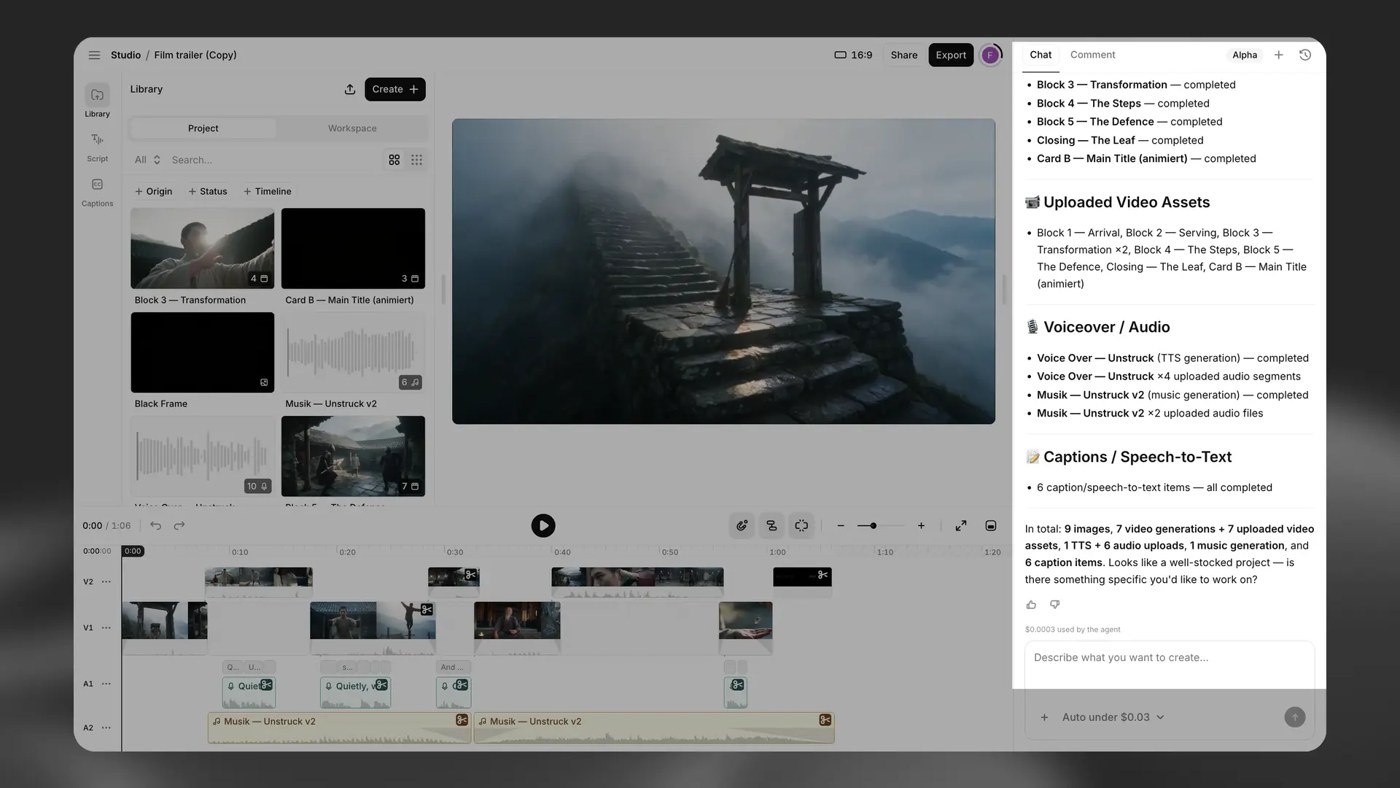
- Studio Agent costs extra credits. The AI co-editor in Video projects is “available on all plans”, but “chat usage consumes credits based on token usage. Media generation consumes additional credits.” ElevenLabs does not publish a per-message price, so watch your balance when you lean on it.
- Rollover. On paid plans, “Unused credits roll over for up to two months”, up to 2× your monthly quota, so your balance tops out at 3×. “Rollover does not apply to the Free plan.”
What fits in each plan (our math)
These use ElevenLabs’ own approximate minutes from the Text to Speech tab (about 1,000 credits per spoken minute on Multilingual v2). Your real usage depends on your text, the model and how much you regenerate.
- A weekly 20-minute narrated podcast: 4 × 20 = 80 minutes a month fits Creator’s ~121 minutes. A weekly 45-minute show (180 minutes) needs Pro.
- An 8-hour audiobook (480 minutes): more than Creator’s ~121 minutes a month, and more than Creator’s maximum rolled-over balance (3 × 121,000 = 363,000 credits, about 6 hours). It fits in one month of Pro (~600 minutes), which also gives you 192 kbps MP3 and WAV files.
- Cost per narrated hour at list price: about US$10.91 on Creator (US$22 ÷ 121 × 60), US$9.90 on Pro, and US$8.25 on Pro billed yearly.
- Project size: 500 chapters × 400 paragraphs × 5,000 characters is a theoretical 1 billion characters per project, far more than any plan’s credits. In practice the limits that bite are the project count (5 on Free) and your credits.
What actually changes between plans
- Free: Studio works, including document import and multi-cast. But ElevenLabs’ Terms say Free Users “may only use the Services for non-commercial purposes”, the Studio tab says “Personal use only”, video exports carry a watermark, there is no voice cloning, and credits do not roll over.
- Starter: commercial license and Instant Voice Cloning, 20 projects, and podcast creation (GenFM), which “requires a paid subscription”. Audio is still 128 kbps, and the Studio tab shows no watermark-free video (see the mismatch box).
- Creator: watermark-free video, Professional Voice Cloning, 1,000 projects, and about four times Starter’s credits for under four times the price.
- Pro: “16-bit, 44.1 kHz WAV, or 192 kbps MP3 (Ultra Lossless)” exports and 3,000 projects. This is the plan to look at if you are publishing audiobooks and care about file quality.
- Scale and Business: mainly more credits, 20,000 projects, and 3 or 10 editor seats for a team.
- Downgrading: “we do not delete your data.” Over the project limit, you keep your existing projects but cannot create new ones. Cancelling loses “the ability to generate audio using your Instant and Professional Voice Clones” and some Voice Library voices.
- API: “The ElevenCreative Studio API is only available upon request.” Studio Agent “is not available through the API.”
Where ElevenLabs’ own pages disagree (as of October 23, 2026):
- Free projects: 3 or 5? The Free plan card says “3 Projects in Studio”; the Studio tab, the Studio page pricing table and the help center say 5.
- Watermark on Starter. The Studio docs say “Paid plans export videos without a watermark”, but the Studio tab marks watermark-free video export with a cross for Starter (and for Free). Do not count on clean Starter video exports until you have tested one.
- Creator audio quality. The Text to Speech tab lists “128 & 192 kbps” from Creator up, but the Studio tab and the Studio docs give Creator 128 kbps MP3 exports. For Studio exports, plan on 192 kbps starting at Pro.
- Voices and languages. The Studio page says “over 10,000 voices” and “32 languages”; the pricing tables say “17,000+ voices” and list 74 languages for Text to Speech.
- Import formats. The help center lists EPUB, PDF, DOCX, TXT, HTML and URL; the Studio page FAQ lists EPUB, PDF, TXT, HTML, MP4, MOV, MP3, WAV and FLAC plus URL, with no DOCX.
- Version number. The Studio page says “Introducing Studio 4.0” and, further down, “Studio 3.0 combines every tool you need”. The docs describe Studio 4.0.
How to make and export a project in Studio
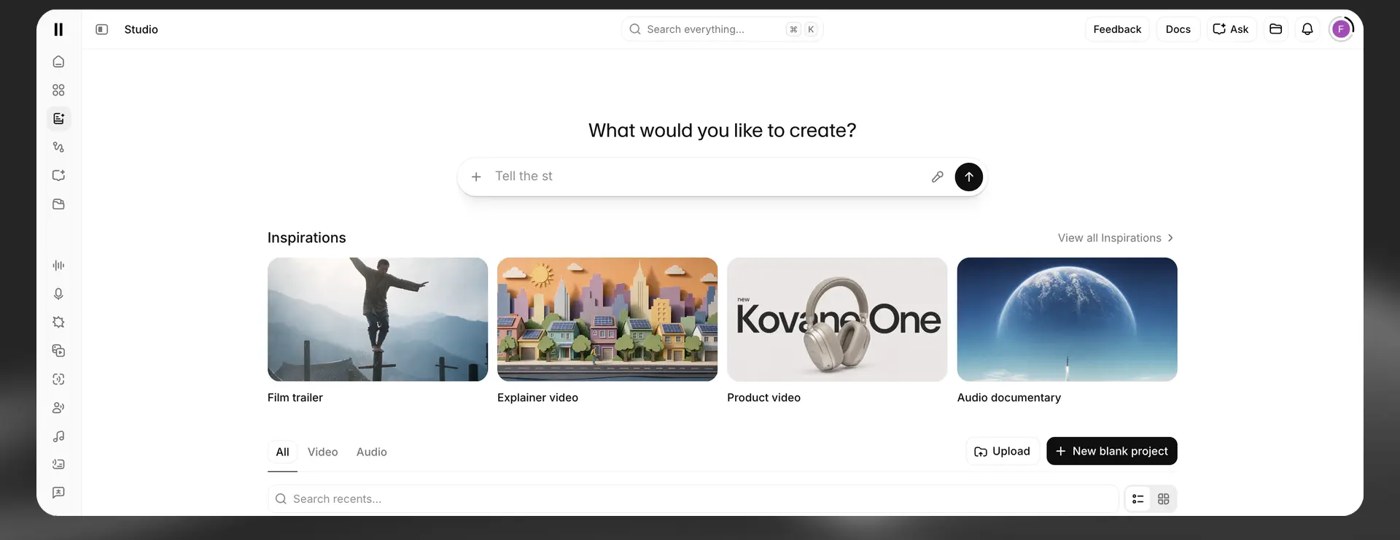
- Open Studio and describe what you want in the “What would you like to create?” bar, start from an Inspiration (film trailer, explainer, audio documentary, podcast and more), upload a file, or create a blank project. An Audio project “creates a blank audio project for long-form narration, podcasts, and audiobooks.”
- For a book, import an EPUB: it is “the best file format”, and chapters formatted as Heading 1 become Studio chapters automatically.
- Assign voices to paragraphs or characters, fix names in the pronunciation editor, and use your free regenerations on lines you don’t like. For video, pick the aspect ratio (16:9, 9:16, 4:5 or 1:1) and let Studio Agent draft the timeline if you want.
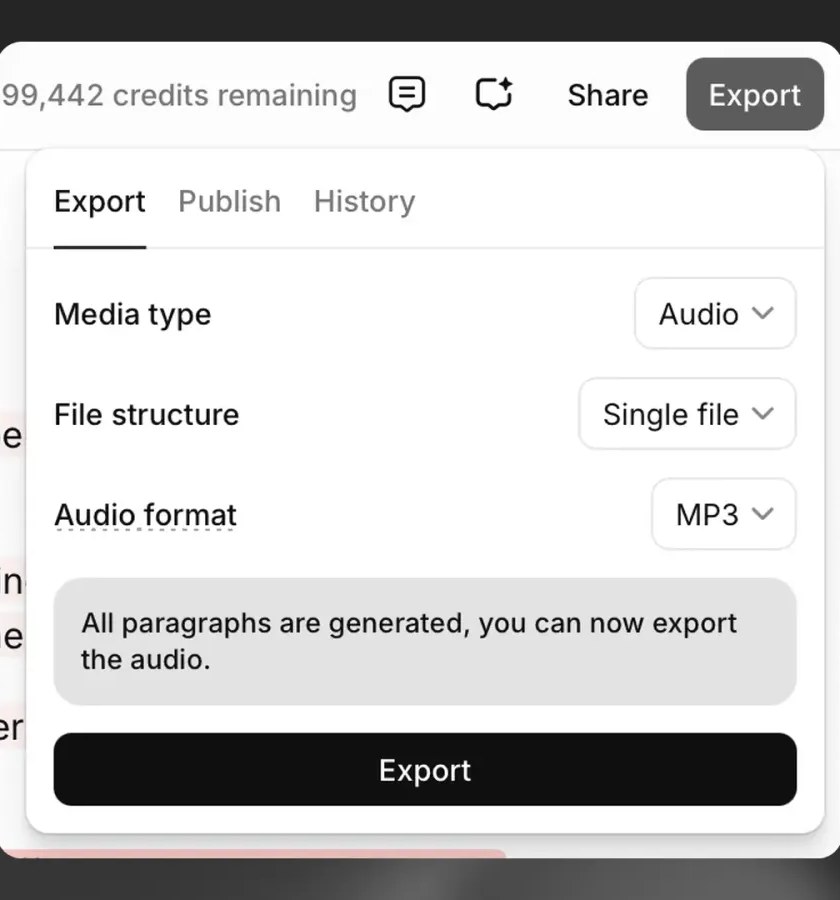
- Add Title, Author, ISBN and a Description in the export settings; they are written into the audio files.
- Click Export to get MP3 or WAV (or video if the project has a video track or captions). For audiobooks there is also Export > Publish > Spotify: you choose a chapter for the free preview (its first 5 minutes), and Spotify adds “This audiobook is narrated by a digital voice.” to the description.
If a download fails, ElevenLabs says most affected users are on the Brave browser; switch browsers and turn off ad and pop-up blockers.
Start with ElevenLabs Studio (PartnerStack referral)
Which plan to pick for Studio
If you: Want to try Studio on a personal project
- Pick: Free (5 projects, personal use, watermarked video)
If you: Publish short commercial voiceovers or a small podcast, audio only
- Pick: Starter
If you: Make narrated videos for YouTube or clients and need clean exports
- Pick: Creator
If you: Narrate a full audiobook, or want 192 kbps MP3 and WAV files
- Pick: Pro
If you: Produce as a team
- Pick: Scale (3 seats) or Business (10 seats)
If you: Need Studio in your own software
- Pick: Ask ElevenLabs sales: the Studio API is available on request
If you would rather hire people than edit it yourself, ElevenLabs also sells human-made audiobooks and dubs; see our guide to ElevenLabs Productions pricing.
More from ElevenLabs on SiftGuide
For how credits work across every ElevenLabs tool, see the ElevenLabs pricing guide. For a step-by-step audiobook walkthrough (Studio plus ElevenReader), see the ElevenLabs audiobook guide. Translating video instead? See how to dub a video with ElevenLabs.
FAQ
Is ElevenLabs Studio free?
Yes, Studio is included in every plan, including Free (10,000 credits a month, 5 projects). Free is personal use only, its video exports are watermarked, and the GenFM podcast feature needs a paid plan.
How much does ElevenLabs Studio cost?
There is no separate Studio price. Plans are US$0, US$6, US$22, US$99, US$299 and US$990 a month (Starter US$1 and Creator US$11 for the first month), or monthly price × 10 per year. Prices exclude taxes.
How many credits does Studio use?
On Eleven Multilingual v2, 1 character = 1 credit. Exporting is free for paragraphs already generated, you get up to two free regenerations per unchanged paragraph, and Studio Agent chat uses extra credits based on tokens.
Which plan exports 192 kbps or WAV audio?
Pro and above: 16-bit, 44.1 kHz WAV or 192 kbps MP3. Free, Starter and Creator get 128 kbps MP3 (or WAV made from a 128 kbps source).
How many projects can I have?
Free 5, Starter 20, Creator 1,000, Pro 3,000, Scale and Business 20,000. The Free plan card says 3, so check your account.
Can I publish a Studio audiobook to Spotify?
Yes: Export > Publish > Spotify creates the MP3 files, which you upload in Spotify for Authors. Spotify labels the book as narrated by a digital voice.
Sources
All checked on October 23, 2026:
- ElevenLabs pricing (plan cards, credits FAQ, Compare plans: Studio and Text to Speech tabs)
- ElevenLabs Studio page, pricing table and FAQ
- ElevenLabs Terms of Service
- Studio product guide (docs)
- Help center: Project size and project limits
- Help center: On what plans can I use Studio?
- Help center: Does it cost credits to regenerate?
- Help center: What is Auto-Regenerate?
- Help center: Downgrading
- Help center: Import formats
- Help center: Downloads and export credits
- Help center: Export to Spotify
- Studio API information
