
Prices checked on the official PDFelement store pages on October 24, 2026 (US dollars, before local taxes). Wondershare changes sale prices often, so the price on the checkout page is the one that counts. This post contains affiliate links: if you buy through them, SiftGuide may earn a commission at no extra cost to you. We have not lab-tested PDFelement for this post; plan terms below come from the official store pages and FAQ.
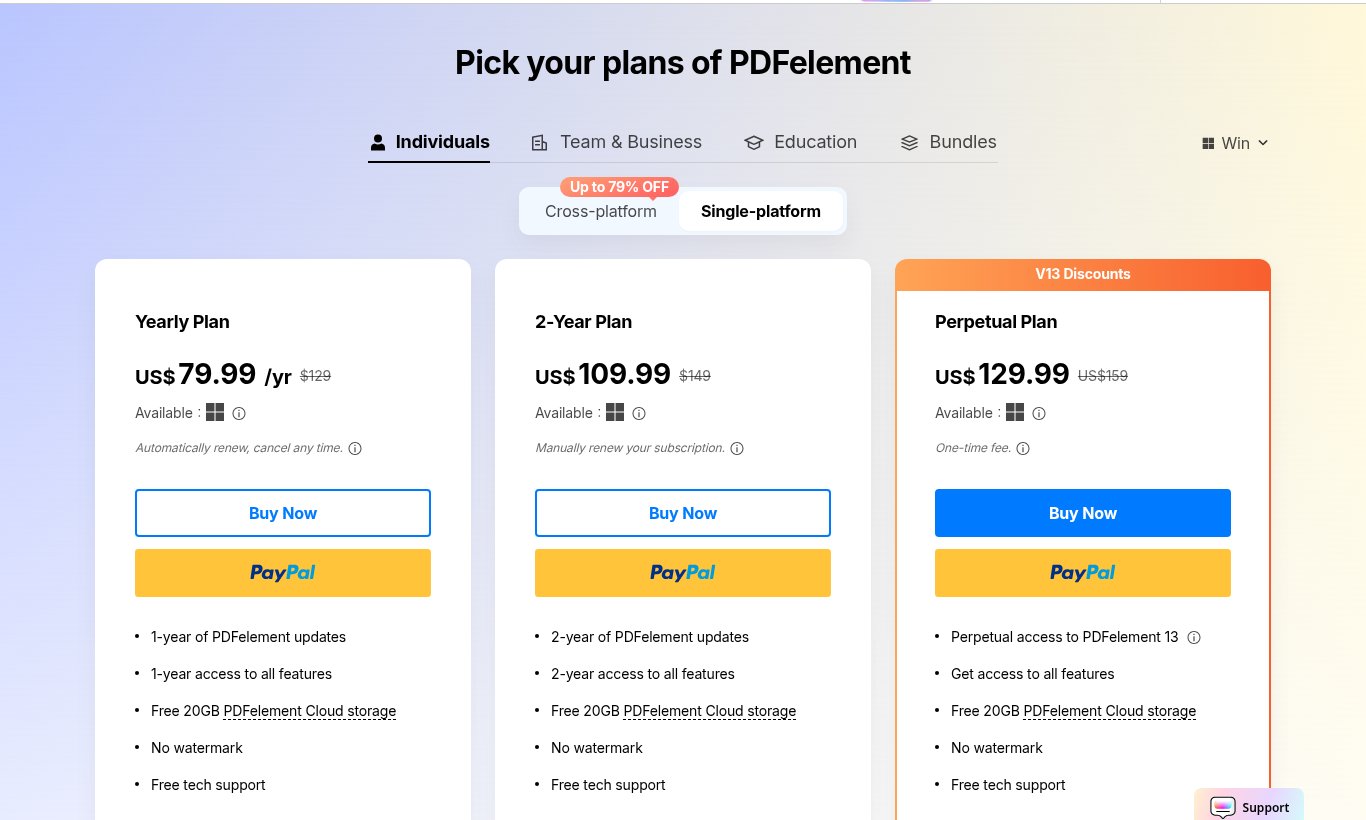
Short answer: an individual PDFelement licence costs US$79.99 a year, US$109.99 for two years or US$129.99 once (Perpetual, PDFelement 13), the same on Windows and Mac. Adding phone, tablet and web access (the “Cross-platform” tab) costs only US$10.00 more on each plan. Students pay US$39.99 a year after verifying with Student Beans. For most people who will use it beyond one year, the 2-Year plan is the best value because it does not auto-renew.
- All individual prices at a glance
- Single-platform vs Cross-platform
- Yearly vs 2-Year vs Perpetual (our arithmetic)
- About the “79% OFF” banner
- AI uses and the AI add-on
- Student, educator and team prices
- What the free trial does not include
- Which plan to pick
- FAQ
PDFelement prices at a glance (individual, 1 user)
Plan: Yearly
- Single-platform (Windows or Mac): US$79.99/yr
- Cross-platform (desktop + iOS, Android, web): US$89.99/yr
- Renewal: Auto-renews, cancel any time
Plan: 2-Year
- Single-platform (Windows or Mac): US$109.99
- Cross-platform (desktop + iOS, Android, web): US$119.99
- Renewal: Manual renewal (no auto-renew)
Plan: Perpetual
- Single-platform (Windows or Mac): US$129.99
- Cross-platform (desktop + iOS, Android, web): US$139.99
- Renewal: One-time fee, PDFelement 13
Plan: Cloud storage
- Single-platform (Windows or Mac): 20GB
- Cross-platform (desktop + iOS, Android, web): 100GB
- Renewal:
Prices are identical on the Windows store page and the Mac store page. Every card lists “No watermark” and “Free tech support”. Local sales tax may be added at checkout.
Single-platform vs Cross-platform: the US$10 question
The store has two tabs. Single-platform covers PDFelement on your Windows PC or Mac with 20GB of PDFelement Cloud. Cross-platform adds “Work on desktop, mobile (iOS & Android), web” and 100GB of cloud storage. The difference is US$10.00 on every plan (US$79.99 vs US$89.99 a year, US$109.99 vs US$119.99 for two years, US$129.99 vs US$139.99 perpetual).
Read the Perpetual small print: on the Cross-platform Perpetual card, mobile and web access is marked “(mobile and web access for a limited time)”. The desktop licence is perpetual, the phone and web part may not be. On the Yearly and 2-Year cards there is no such note.
The Bundles page sells the same “Windows & Mac & iOS & Android & Cloud” package at the same prices (US$89.99 a year or US$139.99 perpetual), so you are not missing a cheaper bundle.
Yearly vs 2-Year vs Perpetual (our arithmetic)
Compare: Two Yearly payments
- Single-platform: US$159.98
- Cross-platform: US$179.98
Compare: 2-Year plan
- Single-platform: US$109.99 (saves US$49.99)
- Cross-platform: US$119.99 (saves US$59.99)
Compare: Perpetual vs one year
- Single-platform: +US$50.00
- Cross-platform: +US$50.00
Compare: Perpetual vs two Yearly payments
- Single-platform: US$129.99 is less than US$159.98
- Cross-platform: US$139.99 is less than US$179.98
- Yearly fits a one-off project. The FAQ says it “will renew automatically on your annual renewal date until you cancel” and that “renewal rates are subject to change” (with notice). Set a reminder if you only need it once.
- 2-Year is the quiet winner: two years of updates for less than two yearly payments, and the card says “Manually renew your subscription”, so nothing is charged again automatically.
- Perpetual means PDFelement 13. The FAQ: a perpetual licence “continues to authorize access to the current PDFelement version (PDFelement 13) indefinitely”, with free minor updates, but “major upgrades may require an additional purchase.” It pays off if you keep using the same version for more than about 20 months.
About the “79% OFF” banner
The store header says “Up to 79% OFF”. That figure is measured against crossed-out list prices, not against what people normally pay. On the Single-platform tab the crossed-out prices are $129 (Yearly), $149 (2-Year) and US$159 (Perpetual); the Cross-platform tab shows $304, $509 and $695. By our arithmetic, US$89.99 against $304 is about 70% off and US$139.99 against $695 about 80% off, while US$79.99 against $129 is about 38% off. The useful number is the price you pay, not the percentage.
AI uses and the AI add-on
PDFelement’s AI features (summarise, translate, rewrite, chat with a PDF) are metered. The comparison table lists 10 PDF AI uses in the trial and 50 on paid plans. The FAQ: “There’s no extra charge to try the AI features, but they have usage limits”; after that you buy a Monthly, Quarterly, Semi-Annual or Annual AI Add-on.
Mac buyers, watch the checkbox: each card on the Mac store page shows “Add PDFelement AI 7-day free trial”: “Try 1,000 AI uses for free … then auto-renew at $39.99/year (12,000 total AI uses over 12 months). You can cancel anytime.” The box was unticked by default when we checked; leave it that way unless you want a second, auto-renewing subscription. With it, a Yearly licence becomes US$119.98 a year by our arithmetic. We did not see this box on the Windows cards on October 24, 2026.
Student, educator and team prices
Buyer: Students (Student Beans login)
- Plan: PDFelement Pro for Win, Yearly, 1 user
- Price: US$39.99 (crossed-out US$129)
Buyer: Students
- Plan: PDFelement Pro for Win, Perpetual, 1 user
- Price: US$99.99 (crossed-out US$159)
Buyer: Educators
- Plan: Custom plan
- Price: Form on the education page
Buyer: Teams (Windows)
- Plan: Annual, per user
- Price: US$109 per user (US$545 for 5, US$1,090 for 10)
Buyer: Teams (Windows)
- Plan: Perpetual, per user
- Price: US$139 per user (US$695 for 5, US$1,390 for 10)
The student Yearly plan is US$40.00 less than the regular US$79.99. Team prices scale linearly (no volume discount up to 10 users on the selector; more than 10 users goes through a sales form). A single team seat costs about $29 more per year than an individual Yearly licence, so why buy it? The FAQ: “Individual license is for a single user only, if you purchase multiple individual licenses, it still only allows one user”, while a team licence lets you assign and manage users in your Wondershare ID account. “Individual license and Team license provides the same product.”
What the free trial does not include
The Windows trial is 14 days and needs no credit card; the Mac trial is 7 days. The store FAQ lists the limits:
- Saved PDFs get a watermark (in both the unregistered and the registered trial).
- Without registering you only get Create, View, Protect PDF and Organize Pages.
- Registered trial: Recognize Table and Create Notes 3 times only; Batch Process and Combine PDF up to 3 files within 20 MB; 1 eSign request (3 on paid plans).
- “Advanced features such as Compress PDF, Scrolling Screenshot, XFA, and OCR PDF are unavailable in the registered trial version” (the comparison table shows an OCR results preview only).
So if OCR of scanned documents or compressing large PDFs is why you want PDFelement, the trial will not prove it. That is what the store’s 30-day money-back guarantee is for, but it applies only “if your request meets our policy guidelines”; read the refund policy first. You may also see a “Download Insurance” extra at checkout: per the FAQ it only lets you re-download the program within 24 months.
Want to see the workflow first? Our step-by-step PDFelement guide shows editing, OCR, converting and compressing.
Which PDFelement plan to pick
If you: Need it for one project or a few months
- Pick: Yearly US$79.99, then cancel auto-renewal
If you: Will use it for 1-2 years
- Pick: 2-Year US$109.99 (no auto-renew)
If you: Want to pay once and stay on version 13
- Pick: Perpetual US$129.99
If you: Edit PDFs on a phone or in a browser too
- Pick: Cross-platform (+US$10.00)
If you: Are a student
- Pick: Education page, US$39.99 a year
If you: Need it for several people
- Pick: Team plan, from US$109 per user a year
Related on SiftGuide
Still choosing between PDF editors? Read how to choose a PDF editor in 2026. Only need a few online conversions? HiPDF plans and prices covers Wondershare’s browser tool. Also convert videos? See the PDFelement + UniConverter duo.
FAQ
How much does PDFelement cost in 2026?
US$79.99 a year, US$109.99 for two years or US$129.99 once (Perpetual) for one user on Windows or Mac; US$10.00 more for the cross-platform version. Checked October 24, 2026, before taxes.
Is PDFelement cheaper on Windows than on Mac?
No. Individual prices are the same on both. The Mac page adds an optional AI trial checkbox that renews at $39.99/year.
Does the Perpetual licence include future versions?
It covers PDFelement 13 with free minor updates; the FAQ says major upgrades may require an additional purchase.
Does the 2-Year plan renew automatically?
The 2-Year cards say “Manually renew your subscription.” The Yearly plan does auto-renew until you cancel.
Is there a student discount?
Yes: US$39.99 a year or US$99.99 perpetual for PDFelement Pro for Windows after logging in with Student Beans.
Is there a refund?
The store says all products come with a 30-day money-back guarantee, approved if the request meets Wondershare’s policy guidelines.
