
Affiliate disclosure: this post contains an affiliate link to ElevenLabs (via PartnerStack). If you subscribe through it, SiftGuide may earn a commission at no extra cost to you. Every price, limit and right below comes from ElevenLabs’ own pricing pages, Terms of Service and docs, checked on October 22, 2026. Prices are in US dollars and exclude taxes.
Short answer: ElevenLabs Voice Design creates a brand-new voice from a text description (“A calm male narrator” is enough to start). It is included on every plan, Free too, and has no separate price: each click on Generate voice gives you three voice options and you pay only for the characters of the preview text, once. In the API that text must be 100 to 1,000 characters. Saving the voice you like uses one of your custom voice slots: 3 on Free, 10 on Starter (US$6), 30 on Creator (US$22), 160 on Pro (US$99). Commercial use needs a paid plan.
Voice Design by plan at a glance
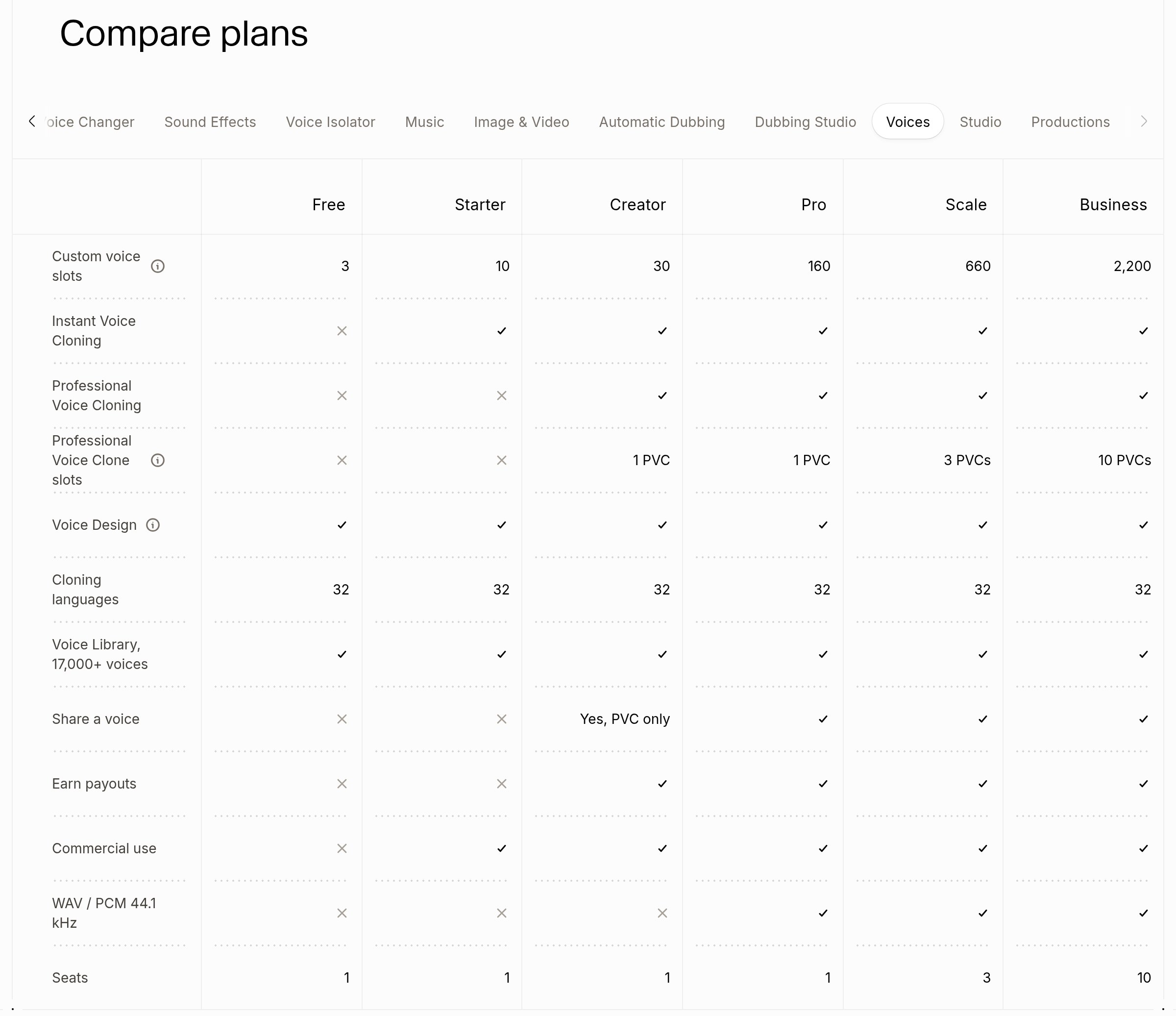
ElevenLabs’ “Compare plans” table on elevenlabs.io/pricing has no separate Voice Design tab; Voice Design is a row of the Voices tab (rendered October 22, 2026; the yes/no columns are icons, see the screenshot below). The same rows, for Free to Pro, appear in the “Voice Design Pricing” table on elevenlabs.io/voice-design.
Plan: Free
- Price a month: US$0
- Credits a month: 10,000
- Voice Design: Yes
- Custom voice slots: 3
- Commercial use: No
- Instant / Professional cloning: No / No
- WAV / PCM 44.1 kHz: No
- Seats: 1
Plan: Starter
- Price a month: US$6
- Credits a month: 30,000
- Voice Design: Yes
- Custom voice slots: 10
- Commercial use: Yes
- Instant / Professional cloning: Yes / No
- WAV / PCM 44.1 kHz: No
- Seats: 1
Plan: Creator
- Price a month: US$22 (US$11 the first month)
- Credits a month: 121,000
- Voice Design: Yes
- Custom voice slots: 30
- Commercial use: Yes
- Instant / Professional cloning: Yes / Yes (1 PVC)
- WAV / PCM 44.1 kHz: No
- Seats: 1
Plan: Pro
- Price a month: US$99
- Credits a month: 600,000
- Voice Design: Yes
- Custom voice slots: 160
- Commercial use: Yes
- Instant / Professional cloning: Yes / Yes (1 PVC)
- WAV / PCM 44.1 kHz: Yes
- Seats: 1
Plan: Scale
- Price a month: US$299
- Credits a month: 1,800,000
- Voice Design: Yes
- Custom voice slots: 660
- Commercial use: Yes
- Instant / Professional cloning: Yes / Yes (3 PVCs)
- WAV / PCM 44.1 kHz: Yes
- Seats: 3
Plan: Business
- Price a month: US$990
- Credits a month: 6,000,000
- Voice Design: Yes
- Custom voice slots: 2,200 (help center: 660)
- Commercial use: Yes
- Instant / Professional cloning: Yes / Yes (10 PVCs)
- WAV / PCM 44.1 kHz: Yes
- Seats: 10
Paying yearly works out to about US$5 a month for Starter, US$18.33 for Creator and US$82.50 for Pro. Unused credits on paid plans roll over for up to two months (up to 2× the monthly quota); on Free they do not. The Free plan card on the pricing page lists Voice Design among its features.
See ElevenLabs plans (PartnerStack referral)
What one Voice Design generation really costs
ElevenLabs’ guide is explicit: “The only charge for using voice design is the number of credits to generate your preview text, which you are only charged once even though we are generating three samples for you.” The help center adds that Voice Design “only consumes credits when you generate voices”, so writing and editing the prompt is free. Saving one of the three previews costs no credits, but it takes a voice slot.
ElevenLabs does not print a per-character rate for Voice Design. The pricing FAQ lists Text to Speech at “1 credit per character”; if the preview text is billed at that rate (our assumption), the numbers look like this (our arithmetic):
- Per generation: 100 to 1,000 credits (the API limit for the preview text is 100 to 1,000 characters; the app counter in ElevenLabs’ screenshot reads “174/1,000”). Each generation gives three voices.
- Free (10,000 credits): 10 generations with a full 1,000-character preview (30 voice options), or up to 100 with the shortest preview.
- Starter (30,000 credits, US$6): 30 full-length generations (90 options), about US$0.20 each; at 100 characters, 300 generations at about US$0.02 each.
- Credits are shared: the same pool pays for Text to Speech, music, dubbing and the rest, so every preview is credit you cannot spend on narration.
- The real limit is slots, not credits: on Free you can keep only 3 custom voices at a time, and designed voices share those slots with your cloned voices. Delete a voice to free a slot (“Deleting a voice cannot be undone”). Voices saved from the Voice Library do not use slots.
The help center also says “Adding and editing voices are voice operations”, with a monthly quota that resets each billing cycle: Free 55, Starter 65, Creator 95, Pro 290, Scale and Business 1,040.
Where ElevenLabs’ own numbers disagree (as of October 22, 2026):
- Business voice slots: the compare table gives Business 2,200 custom voice slots; the help center article on voice slots says Business gets 660, the same as Scale.
- Which model: the Voice Design page says it is “powered by our latest Text to Speech v3 model”, while the same page’s banner and the help center call Eleven v4 the latest model; the help center says designed voices work with Eleven v4 but “may be less performative” there than on earlier models. The API offers
eleven_multilingual_ttv_v2(default) andeleven_ttv_v3. - Price per character: the guide and help center say you pay for the characters of the preview text but give no rate; the pricing FAQ only lists rates for Text to Speech (1 credit per character for V2 Multilingual). Check the cost shown in the app before you generate.
- API price: the API pricing page has no Voice Design line at all (it only appears in the footer menu), although that page says “API usage is billed in US dollars, not credits”.
- Menu path: the docs say “Voices -> My Voices -> Add a new voice -> Voice Design”; the Voice Design page FAQ says “Voice -> My Voices”. Small, but if you cannot find it, look under Voices.
Can you use a designed voice commercially?
Only on a paid plan. The compare table shows no commercial use on Free and a tick from Starter up, and the Terms of Service say Free Users “may only use the Services for non-commercial purposes” while Paid Users “may use the Services for commercial purposes”. Non-commercial users must sign up with a personal e-mail address.
- YouTube narration, ads, game characters, an agent’s voice: Starter (US$6) is the minimum, with 10 slots for designed or cloned voices.
- Sharing it with others in the Voice Library: not possible. The help center says synthetic voices created using Voice Design “cannot be shared in the Voice Library”, so you cannot earn library payouts from a designed voice; only verified Professional Voice Clones can be shared.
- Experimental: ElevenLabs calls Voice Design “still experimental” and says output quality “can vary depending on your prompt and use case”. For the most consistent results it recommends a Professional Voice Clone (Creator and up).
How to use ElevenLabs Voice Design
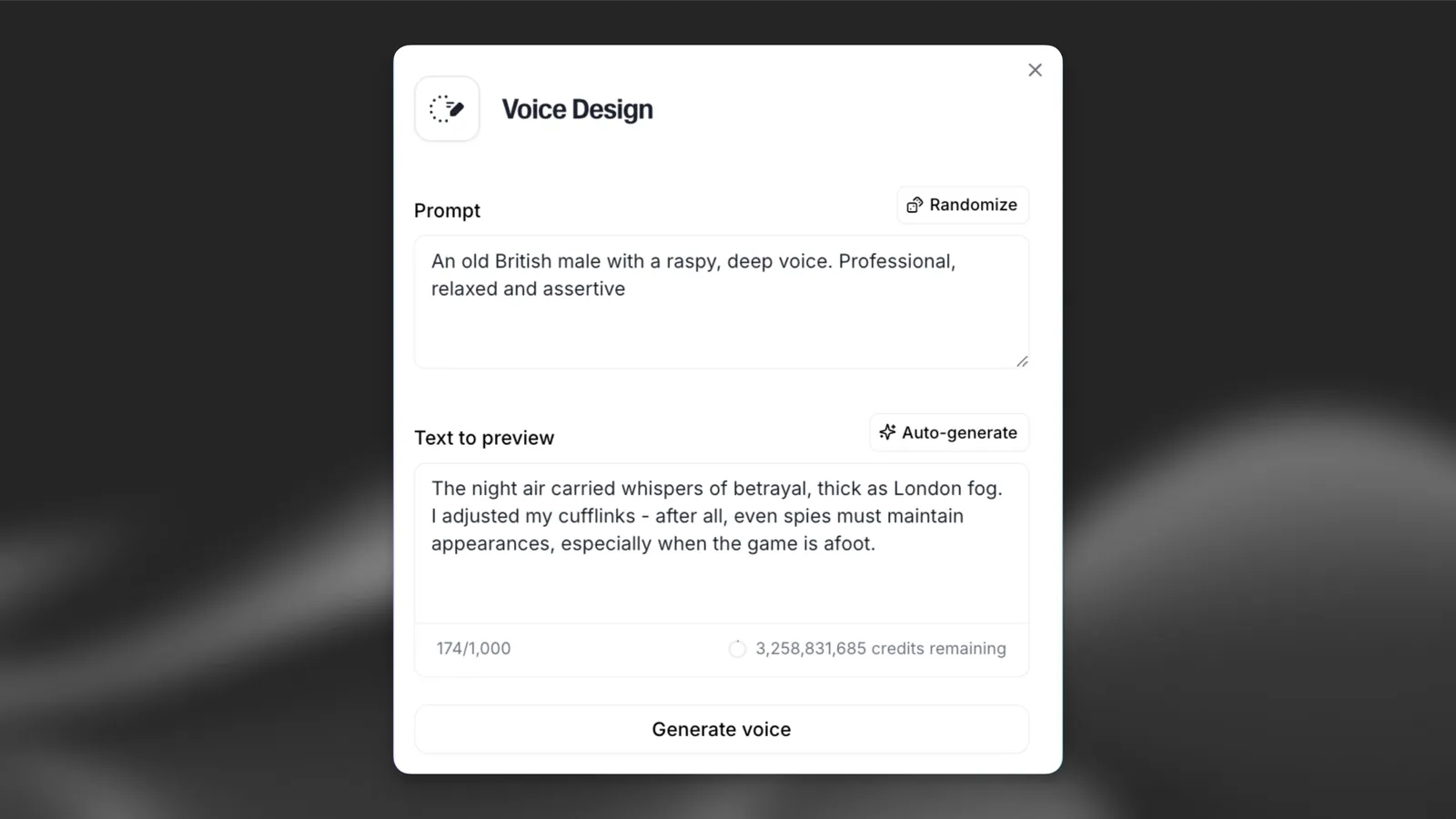
- In the ElevenLabs app go to Voices → My Voices → Add a new voice → Voice Design.
- Write the Prompt: age, gender, accent, tone, pacing, emotion and audio quality. Randomize fills in an example if you are stuck.
- Write the Text to preview (it is what you pay for) or press Auto-generate; auto-generated previews include audio tags.
- Set Loudness (volume of the preview and of the saved voice) and Guidance scale (how strictly the prompt is followed).
- Press Generate voice, listen to the three options, and save the best one. It goes into My Voices and uses one slot.
- Not quite right? Voices made with Voice Design can be remixed (change gender, accent, pacing or audio quality by prompt). Remixing creates a new voice and leaves the original unchanged; it is priced on the length of the test script.
Prompt tips from ElevenLabs’ guide
- Use their template:
Native <Language>. <Gender>, <Age range>. <Quality level>. Persona: <2–5 words>. Emotion: <2–3 adjectives>.followed by one or two sentences about timbre, pacing and delivery. - Say the language and dialect first to prevent drift.
- Don’t write “accent” when you mean intonation: it can trigger an unwanted dialect shift.
- Avoid FX words like “reverb”, “echo”, “phone” or “tape”; they can hurt quality. For a clean result add “perfect audio quality” or “studio-quality recording”.
- “Thick” beats “strong” for a prominent accent, per the guide.
- Match the preview text to the voice and make it longer: the guide says longer preview texts “tend to produce more stable and expressive results”. That costs more credits, so it is a trade-off.
- Guidance scale: higher values follow the prompt more strictly but can sound worse on niche prompts; lower values sound better but follow the prompt less.
Try ElevenLabs Voice Design (PartnerStack referral)
For developers: the Voice Design API
It is two calls. First POST https://api.elevenlabs.io/v1/text-to-voice/design with a voice_description and either text (100 to 1,000 characters) or auto_generate_text: true. Optional fields include model_id (eleven_multilingual_ttv_v2 by default, or eleven_ttv_v3), loudness (default 0.5), guidance_scale (default 5), seed (“Same seed with same inputs produces same voice”), should_enhance to expand a short prompt, and, on v3 only, reference_audio_base64. The response holds previews, each with a generated_voice_id and base64 MP3 audio. Then save the one you like with POST https://api.elevenlabs.io/v1/text-to-voice (voice_name, voice_description, generated_voice_id). Remixing uses /v1/text-to-voice/{voice_id}/remix. PCM at 44.1 kHz needs Pro or higher. Designed voices can then be used by ID in the other APIs.
Which plan to pick
If you want to: Experiment with prompts, keep up to 3 voices, no commercial use
- Pick: Free
If you want to: Use designed voices in videos, ads or an app; keep up to 10
- Pick: Starter, US$6 a month
If you want to: A cast of characters (up to 30 voices), or a Professional Voice Clone for top quality
- Pick: Creator, US$22 a month (US$11 the first month)
If you want to: Large voice catalogues (160 slots) or WAV / PCM 44.1 kHz
- Pick: Pro, US$99 a month
If you want to: A team sharing one account
- Pick: Scale, US$299 a month (3 seats) or Business, US$990 (10 seats)
More from ElevenLabs on SiftGuide
For how credits work across every ElevenLabs tool, see the ElevenLabs pricing guide. Want a copy of a real voice instead of a new one? See Instant vs Professional Voice Cloning. Want to speak through your new voice? See ElevenLabs Voice Changer pricing. Need sounds rather than voices? See ElevenLabs Sound Effects pricing. Cleaning up a real recording rather than inventing a voice? See ElevenLabs Voice Isolator pricing.
FAQ
Is ElevenLabs Voice Design free?
Yes, Voice Design is included on the Free plan. You spend credits from your 10,000 free monthly credits on the preview text, can keep up to 3 custom voices, and may not use the results commercially.
How much does one Voice Design generation cost?
Only the characters of the preview text, charged once for all three options. ElevenLabs gives no separate rate; at the Text to Speech rate of 1 credit per character (our assumption) a generation costs 100 to 1,000 credits, which on Starter is about US$0.02 to US$0.20 (our arithmetic).
How many designed voices can I save?
As many as your custom voice slots allow: 3 on Free, 10 on Starter, 30 on Creator, 160 on Pro, 660 on Scale. For Business the compare table says 2,200 and the help center 660.
Can I use a designed voice on YouTube or in ads?
On any paid plan (Starter and up), yes. Free is limited to non-commercial use by the Terms of Service.
Can I share a designed voice in the Voice Library?
No. ElevenLabs only lets human-verified Professional Voice Clones be shared; Voice Design voices cannot be shared.
Does Voice Design work with Eleven v4?
Yes, according to the help center, and with earlier models including Eleven v3, with audio tags; on v4 the voices may be less performative.
Is there an API?
Yes: POST /v1/text-to-voice/design to generate previews, then POST /v1/text-to-voice to save one.
Sources
All checked on October 22, 2026:
- ElevenLabs pricing (plans, credits FAQ, Compare plans: Voices)
- ElevenLabs Voice Design page, pricing table and FAQ
- ElevenLabs API pricing
- ElevenLabs Terms of Service
- Voice Design (product guide and prompting guide)
- Voice Design quickstart (API)
- API reference: Design a voice
- API reference: Create a voice
- Voice remixing
- Help Center: how much does Voice Design cost?
- Help Center: voice slots per tier
- Help Center: sharing AI-generated voices
